
PrivacyTestLab
0
Do you find this page useful?
The modern web is an essential utility, but it also functions as a highly sophisticated threat landscape. Every day, individuals and corporate networks face an array of automated and targeted exploits designed to compromise data privacy, capture financial assets, and hijack digital identities. To navigate these risks effectively, you must understand how these threats operate at a structural level. This guide breaks down the most prevalent internet hazards, giving you actionable defense protocols to protect your digital footprint.
Before looking at individual threats, it helps to understand how these security challenges are classified. Most online hazards fall into one of these five defensive domains:
Exploiting human biases like trust, fear, and urgency rather than cracking software security code directly.
Deploying unauthorized malicious code directly onto endpoints, smartphones, or network routers.
Sniffing or altering unencrypted data packets while they transit across wireless networks or web directories.
Stealing, guessing, or buying leaked system passwords to bypass validation gates without authorization.
Silently mapping out network configurations and browser properties to track user behaviors for advertising or targeting profiles.
Phishing remains the primary initial access vector for security breaches worldwide. Instead of attacking software perimeters directly, attackers distribute deceptive messages designed to mimic trusted institutions like banks, utility brands, or internal corporate divisions. Their ultimate goal is to trick you into entering private credentials on a malicious lookalike validation page or downloading a harmful attachment.
The best way to prevent phishing is to verify the sender outside the message itself. Never click direct call-to-action links inside unexpected emails. Instead, manually type the official website address into your browser window. You can monitor active security definitions and alerts via the official Cybersecurity and Infrastructure Security Agency (CISA) platform.
Malware is a broad term for any unauthorized software script running on your device without your explicit permission. Modern malicious payloads are built to operate silently in the background, evading discovery by operating system utilities while tracking keystrokes, scraping local system data, or turning host machines into remote entry points.
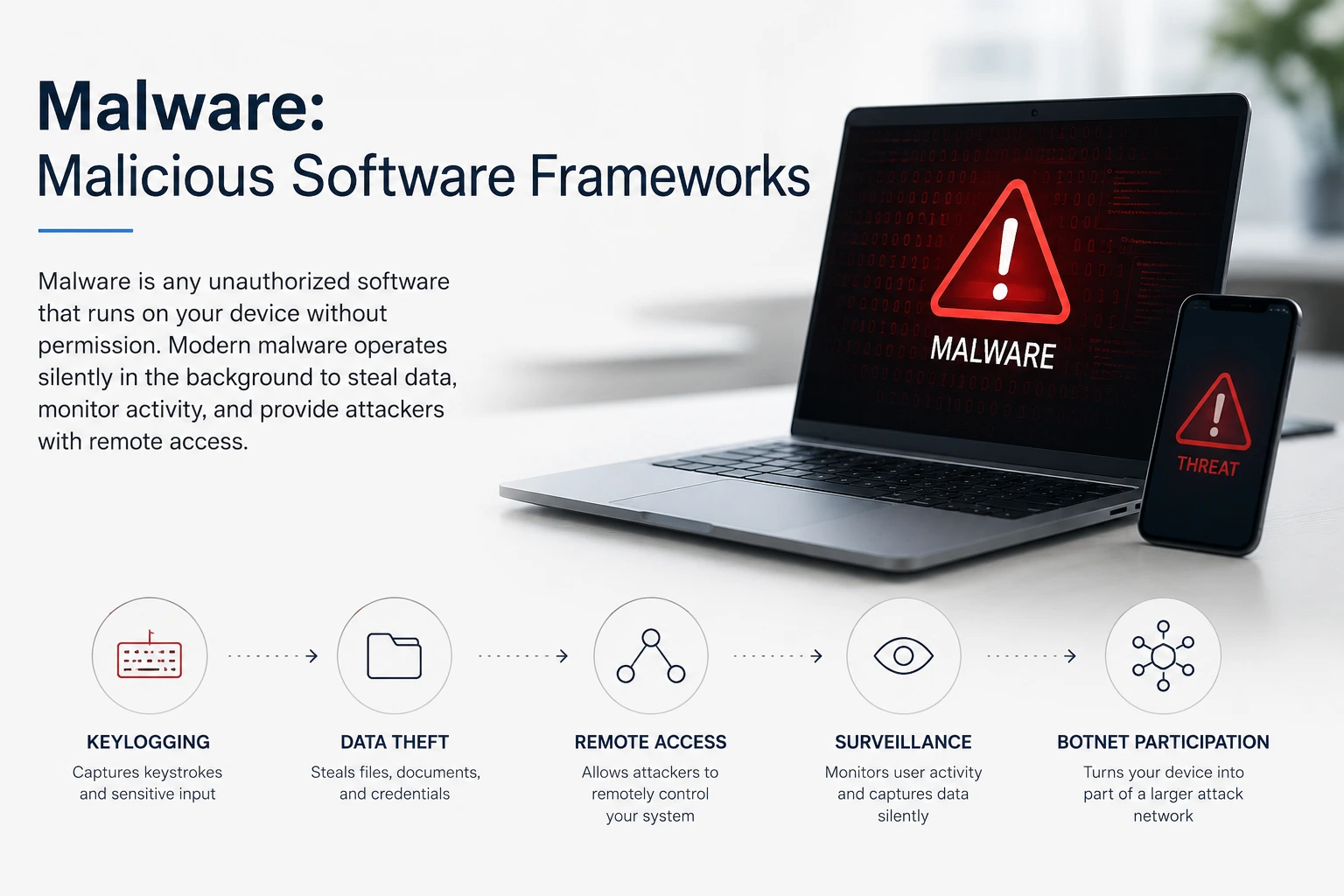 Modern malware often operates silently in the background, stealing data, monitoring activity, and providing attackers with unauthorized access to infected devices.
The baseline defenses against malware infection are keeping your software up to date and practicing smart digital browsing habits. Operating system vendors release regular security updates to patch software vulnerabilities before exploits can take advantage of them. Turning on real-time behavioral monitoring and avoiding unverified third-party software downloads keeps your machine's environment safe from code execution attempts.
Ransomware is an advanced, high-impact malware variant that executes localized encryption scripts against a device's file structure. Once it compromises a system, it locks your personal documents, databases, and structural operating system directories using strong encryption, rendering them completely unreadable. The attackers then display a text note demanding payment, typically via untraceable digital currencies, in exchange for the decryption key.
| Extortion Layer | Operational Execution Strategy |
|---|---|
| Data Locking | Encrypts your local files using asymmetric algorithms, making recovery impossible without the private key. |
| Double Extortion | Attackers steal your sensitive files before locking them, threatening to publish them online if you refuse to pay. |
Because modern encryption is mathematically sound, it is usually impossible to unlock encrypted files after an attack has occurred. Your primary line of defense is maintaining an automated backup strategy. Storing independent data copies on an offline external storage device or an isolated cloud repository ensures you can fully restore your system without paying extortion fees.
Browser fingerprinting is a passive, highly accurate method of web tracking that doesn't rely on saving data files inside your browser storage. When you load a website, the remote hosting server queries your browser for specific technical properties, including your layout dimensions, installed system fonts, device graphics cards, operating system versions, and language settings. By combining these individual points, trackers build a unique digital profile that identifies your machine across the web.
Unlike traditional tracking methods, browser fingerprinting is completely stateless. Clearing your browser's history, wiping its cache, or using temporary browsing sessions will not change your hardware attributes or reset your digital profile.
To minimize fingerprinting risks, use privacy-focused web browsers designed to uniform or randomize these system variables. Making your browser look identical to millions of other active endpoints prevents trackers from singling out your specific configuration.
Tracking cookies are small text data blocks saved inside your local web browser directory by the websites you visit. While first-party cookies are useful for saving configuration parameters—like keeping you logged into an application or holding items in a shopping cart—third-party tracking cookies are deployed by outside advertising networks to build a timeline of your browsing habits across different platforms.
Generated directly by the host domain you are viewing. They keep you authenticated, remember language preferences, and optimize your local layout performance.
Injected by external advertising widgets embedded within the page code. They track your navigation across unrelated websites to map out your long-term interests and habits.
Managing cookie tracking is straightforward using modern browser privacy controls. Adjusting your application's settings to block third-party scripts automatically removes cross-site tracking. Additionally, using open-source content blockers prevents tracking elements from executing code during your browsing sessions.
A data breach happens when hackers bypass corporate security systems to steal confidential user databases. These stolen collections usually contain millions of sensitive records, including names, home addresses, phone numbers, passwords, and credit card details. Once stolen, these files are often uploaded to dark web forums or compiled into massive databases for other criminals to buy.
Even if your personal computer is completely secure, a vulnerability in an online platform you use can still expose your information. Because many people reuse the same password across multiple sites, a single corporate data breach can give hackers access to your other profiles.
To protect your accounts from corporate breaches, use unique passwords for every single website you visit. You can check if your information has been leaked in a known security incident by using the public security resource Have I Been Pwned.
Digital identity theft happens when someone takes your personal details to commit fraud in your name. Criminals use stolen information, like your Social Security number, date of birth, and full legal name, to open fraudulent bank accounts, take out lines of credit, or claim government benefits, which can severely damage your credit score.
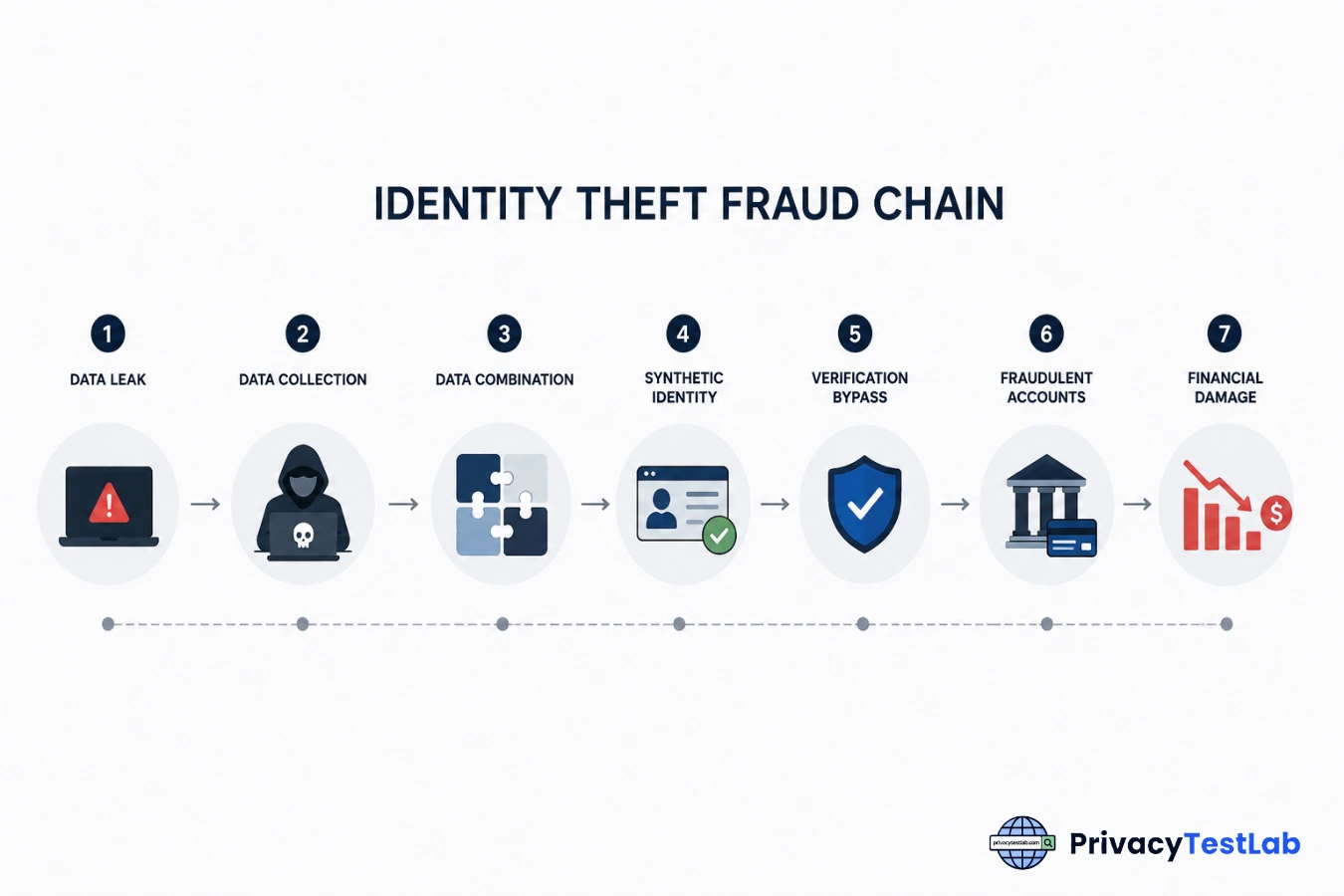 Modern behavioral analysis engines intercepting runtime payload extractions before memory injection occurs.
Recovering from identity theft can take months of paperwork and legal disputes. The most effective way to stop unauthorized accounts from being opened is to freeze your credit files with major credit bureaus. If you suspect your identity has been compromised, you can create an official recovery plan on the Federal Trade Commission (FTC) Identity Theft Portal.
Free public Wi-Fi networks in coffee shops, airports, and hotels often lack standard security configurations. Because these connections are unencrypted, anyone else on the same network can use basic monitoring software to watch your active connection. This allows them to see the website addresses you visit or capture sensitive information you send over unencrypted channels.
To protect yourself on public networks, avoid logging into financial platforms or accessing sensitive data unless you are using an encrypted tunnel. Using a Virtual Private Network (VPN) creates a secure layer over your traffic, ensuring that even if someone intercepts your data packets, they remain unreadable.
A Man-in-the-Middle attack happens when a malicious actor secretly positions themselves between your device and the website server you want to reach. Instead of connecting directly to the real platform, your traffic goes through the attacker's machine. This allows them to read, alter, or inject harmful data into your session without you noticing.
Attackers set up a free wireless hotspot with the exact same name as a trusted local network, tricking your device into connecting to their hardware automatically.
By stealing your active login cookie data during transit, attackers can copy your open web browser session and access your accounts without needing your password.
The most reliable protection against intercept attacks is making sure websites use secure connections. Only use websites that display the padlock symbol and look for the `https://` prefix in your address bar, which confirms your connection uses data encryption verified by international standards on the OWASP Foundation hub.
Password attacks use automated software tools to guess user credentials and gain access to secure accounts. Instead of guessing manually, attackers use scripts that can try thousands of password combinations every second, exploiting short, weak, or common password choices.
To secure your accounts against automated guessing, use long passwords or unique random passphrases that align with security frameworks recommended by the National Institute of Standards and Technology (NIST). A dedicated password manager can help generate and safely store these records for you, while turning on **Multi-Factor Authentication (MFA)** keeps your accounts safe even if someone manages to steal your password.
DNS spoofing (or DNS cache poisoning) happens when attackers introduce fraudulent routing data into a Domain Name System resolver. When you type a legitimate web address into your browser, the corrupted DNS record intercepts the request and quietly diverts your connection to a counterfeit server controlled by the hacker, completely without your knowledge.
To guard against routing tricks, configure your local hardware to use secure encrypted DNS resolution methods like **DNS over HTTPS (DoH)** or **DNS over TLS (DoT)**. Keeping local network router firmware updated prevents hackers from tinkering with your local routing preferences.
Fake websites are exact visual clones of legitimate platforms—such as banking portals, email systems, or shopping apps—designed to extract login credentials or credit card information from visitors. Scammers register domains using common typos or misspellings of popular destinations (a tactic known as *typosquatting*) to snare users who miskey URLs.
Protect yourself from deceptive clones by bookmarking your vital financial sites and using comprehensive password managers. Because password managers look at the exact domain string, they will refuse to auto-fill your credentials if you land on a clone site.
Cryptocurrency scams involve fraudulent schemes that trick users into sending digital assets or giving away authorization to their non-custodial web3 wallets. Because blockchain transactions are permanent and cannot be reversed by banks, malicious apps use fake tokens, bogus airdrops, and deceptive smart contracts to permanently drain funds.
Never type your secret seed phrase or recovery keys into any website or application. No legitimate support agent, developer, or project coordinator will ever ask you for this information under any circumstances.
Keep your crypto assets secure by strictly verifying smart contracts before approving signatures, using hardware cold-storage wallets, and disregarding high-yield investment groups or unsolicited giveaway promotions on social apps.
Mobile threats consist of malware, spyware, and scam tactics tailored explicitly for smartphones. These include SMS phishing (Smishing), rogue background apps that smuggle malware onto your phone through unverified app stores, or predatory utility software that triggers hidden subscription charges without your consent.
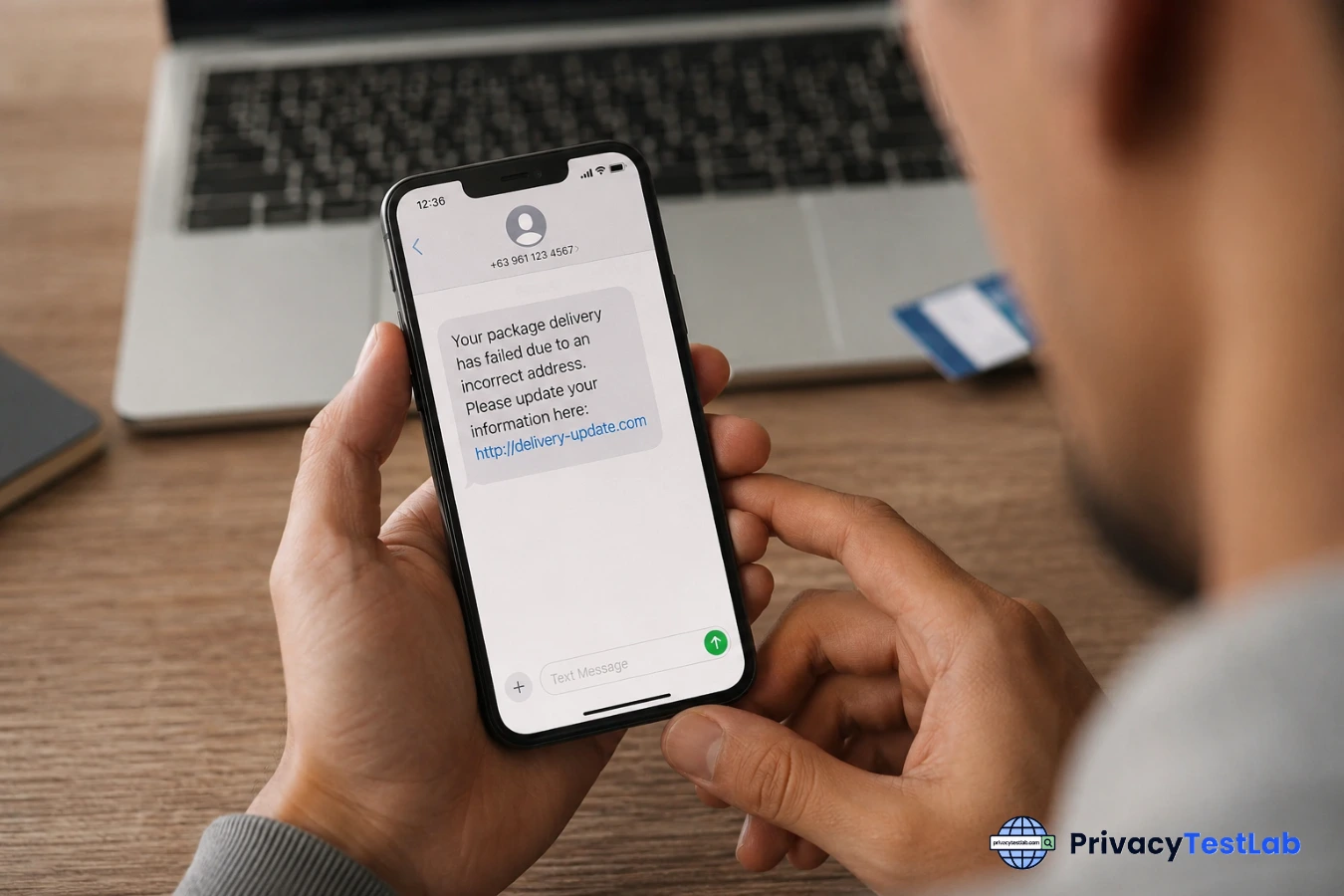 Image Caption: How manipulative package-delivery texts bait users into installing tracking profiles on their devices.
Protect your mobile device by only installing software from official platform marketplaces, closely checking requested application runtime permissions, and rejecting links sent over SMS from unrecognized or unverified numbers.
Social media threats encompass security risks that target users across networking platforms. These include account takeovers through credential leaks, automated bot propagation, and targeted profiling where malicious actors harvest publicly visible biographical details—such as birthdates, location check-ins, and family connections—to craft highly customized scams elsewhere.
Scammers copy public photos and user names to build mirror profiles. They then message the original user's friend network requesting emergency financial aid or distributing malicious link redirections.
Seemingly harmless viral questionnaires or third-party photo filter integrations frequently mask data-harvesting operations designed to capture account verification tokens.
To secure your accounts, audit your platform configuration profiles and set data visibility permissions to private. Restrict profile details to confirmed connections and reject connection invitations from duplicated or unverified accounts.
AI-powered scams leverage advanced machine learning models to maximize the believability and scope of fraudulent interactions. Using short audio samples harvested from public video posts, threat actors train algorithms to clone specific human voices or generate synthetic video media (deepfakes) that precisely mimic relatives, corporate officers, or public personalities.
Counter synthetic scams by implementing a private "family verbal passcode" to verify identity during suspicious emergency calls. If an unexpected request for funds occurs, hang up immediately and establish contact through a known, verified offline communications channel.
Internet of Things (IoT) security risks involve network vulnerabilities embedded within internet-connected smart devices, including home security cameras, smart thermostats, routers, and appliances. Many consumer hardware products ship with hardcoded manufacturer passwords or lack infrastructure protocols to receive over-the-air firmware security patches, leaving them vulnerable to automated network compromise.
Isolate your IoT devices by putting them on a separate guest network on your home router. This architecture blocks compromised appliances from accessing your primary phones or computers, ensuring that local system processes remain secure if a smart device is breached.
Traditional tracking cookies are easily blocked, but advanced threat actors rely on browser fingerprinting to harvest unique configuration variables. Unlike cookies, fingerprinting reads immutable properties built straight into your system architecture.
A strong password stops automated brute-force attacks, but it cannot defend against corporate database breaches, server-side data leaks, or targeted phishing schemes where you are tricked into typing your credentials into a cloned asset.
Review global authentication frameworks and enterprise hardening requirements directly on the official Cybersecurity and Infrastructure Security Agency (CISA) educational portal.
If your credentials are caught in a leak, you must act systematically to contain lateral network damage before attackers exploit the exposed information across secondary services.
Yes. While most text-based attacks rely on Smishing (SMS Phishing) to trick you into manually entering sensitive information, advanced threat networks leverage modern background delivery exploits.
These malicious web environments exploit unpatched software bugs in your mobile browser or operating system core to execute malware payloads background-side immediately upon loading the link.
Highly specialized vector bugs target kernel vulnerabilities directly through system rendering processes, occasionally compromising the smartphone before you even touch the message alert.
Proactive Mitigation: To prevent background exploits, keep your device operating system updated and completely disable the automatic preview generation feature for links in your default messaging applications.
A high-quality VPN provides excellent protection against local data interception on public networks by encrypting your active data stream. This structural layer completely thwarts local Man-in-the-Middle (MitM) packet sniffing. However, a VPN is not a catch-all security shield.
| What a VPN Shields Successfully | What a VPN Cannot Defend Against |
|---|---|
| ✓ Local network traffic packet sniffing | ✗ Malware or ransomware software installations |
| ✓ Rogue open router credentials harvesting | ✗ Phishing entries submitted on fake landing pages |
| ✓ IP/Geographical transmission tracking | ✗ Device-level browser fingerprint profiling |
True network isolation requires pairing a premium VPN with client-side firewalls, keeping sharing parameters deactivated, and periodically auditing your device leak vector status via local network tests like the diagnostics on the PrivacyTestLab utility index.
Minimizing your digital footprint requires systematically removing the puzzle pieces commercial data brokers use to compile target profiles for corporate impersonation or targeted social engineering.
To file official consumer removal requests or investigate your regional consumer tracking protections, review information directly on the Federal Trade Commission (FTC) consumer privacy page.
Statistically, Phishing attacks and social engineering frameworks remain the most frequent entry points for online exploits. Threat actors favor psychological exploitation over brute-forcing encrypted software parameters because human error is generally easier to exploit than hardened computer networks.
Modern phishing operations use highly convincing delivery notifications, banking alerts, or AI-synthesized workspace messages to bypass defensive perimeters. Overcoming this requires building strict structural habits:
Social Engineering & Psychological Manipulation
Social engineering is the act of manipulating people into performing actions or divulging confidential information. Instead of exploiting technical software flaws, these attackers exploit human psychology—relying on fear, urgency, authority, or greed to trick victims into bypassing standard security protocols or opening malicious attachments.
An attacker invents a scenario (a "pretext") to establish trust, often pretending to be an internal IT technician or HR representative needing to verify personal details.
Scammers leave malware-infected items (like free software downloads or physical USB drives) in spots where targets will naturally grab them out of curiosity.
Defending against psychological manipulation requires regular training and independent communication channels. Always verify identity using a separate, trusted method before sharing data, and remain skeptical of any sudden, high-pressure requests demanding immediate action.