
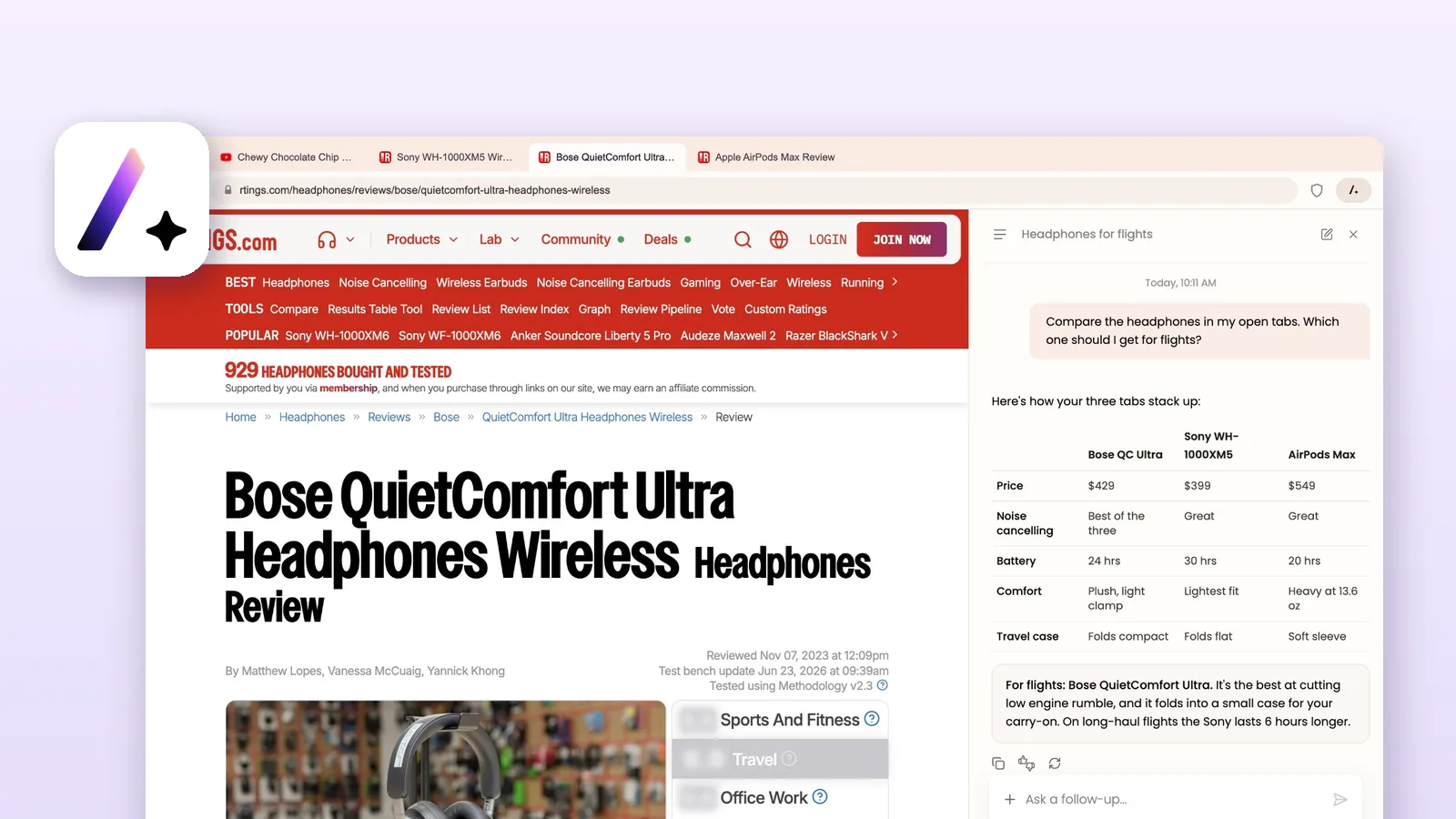
A fast Chromium browser with a genuinely useful AI assistant beside every page and an ad blocker that scored 97 out of 100 in our test. Switch Ace Shield on and it is one of the easiest ways to get AI help while you browse.
- Strength: Ask Ace summarised pages accurately, beside the page
- Strength: Ace Shield scored 97/100 on AdBlock Tester
- Strength: No WebRTC leak; local IP hidden with mDNS
- Strength: Signed installer, clean uninstall, free AI
- Weakness: Ace Shield is off until you switch it on
- Weakness: No fingerprint protection; Windows and Mac only
Free for Windows and Mac, AI assistant included
How the 9.1 breaks down
Why each area scored what it didThe short version
- PriceFree, including the AI assistant
- PlatformsWindows and macOS
- EngineChromium 150 (same as Chrome)
- Chrome extensionsSupported
- Ad blockingAce Shield: 97/100 in our test
- WebRTC leakNone; local IP hidden
- InstallerSigned (DigiCert), clean uninstall
- Default searchBing
Ace is a free AI browser for Windows and Mac. It's built on Chromium, the open-source engine behind Google Chrome, so websites and Chrome extensions work the way you expect. What makes it different is Ask Ace, an assistant that opens beside the page you're on and can summarise it, compare your open tabs, plan a trip, write an email or generate an image, without copying anything into a separate chatbot.
In our tests the assistant was the highlight: it summarised a long Wikipedia article correctly and pulled out the exact figure we asked for. With Ace Shield switched on, the browser scored 97 out of 100 on AdBlock Tester, and our WebRTC leak test found nothing. The installer is signed by a verified company, and Ace uninstalls like any normal Windows app.
Our verdict: Ace is the easiest way we've found to get useful AI help inside the browser for free. Turn on Ace Shield first. If you need strong anti-fingerprinting or a phone app today, look at our privacy picks instead.
What Ace does well
- AI that works where you already are. Ask Ace opens as a side panel next to the page. It reads the page for you, so you can ask "summarise this", "what's the price difference?" or "which one should I buy?" without copying text anywhere.
- It understands your tabs, not just one page. Ace can compare several open tabs side by side and group a messy tab bar into topics in one go.
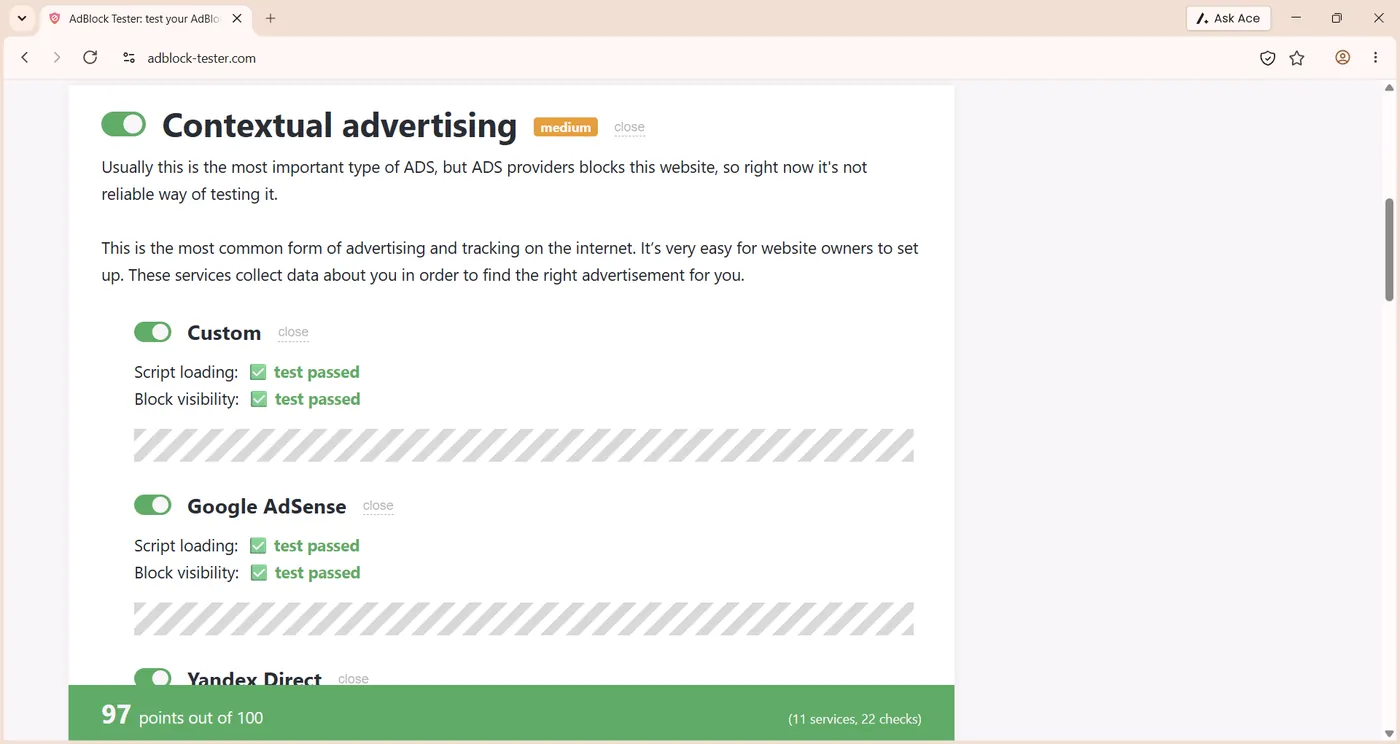
- Strong ad and tracker blocking. With Ace Shield on, it passed 22 checks across 11 ad and analytics services on AdBlock Tester, a score of 97 out of 100.
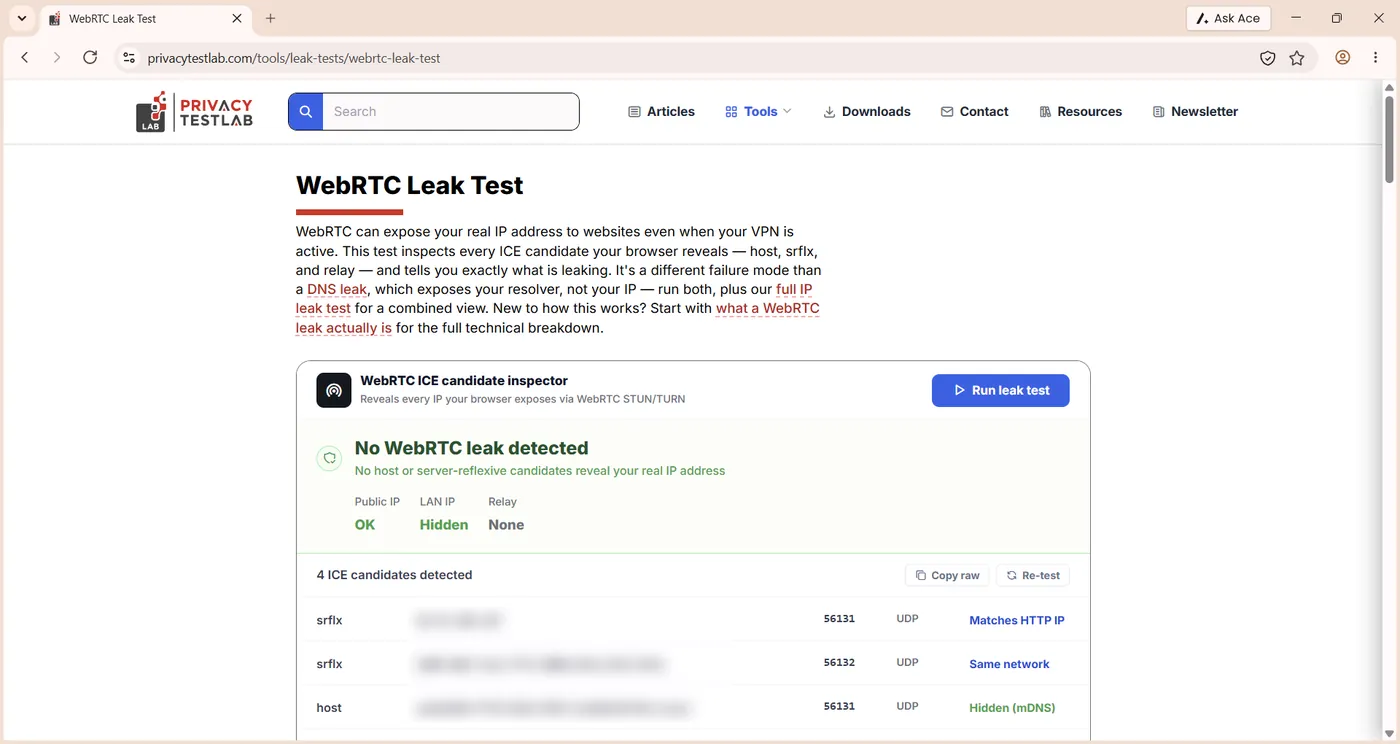
- No WebRTC leak. Our WebRTC test showed no leak of your local network address. Ace hides it behind a random mDNS name, the modern Chromium protection.
- Feels like Chrome. It runs on Chromium 150, so sites render exactly as they do in Chrome. It supports Chrome extensions and imports bookmarks, passwords and history from Chrome.
- Free, with no AI subscription. The assistant, image generation and video summaries are included at no cost.
- A trustworthy install. The installer carries a valid DigiCert code-signing certificate for a verified US company. 70 of 71 antivirus engines on VirusTotal found nothing, and the uninstaller removes it cleanly.
What is the Ace browser?
Ace calls itself "the helpful browser". It's a desktop web browser with AI built into it, rather than an AI chatbot with a browser bolted on. Its privacy policy names Ace AI Labs Inc. as the company behind the product. The Windows program is signed by BrowseAI LLC, a company registered in Delaware, USA. The build we tested was Ace 150.0.7915.1 (64-bit), based on Chromium 150.
The idea is simple. Most people already use ChatGPT or another assistant while they browse, flipping between tabs to paste in text. Ace removes that step: the assistant sits on the right of the window and already knows which page you're on. Ace's own examples are everyday tasks: find the cheapest tickets, turn a two-hour lecture into text, plan a birthday party or draft a reply "in your voice".
Ace is part of the new wave of AI browsers, alongside Perplexity Comet, Opera Neon and Brave's Leo assistant. Where Comet leans towards research with cited answers, Ace is built for everyday jobs, and it's completely free.
Ace in pictures
Here's what Ask Ace looks like on real pages. Use the arrows to move between the screenshots.
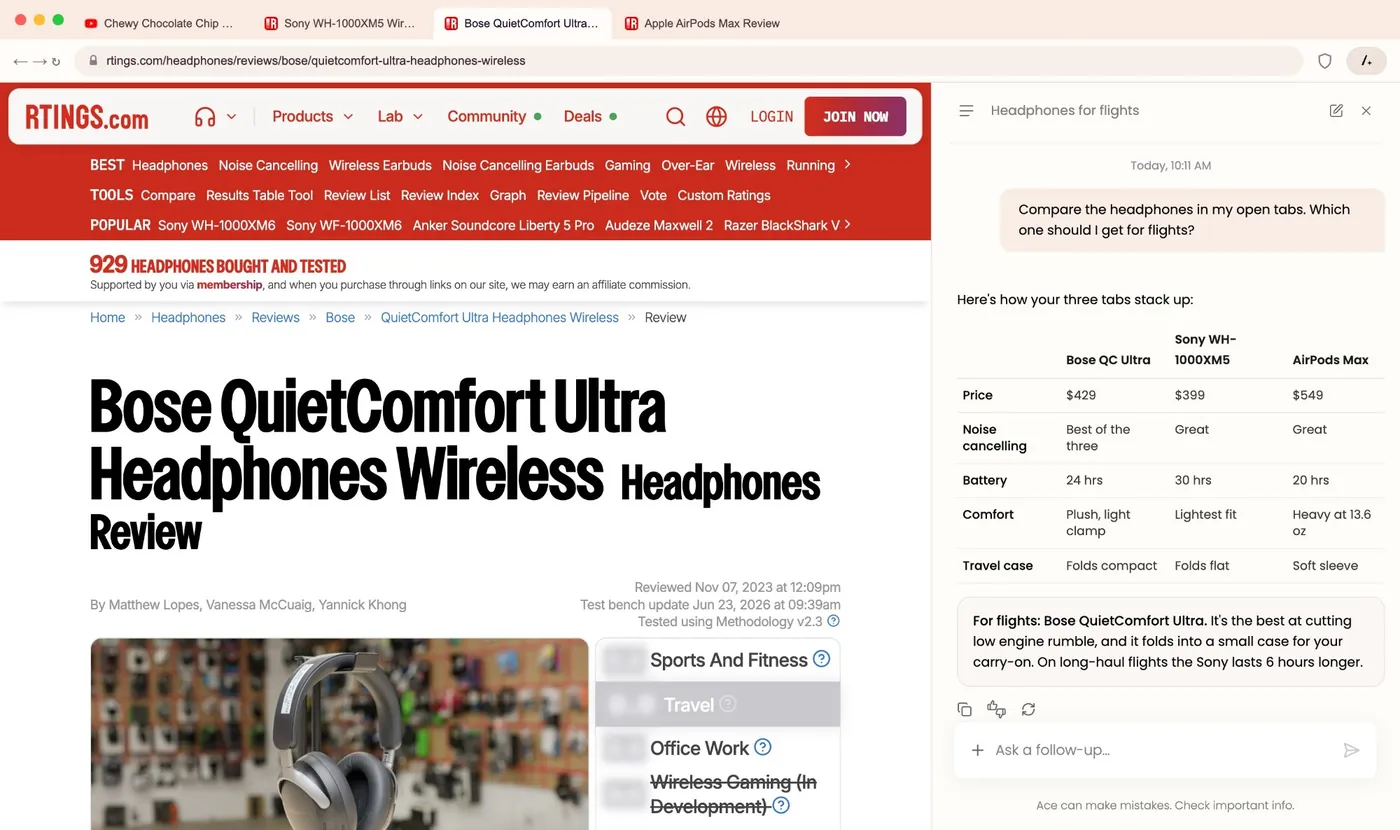
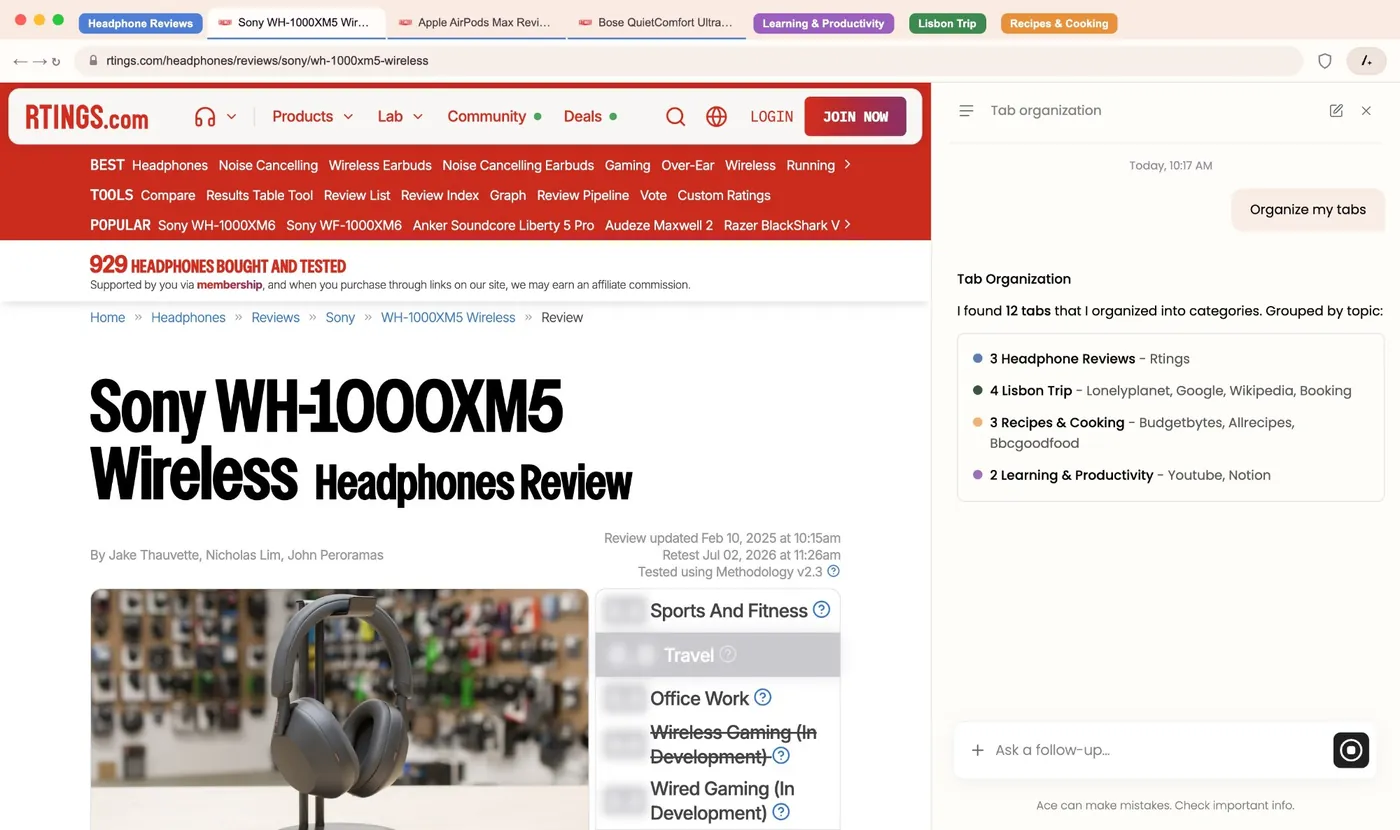
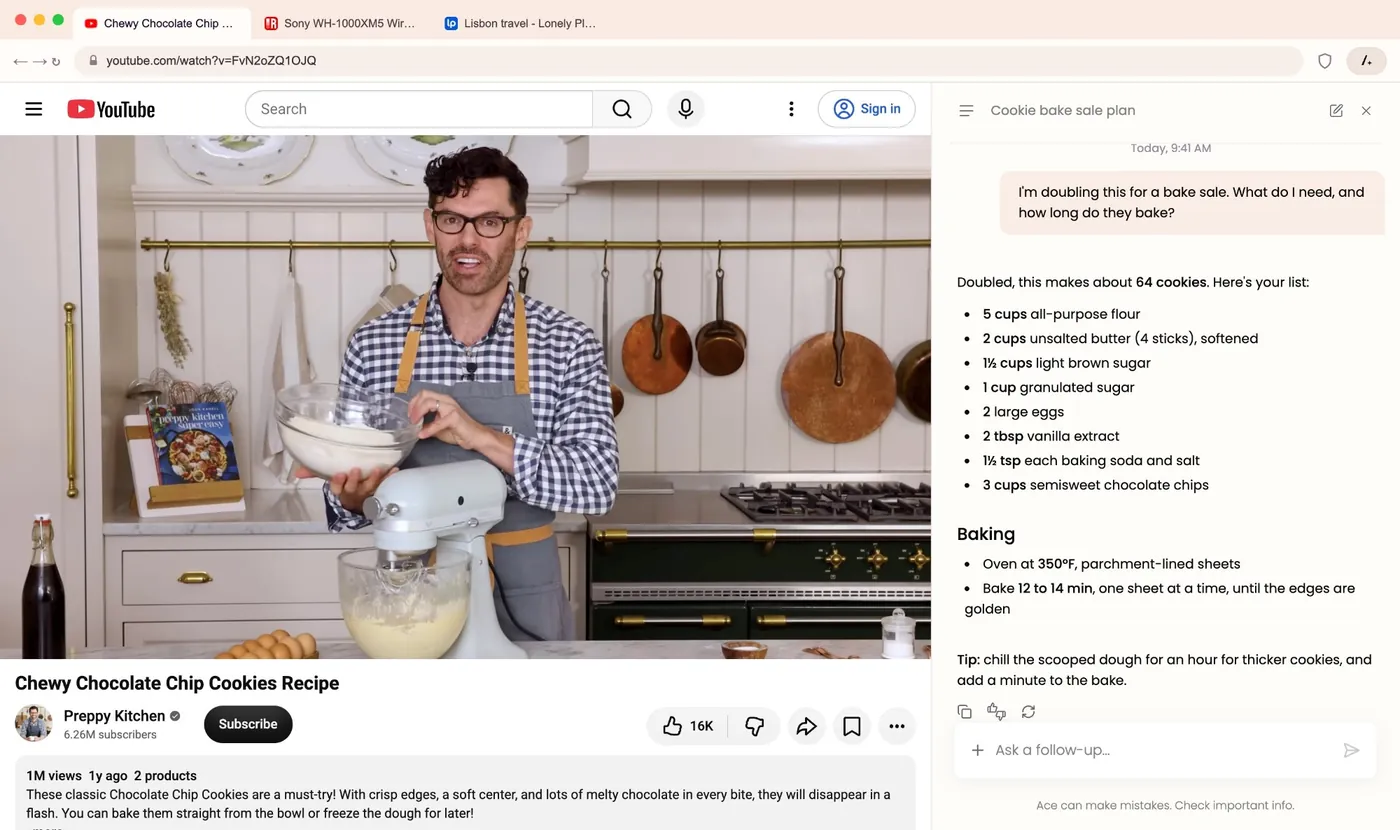
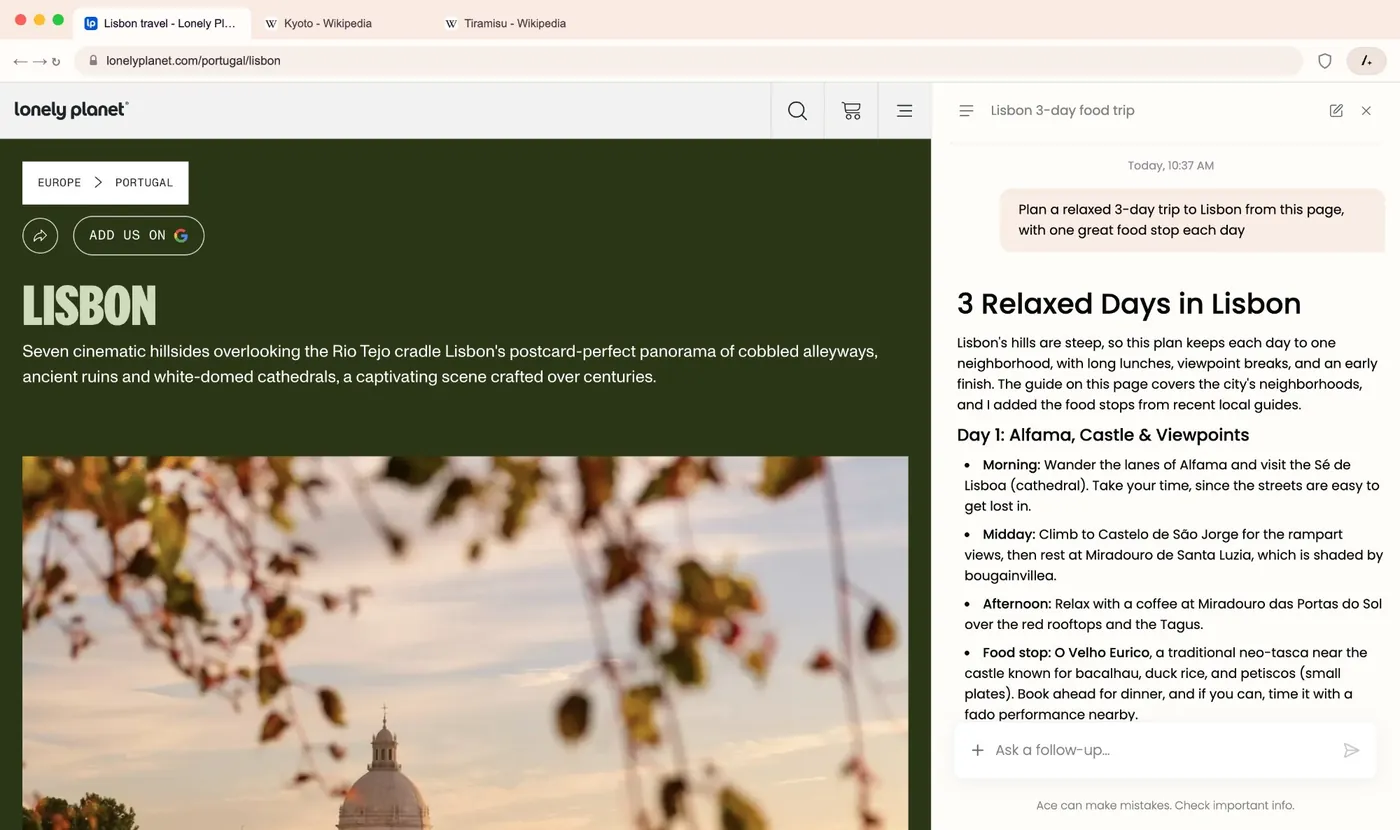
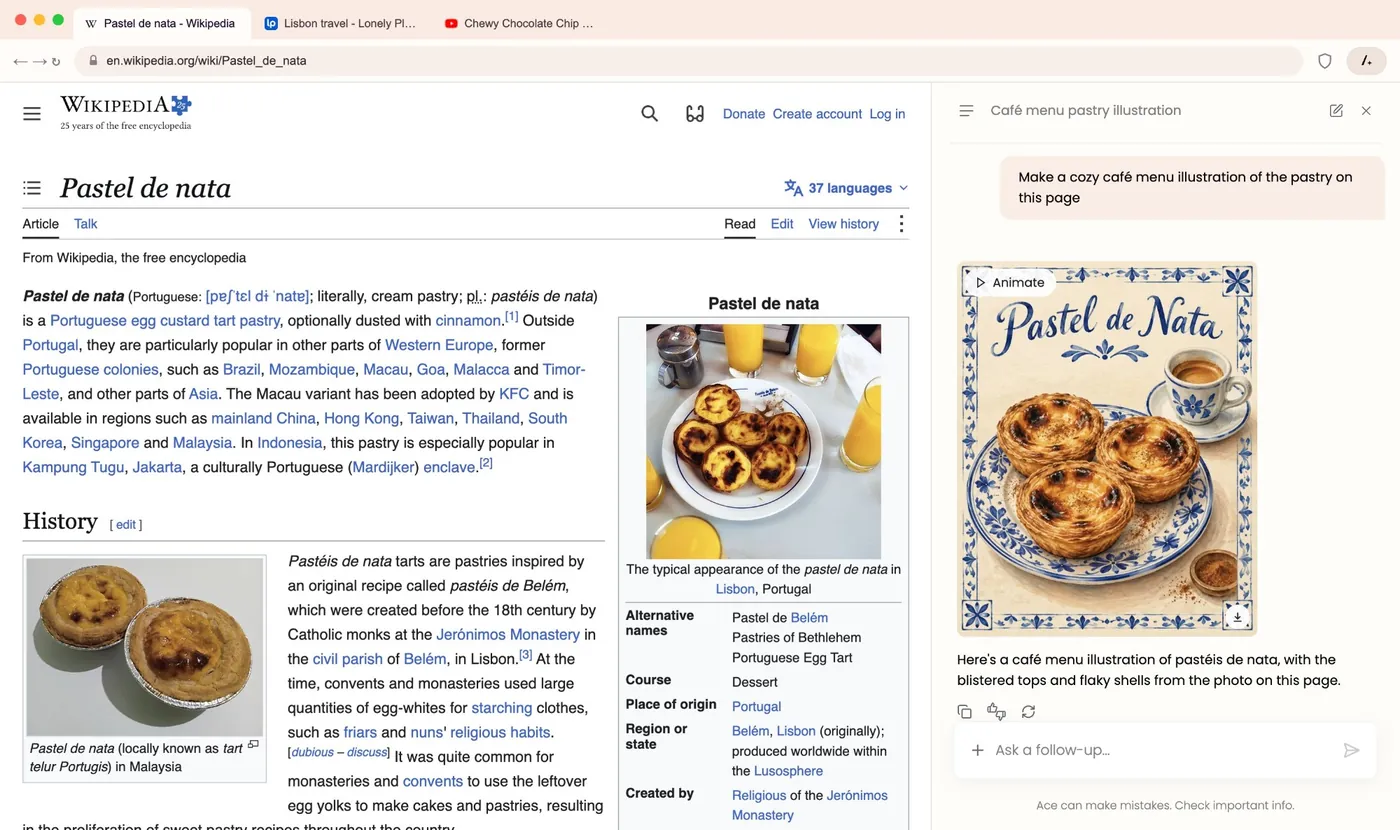
Screenshots supplied by Ace. Our own test screenshots follow below.
Is Ace browser safe?
Yes. In our checks, Ace is a legitimate, safely signed browser, not malware. Searches like "Ace browser malware", "Ace browser virus" and "Ace browser hijacker" are common, so we checked the things that separate a real browser from unwanted software:
- Code signature. The Ace program on our laptop carries a valid signature from DigiCert, one of the largest certificate authorities, issued to BrowseAI LLC of Delaware as a verified private organisation. Windows confirmed the signature as valid. Malware is rarely signed with an organisation-validated certificate, because the company has to prove who it is.
- Antivirus scan. On VirusTotal, 70 of 71 antivirus engines found nothing in the Ace program file. One engine, Dr.Web, labels it as "Program.Unwanted", its generic category for potentially unwanted programs rather than a virus or trojan. New browsers that ask to become your default often get that label from one or two engines.
- A normal install and uninstall. Ace appears in Windows Settings under Installed apps with its own uninstaller. It didn't install anything else alongside it during our test.
- Automatic updates. Ace updates itself, like Chrome, so you get Chromium security fixes without doing anything.
The "hijacker" worry usually comes from browsers or extensions that arrive bundled inside other free software. The safe way to get Ace is from its official site, ace.ai/download, or from our downloads directory. If a browser ever appears on your PC that you don't remember installing, uninstall it from Settings and scan your PC; that advice applies to any app.
How we tested Ace
We installed Ace on a laptop in India in November 2026 and used it as our everyday browser during testing. We checked:
- The assistant: we opened long pages and asked Ask Ace to summarise them and answer specific questions, then checked its answers against the page.
- Ad and tracker blocking: AdBlock Tester, with Ace Shield off and on.
- Leaks: our own WebRTC leak test and browser fingerprint test.
- App safety: the Windows code signature, a VirusTotal lookup of the program file's SHA-256 hash, and the uninstall entry.
- Privacy: we read Ace's full privacy policy and summarise it below.
Ace test results
| Test | Result | What we found |
|---|---|---|
| AI page summary | Pass | Accurate five-point summary; picked out the right market-share figure |
| AI reliability | Good | First request returned an error; it worked on the first retry |
| Ad and tracker blocking | 97 / 100 | AdBlock Tester, 11 services and 22 checks, with Ace Shield on |
| Blocking by default | Off | Ace Shield ships switched off; one click turns it on |
| WebRTC leak | Pass | No leak; local network address hidden behind an mDNS name |
| Fingerprinting | Standard | Same fingerprint signals as Chrome; no randomisation |
| Code signature | Valid | DigiCert certificate issued to BrowseAI LLC |
| VirusTotal | 70 / 71 clean | One engine labels it a potentially unwanted program |
| Uninstall | Clean | Listed in Windows Installed apps with its own uninstaller |
| Engine | Current | Chromium 150, updated automatically |
Ask Ace, the AI assistant
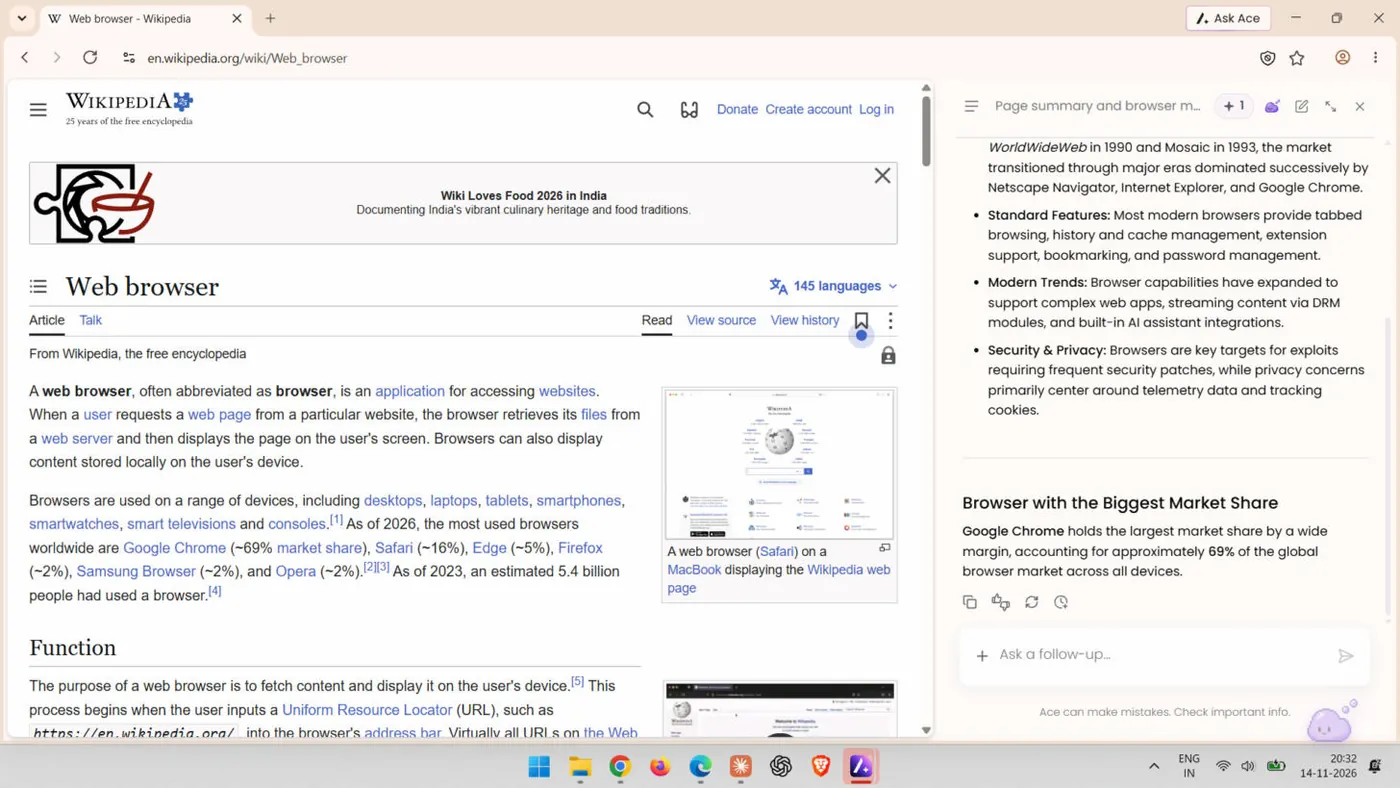
Click Ask Ace in the top right and a panel opens beside the page with shortcuts for Write, Plan, Generate, Shop, Learn and Search, plus buttons to drag in files or take a screenshot of the page. The current page is attached to your question automatically.
We opened Wikipedia's long "Web browser" article and asked for a five-point summary and which browser has the biggest market share. Ace gave five accurate points covering how browsers work, their history from WorldWideWeb and Mosaic, standard features, modern trends and security. It correctly answered that Google Chrome leads with about 69% of the market, the figure on the page. Our first request returned an error message; pressing Retry worked straight away, and every question after that went through.
Beyond summaries, Ace's assistant can compare several open tabs, organise your tab bar into groups, answer questions about a YouTube video, write and rewrite text, and generate images. All of this is free. Like every AI tool, it can make mistakes, and Ace says so under the chat box, so check anything important.
Ace Shield: ad and tracker blocking
Ace Shield is Ace's built-in blocker. It lives behind the shield icon in the address bar, with two switches: Enable Ace Shield and Block ads on this site. On a fresh install, both were off. Switch them on once and Ace blocks ads everywhere; you can turn it off for a single site that breaks.
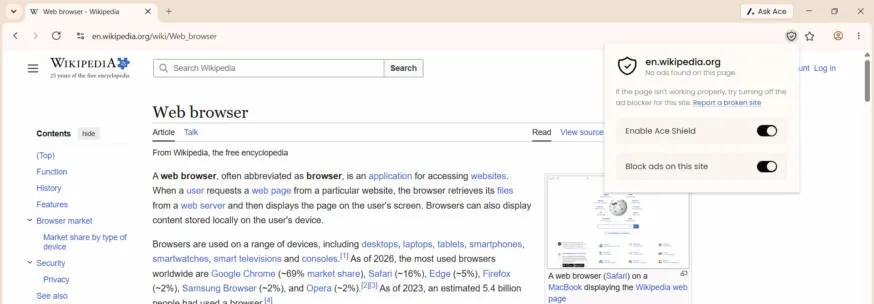
With Shield on, Ace scored 97 out of 100 on AdBlock Tester, passing script loading and visibility checks for contextual ads such as Google AdSense and Yandex Direct, plus analytics and banner services. That's in the same range as dedicated blockers. Even Wikipedia's own notice banner disappeared once Shield was on.
WebRTC and fingerprint tests
WebRTC is the browser feature behind video calls, and in some browsers it can reveal your real IP address even when you use a VPN. Our WebRTC leak test found no leak in Ace. Your local network address is replaced with a random ".local" name, so websites can't read it.
Our browser fingerprint test read the same signals from Ace that it reads from Chrome: the canvas and graphics card, installed fonts, screen size and time zone. Ace doesn't randomise these the way Brave or Tor Browser do. That's normal for Chromium browsers, but if hiding your fingerprint is a priority, Brave or Mullvad Browser go further.
Ace privacy: what the policy says
We read Ace's full privacy policy. These are the points that matter most:
- Your AI chats aren't shared with advertisers. The policy says this in capitals. Ace can use them internally to personalise your chats, which can include showing sponsored suggestions.
- AI partners can't train on your data. Where Ace uses third-party AI services inside its own interface, it says it requires them not to use your information to train models.
- Google data is ring-fenced. If you connect Gmail, Drive or Calendar, Ace says it uses that data only to do what you ask, never for ads or AI training, under Google's Limited Use rules.
- Search is powered by Bing. Searches go to Bing, which has its own privacy policy; you can change the default search engine in settings.
- Private browsing is available. Incognito windows don't keep your browsing data after you close them.
- Deleting data. Clearing history in Ace's settings removes it from your device. To have Ace delete data from its servers too, you send a request, as the policy explains.
Ace is free and partly funded by sponsored content, so it's a good fit for everyday browsing with AI help. For the most private browsing possible, a browser like Tor Browser is built for that one job.
Ace vs Chrome, Brave and Edge
All four browsers use the same Chromium engine, so sites and extensions behave alike. The differences are in what's built in:
| Browser | Price | Built-in AI | Ad blocking | Platforms |
|---|---|---|---|---|
| Ace | Free | Ask Ace side panel, image generation, tab chat | Ace Shield (97/100 in our test) | Windows, macOS |
 Chrome | Free | Gemini | Needs an extension | All major platforms |
 Brave | Free | Leo | Brave Shields, on by default | All major platforms |
 Edge | Free | Copilot | Tracking prevention | All major platforms |
Ace vs Chrome: Ace feels the same to use and runs the same extensions, but adds a free assistant that reads the page and a built-in ad blocker. If you live in Google's services, Chrome's Gemini ties in more closely with your Google account.
Ace vs Brave: Brave blocks by default and randomises your fingerprint, so it leads on pure privacy. Ace's assistant does more everyday jobs in one panel, like comparing tabs, planning and making images.
Ace vs Edge: Both put AI in a side panel. Ace keeps the interface clean and focused on the page you're on, and its blocker goes beyond tracking prevention to block ads too.
For the full field, including Perplexity Comet and Opera Neon, see our best browsers of 2026.
Ace browser download for Windows and Mac
Ace is available for Windows and macOS. Ace says Linux is coming next, followed by iPhone and Android. To install it:
- Go to ace.ai/download and download the installer.
- Run the file and follow the steps. On Windows it installs in under a minute.
- Import your bookmarks, passwords, extensions and history from Chrome when asked.
- Click the shield icon in the address bar and switch on Ace Shield.
- Optionally, set Ace as your default browser in Windows Settings, then Apps, then Default apps.
You'll also find Ace in our downloads directory, with its official links.
How to uninstall Ace
Ace removes cleanly. On Windows, open Settings, then Apps, then Installed apps, find Ace, and choose Uninstall. On a Mac, quit Ace and drag it from Applications to the Bin. Ace also publishes a step-by-step uninstall guide.
Pros and cons
What we liked
- Free AI assistant beside every page
- Accurate page summaries in our test
- Compares and organises your open tabs
- Ace Shield scored 97/100 on AdBlock Tester
- No WebRTC leak
- Chromium 150 with Chrome extension support
- Signed installer and clean uninstall
What we didn't
- Ace Shield is off until you switch it on
- No fingerprint randomisation
- Windows and Mac only for now
- First AI request needed a retry
- Chats can be used to show sponsored suggestions
How we scored Ace: 9.1 / 10
We score AI browsers in six areas. The assistant and privacy carry the most weight, because they're why you'd choose an AI browser and what it costs you.
| Area | Weight | Score | Why |
|---|---|---|---|
| AI assistant | 25% | 9.5 / 10 | Accurate summaries beside the page, tab comparison, images; one retry needed |
| Privacy and blocking | 25% | 8 / 10 | 97/100 ad blocking and no WebRTC leak; Shield off by default, no fingerprint protection |
| Speed and compatibility | 15% | 9.5 / 10 | Chromium 150, Chrome extensions, imports from Chrome |
| Safety of the app | 15% | 9 / 10 | Valid DigiCert signature, 70/71 clean on VirusTotal, clean uninstall |
| Ease of use | 10% | 9.5 / 10 | Quick install, clear side panel, one-click Shield |
| Value | 10% | 10 / 10 | Free, AI included, no subscription |
| Overall | 100% | 9.1 / 10 | Weighted total: 9.1 |
Ace earns its 9.1 by doing the main job of an AI browser very well, for free: the assistant is useful on real pages, and the blocker is excellent once it's on. Turning Ace Shield on by default and adding fingerprint protection would push it higher. We'll retest as Ace adds Linux and mobile apps.
Who Ace is for
Choose Ace if you already use ChatGPT or another assistant while you browse and want it built in, for free: for summarising articles and videos, comparing products across tabs, planning trips, writing emails or making quick images. It's also a comfortable switch from Chrome, since your extensions and bookmarks come with you.
Choose something else if your top priority is anonymity or anti-fingerprinting (Tor Browser or Mullvad Browser), or you need a browser on your phone today. Whatever you pick, run our WebRTC leak test once to see what your browser reveals.
Frequently asked questions
Is Ace browser safe?
Yes. In our tests the Ace program had a valid DigiCert code signature issued to BrowseAI LLC, 70 of 71 antivirus engines on VirusTotal found nothing, and it installed and uninstalled like a normal Windows app. It also passed our WebRTC leak test. Download it only from ace.ai.
Is Ace browser malware or a virus?
No. Ace is a signed, legitimate Chromium browser. One of 71 engines on VirusTotal (Dr.Web) labels it a "potentially unwanted program", a generic category that new browsers often get, not a virus. If Ace ever appears without you installing it, uninstall it from Settings and scan your PC, as you would with any app.
Is Ace browser free?
Yes. Ace is free to download and use on Windows and macOS, including its built-in AI assistant, image generation and video summaries. There is no subscription.
Who makes the Ace browser?
Ace's privacy policy names Ace AI Labs Inc. as the company behind it, and the Windows program is signed by BrowseAI LLC, a company registered in Delaware, USA.
Is Ace based on Chrome?
Ace is built on Chromium, the open-source engine Google Chrome also uses. The version we tested was based on Chromium 150. That's why sites look the same as in Chrome and Chrome extensions work.
Does Ace block ads?
Yes, with Ace Shield. It's off on a fresh install; click the shield icon in the address bar and switch on Enable Ace Shield. With it on, Ace scored 97 out of 100 on AdBlock Tester in our test.
Does Ace work with Chrome extensions?
Yes. Ace supports extensions from the Chrome Web Store, and it can import your bookmarks, saved passwords, extensions and history from Chrome.
Is Ace available on Android, iPhone or Linux?
Not yet. Ace is available for Windows and macOS. Ace says Linux is planned next, followed by iOS and Android.
How do I uninstall Ace browser?
On Windows, open Settings, then Apps, then Installed apps, find Ace and choose Uninstall. On a Mac, quit Ace and drag it from Applications to the Bin. Ace also has an uninstall guide at ace.ai/how-to-uninstall.
Is Ace better than Chrome?
For AI help while you browse, yes: Ace adds a free assistant that reads the page and a built-in ad blocker, while working with the same sites and extensions. Chrome is still the pick for the closest ties to Google services and for phones.
Does Ace use my AI chats for ads?
Ace's privacy policy says your AI conversations are not shared with advertisers. Ace can process them internally to personalise your chats, which can include sponsored suggestions, and it requires third-party AI providers not to train on your data.
