The short version

- AvailabilityIndia only, any internet connection
- Starts from₹1,000 for 2 months (Standard)
- SpecsUp to 8 vCPU, 16GB RAM, 1TB storage
- Operating systemUbuntu Linux, not Windows
- AccessJio set-top box, or browser on any PC
- Run byJio Platforms (Reliance Industries)
JioPC is a cloud computer: the processor, memory, and storage sit in a Reliance data center, and your existing laptop, desktop, or TV just displays the desktop over the internet, the way a video call displays someone else's face. It launched in July 2025 as a feature bundled with Jio's home broadband set-top boxes. On September 2, 2026, Reliance opened it up as a standalone subscription — anyone with an internet connection can sign up now, regardless of which telecom or broadband provider they actually use.
The pitch is that an eight-year-old, underpowered computer can suddenly run modern, resource-heavy apps — including AI tools — because the heavy lifting happens on Jio's servers, not your machine. That's a real and useful idea for a specific set of people: students without a capable PC, households stretching an old laptop, anyone who wants extra computing power without buying new hardware. It's also worth knowing exactly what you're renting before you pay for it, because "cloud PC" undersells one detail that changes what JioPC is actually good for: it runs Linux, not Windows.
What JioPC is
JioPC is a virtual desktop service built by Jio Platforms, the digital arm of Reliance Industries. Instead of buying a physical computer, you rent computing power — CPU cores, RAM, storage — hosted in Jio's cloud, and access it remotely as if it were a local machine. The company's pitch is aimed squarely at India's large base of older, lower-spec PCs: rather than replace hardware to run modern software or AI tools, you stream a more capable virtual machine to whatever screen you already own.
The service isn't brand new. Jio first launched JioPC in July 2025, exclusively for JioHome (Jio Fiber and JioAirFiber) broadband subscribers, accessed through the free Jio set-top box already bundled with those connections. What changed on September 2, 2026 is availability: JioPC is now sold as an independent subscription at my.jiopc.in, open to anyone with a working internet connection and a mobile number, with no requirement to be a Jio broadband or mobile customer at all.
Who can use JioPC
As of the September 2026 expansion, JioPC is available to anyone in India who can register a subscription and has a stable internet connection — broadband, JioAirFiber, or 4G/5G mobile data all work. You do not need to be an existing Jio customer; registration accepts non-Jio mobile numbers. Reliance is explicitly positioning it toward students, households with an aging computer, small businesses, and schools that want to extend the life of hardware they already own rather than buy new machines.
The service is India-specific. Jio Platforms operates only within India, and JioPC's billing, currency, and marketing are built entirely around the Indian market — there's no international version or equivalent sign-up path outside the country as of this writing.
Anyone dependent on Windows-specific software — a line-of-business accounting tool, specialized design software, certain games — should treat JioPC as unsuitable rather than a drop-in replacement. It runs Linux, covered in full further down, and that single fact rules out a meaningful share of potential business use cases regardless of how much RAM or storage a plan offers.
JioPC price and plans
JioPC sells two tiers, each with three subscription lengths. Pricing below reflects the standalone plans introduced with the September 2, 2026 expansion; confirm the live price at my.jiopc.in, since promotional pricing on a newly launched service can change quickly.
| Plan | 2 months | 5 months | 10+2 months |
|---|---|---|---|
| JioPC (Standard) | ₹1,000 | ₹2,000 | ₹4,000 |
| JioPC Ultra | ₹1,200 | ₹2,500 | ₹5,000 |
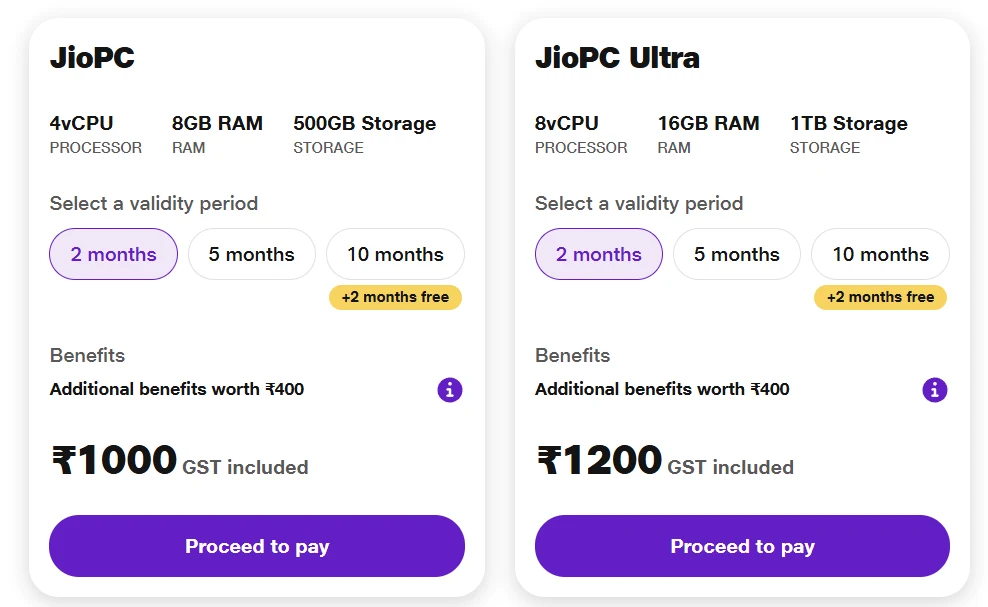
All listed prices include GST. At the annual tier, JioPC Ultra works out to roughly ₹417 per month, or about $4.42 — cheap by cloud-desktop standards; Microsoft's comparable Windows 365 service costs several times more per month internationally, though it also runs actual Windows rather than Linux, which is not a small difference (covered below). The 10+2 month plans effectively give two free months on top of a 10-month commitment, which is the best per-month rate on either tier.
JioPC RAM and storage options
The two tiers differ only in raw resources, not in features or the operating system running on top of them:
- JioPC (Standard) — 4 virtual CPUs, 8GB RAM, 500GB cloud storage
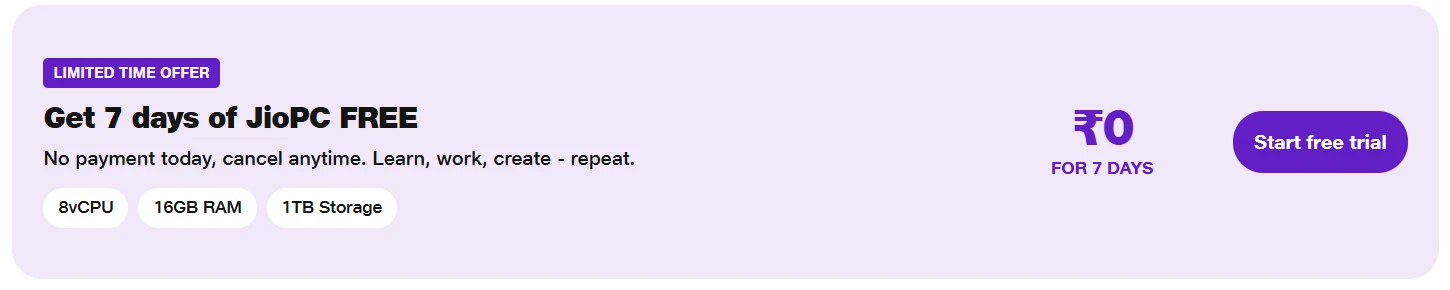
- JioPC Ultra — 8 virtual CPUs, 16GB RAM, 1TB cloud storage
Jio hasn't published the exact processor model backing these virtual machines; one hands-on report identified an Intel Xeon Platinum 8370C data-center chip during a session, though Jio's own materials don't confirm a specific CPU across all deployments, so treat that as one data point rather than a guaranteed spec. For context on what these numbers mean in practice: 8GB of RAM is comparable to a mid-range laptop sold new in India today, and 16GB comfortably covers multitasking with several browser tabs, office software, and light photo or video editing at once — the kind of workload that genuinely stalls on an eight-year-old machine's original hardware.
How to use JioPC
On a TV or Jio set-top box
This is the original access method, still available to JioHome broadband subscribers at no extra cost beyond their existing plan or their set-top box purchase.
- Turn on your Jio set-top box and open the apps menu.
- Find and open the JioPC app.
- Connect a keyboard and mouse to the set-top box via USB or Bluetooth.
- Sign in with your Jio account; your account details should auto-populate.
- Tap Continue, and the virtual desktop loads on your TV screen.
On a laptop or PC via browser
This is the new path opened up by the September 2026 expansion, and the one relevant to anyone without Jio broadband.
- Go to my.jiopc.in in any modern web browser.
- Register using any mobile number — a Jio SIM isn't required.
- Choose your plan (Standard or Ultra) and subscription length, and complete payment.
- Once activated, your virtual desktop streams directly in the browser tab.
- Bookmark the login page, since there's currently no dedicated desktop client for Windows or Mac — access runs through the browser itself. Which browser you use therefore matters more than usual here; our best browsers of 2026 roundup covers the trade-offs.
Either way, performance depends entirely on your internet connection, not your device's own processor or RAM. A slow or unstable connection will make the cloud desktop feel sluggish or unresponsive regardless of how fast the underlying virtual machine actually is — the opposite failure mode from a normal computer, where a slow internet connection doesn't affect how fast your apps open.
The JioPC app
There are effectively two different "JioPC app" experiences, and it's easy to conflate them:
- The set-top box app — a dedicated app inside the Jio set-top box interface, used only by JioHome broadband subscribers accessing JioPC through their TV.
- The browser-based portal — for the new standalone subscription, JioPC currently runs through my.jiopc.in in a web browser rather than a separate downloadable app for laptops or phones.
Don't confuse either of these with JioAICloud, a separate Jio product that offers Windows and Mac desktop apps for cloud file storage, similar to Google Drive or OneDrive. JioAICloud only syncs files — it doesn't provide a virtual desktop, and it's a different product from JioPC entirely, despite the overlapping "AI" and "cloud" branding.
Ubuntu, not Windows
This is the single most important thing to understand before subscribing, and it's easy to miss in headlines that just say "cloud PC." Both JioPC tiers run Ubuntu Linux — specifically Ubuntu 22.04 with the Cinnamon desktop environment, a layout deliberately designed to look and feel similar to Windows, with a taskbar, start-style menu, and familiar window controls.
What that means practically:
- Pre-installed software includes LibreOffice (a free alternative to Microsoft Office), Google Chrome, and a handful of Linux-native tools like GIMP and Sublime Text.
- Microsoft 365 works, but only through the browser version, not as an installed desktop application — fine for writing documents and spreadsheets, more limited than the full desktop apps for advanced features.
- Windows-only software will not run. A Windows
.exeinstaller, a Windows-specific accounting package, or most PC games built for Windows simply won't function on JioPC's Ubuntu environment.
For a student writing essays, browsing, streaming video, or working inside AI Classroom (covered next), this limitation rarely matters — browser-based tools and LibreOffice cover that entire use case. For a small business tied to a specific Windows desktop application, or a household expecting their existing Windows software to simply carry over into the cloud, it's a dealbreaker, and the kind of detail worth checking before paying for even the cheapest two-month plan.
JioPC vs. Windows 365
Microsoft's Windows 365 is the closest international comparison — also a cloud PC, streamed to any device through a browser or app. The two differ in ways that matter more than price alone:
| Category | JioPC | Windows 365 |
|---|---|---|
| Operating system | Ubuntu Linux (Cinnamon) | Actual Windows |
| Windows software compatibility | No | Yes, native |
| Cheapest annual cost | ~$53 (JioPC Ultra) | Several times higher |
| Availability | India only | Global |
| Target audience | Consumers, students, small business | Primarily enterprise |
JioPC isn't trying to be a budget Windows 365 — it's a different product solving a narrower, cheaper problem: giving an old machine access to more computing power for browser-based and Linux-native tasks, not replicating a full Windows environment. Judge it against that goal rather than against a genuine Windows cloud PC, and the pricing makes a lot more sense.
AI Classroom and Jio Institute
Alongside JioPC itself, Jio runs AI Classroom, a free four-week AI literacy course built jointly with Jio Institute (Reliance's private university) and designed to introduce beginners to practical AI tools rather than academic theory. It's aimed at students and general learners, not developers.
- Free foundation course, available in 12 languages including Hindi, Tamil, Telugu, Bengali, and Punjabi.
- Hands-on practice with tools like ChatGPT, NotebookLM, and Adobe Express, framed around practical study, writing, and creative tasks rather than programming.
- Self-paced structure — weekly modules with a quiz gating access to the next one, plus reference PDFs and videos.
- Certification requires JioPC. Anyone can take the course on any computer and earn a completion badge, but the actual Jio Institute-issued certificate is only awarded to learners who complete it while using JioPC specifically — a deliberate design choice that ties the free educational content to paid or trial use of the cloud PC service.
You can register directly at jio.com/ai-classroom. If you don't already have a capable computer, Jio has bundled a JioPC Welcome Offer trial specifically for people who want to take the course through the service rather than their own machine.
Privacy and data considerations
A cloud PC is a genuinely different privacy shape than a computer you own, and it's worth being deliberate about what that means before you store anything sensitive on one.
- Your files live on Jio's servers, not your device. Documents, browser history, saved logins, and anything else you create inside JioPC exist on Reliance's infrastructure for as long as your subscription is active, not on the physical machine in front of you.
- What happens after your subscription lapses isn't yet clearly documented in Jio's public materials as of this writing — whether data is retained, for how long, or immediately wiped on expiry is the kind of detail worth confirming directly with Jio support before storing anything you'd be upset to lose, rather than assuming either outcome.
- Jio is both your possible ISP and your cloud desktop host for many users, since the service grew out of JioHome broadband. Even for non-Jio-connection subscribers using the standalone plan, the same company now sits in the position of hosting your virtual desktop's activity — a level of vertical integration worth being aware of, separate from any judgment about whether Reliance's data handling practices are good or bad. It's a structurally different arrangement than using a cloud PC service unrelated to your internet provider.
- A stable, fast connection is now a requirement for basic privacy hygiene too — since everything runs remotely, there's no offline access at all if your connection drops, unlike a normal computer that keeps functioning without internet.
Two practical habits cover most of the exposure. Keep the account behind a strong, unique password held in a password manager rather than one reused from another service, since that single credential now unlocks an entire desktop; and if you reach JioPC over public or shared Wi-Fi, the usual caveats about public Wi-Fi apply to the session as much as to any other browsing.
None of this makes JioPC unsafe to use for its intended purpose — browsing, office work, AI Classroom, casual computing on an old machine. It does mean treating it the way you'd treat any cloud service handling documents you care about: avoid using it as the sole copy of anything important, and don't assume the same privacy model as a computer that never leaves your desk.
Why Jio is launching this now
The timing lines up with Jio Platforms' upcoming stock market listing. On August 28, 2026, Jio Platforms received observations from the Securities and Exchange Board of India on its planned IPO, expected to raise approximately ₹37,700 crore, with proceeds earmarked partly for AI and digital infrastructure investment. Opening JioPC to the entire Indian internet population, rather than keeping it a JioHome-only perk, is a way to demonstrate that Reliance's infrastructure investments can generate standalone subscription revenue — a relevant data point for investors evaluating the IPO, not just a consumer product decision made in isolation.
Reliance also announced a new subsidiary, Reliance Intelligence, building large AI-focused data centers in Jamnagar, and has separately partnered with Meta on AI-enabled data center infrastructure in India — JioPC sits inside a much larger push by the company to position itself as India's default AI infrastructure provider, not just a telecom operator.
Is JioPC worth it
For the specific problem it solves, yes. If you have an old, underpowered computer and mainly need browser-based work, office documents, or access to AI tools that your current machine struggles with, JioPC Ultra's ₹5,000-a-year plan is a genuinely cheap way to extend that hardware's useful life — cheaper than most repair costs, let alone a new laptop. Students working through AI Classroom get the added benefit of the free course plus a real certification path.
It's not the right fit if you need actual Windows software, a fast local response with no dependency on your internet connection, or a computer for gaming and any Windows-only professional tool. And because this is a newly expanded service — days old at the time of writing — some practical details (data retention after cancellation, support responsiveness at scale, real-world performance during peak hours) haven't been tested at volume yet. Treat early reviews, including this one, as based on the company's own claims and initial press coverage rather than months of independent field testing, and expect the picture to sharpen over the coming weeks.
Frequently asked questions
What is JioPC?
A cloud computer service from Jio Platforms that streams a virtual desktop — CPU, RAM, and storage hosted in Reliance's data centers — to your existing screen over the internet. It runs Ubuntu Linux, not Windows, and is aimed at giving older computers access to more computing power without a hardware upgrade.
Who can use JioPC?
Anyone in India with a stable internet connection and a mobile number for registration, regardless of which telecom or broadband provider they use. It's not available outside India.
How much does JioPC cost?
The Standard plan (4 vCPU, 8GB RAM, 500GB storage) starts at ₹1,000 for two months, up to ₹4,000 for a 10+2 month plan. JioPC Ultra (8 vCPU, 16GB RAM, 1TB storage) starts at ₹1,200 for two months, up to ₹5,000 for 10+2 months.
Does JioPC run Windows?
No. Both JioPC tiers run Ubuntu Linux with the Cinnamon desktop, styled to resemble Windows but not compatible with Windows-only software. LibreOffice is pre-installed, and Microsoft 365 is accessible through the browser only.
How do I access JioPC?
Through the JioPC app on a Jio set-top box if you're a JioHome broadband subscriber, or through a web browser at my.jiopc.in if you're subscribing as a standalone user with any internet connection.
What is AI Classroom?
A free, four-week AI literacy course built by Jio and Jio Institute, available in 12 languages. Anyone can take it on any computer for a completion badge, but the official Jio Institute certificate is only awarded to learners who complete it using JioPC specifically.
Is my data safe on JioPC?
Your files are stored on Jio's servers rather than your device for as long as your subscription is active. Jio hasn't clearly published what happens to that data after a subscription lapses, so avoid using JioPC as the only copy of anything you'd be upset to lose.
Is JioPC the same as JioAICloud?
No. JioAICloud is a separate Jio product offering desktop apps for cloud file storage on Windows and Mac, similar to Google Drive. It doesn't provide a virtual desktop the way JioPC does.
Do I need a Jio SIM or Jio broadband to use JioPC?
No, as of the September 2026 expansion. Registration at my.jiopc.in accepts any mobile number and works over any internet connection, including non-Jio broadband or mobile data.