
What Is a Proxy Server, and How Is It Different From a VPN?
Plus: free proxies, reverse proxies, AI proxy servers, the "proxy server" apps sold to Free Fire players, and how to set one up on any device.
A proxy server is a computer that sits between your device and the internet, forwarding your requests and passing back the response, so the site you're visiting sees the proxy's IP address instead of yours. It doesn't encrypt anything by default, and depending on the type, the operator running it can see — or even alter — what passes through. A VPN does more: it encrypts your entire connection and covers your whole device, not just one app.
This guide covers how a proxy actually works, the real difference between a proxy and a VPN, the types you'll run into, the documented risks of free proxies, how to set one up on Windows, macOS, Android, and iPhone, and newer categories like AI proxy servers and the "proxy server" apps marketed to mobile gamers.
How a Proxy Server Works

A proxy server inserts itself between your device and whatever you're connecting to. Your request goes to the proxy first, the proxy forwards it to the destination using its own IP address, and the response comes back through the same path before reaching you. The destination only ever sees the proxy's address, not yours — that's the entire trick behind IP masking, and it's the one thing every type of proxy has in common.
What a proxy does not do, unless you specifically choose a type built to add it, is encrypt your connection. A basic HTTP proxy passes traffic through exactly as it arrived. On a plain HTTP page, the proxy operator can read, and even edit, what you send and receive. On HTTPS — now the default across most of the web — the proxy can see which domain you're talking to and how much data moves, but not the contents.
A proxy also typically operates at the application level, meaning you configure it separately for each program: your browser, one specific app, a script. That's the detail that trips people up when comparing a proxy to a VPN, covered next.
Proxy vs. VPN
The core difference is encryption and scope. A VPN encrypts all the traffic leaving your device and covers every app at once. A standard proxy doesn't encrypt anything and only covers the one app or browser you've pointed at it.
That plays out in three practical ways. Coverage: a VPN runs at the operating system level, so once it's on, your browser, email client, and background apps all route through it; a proxy only affects whatever you've explicitly configured, which is why people run a proxy in one browser profile for scraping while leaving the rest of their traffic alone. Encryption: a VPN builds an encrypted tunnel using a protocol like WireGuard or OpenVPN, so even your ISP can't read what you send; a plain proxy does not. Business model: most proxies, especially free ones, make money by logging and reselling browsing data or injecting ads, while a reputable paid VPN's entire pitch depends on the opposite promise.
| Proxy Server | VPN | |
|---|---|---|
| Encrypts your traffic | No, unless it's a secure/SOCKS5-over-TLS proxy | Yes, full tunnel |
| Coverage | One app or browser at a time | Entire device, every app |
| Hides your IP from the destination site | Yes | Yes |
| Hides your traffic from your ISP | No | Yes |
| Typical cost | Often free | Usually a paid subscription |
| Common use case | Scraping, geo-testing, one-off IP changes | General privacy, public Wi-Fi, full-device protection |
A proxy that claims to hide your IP is also one of the more common places a WebRTC leak shows up — the browser can quietly reveal your real address alongside the proxy's, since a standard proxy doesn't touch WebRTC traffic the way a properly configured VPN does. If you're relying on a proxy for privacy rather than just a different exit IP, run a full IP leak test afterward rather than assuming it worked.
Types of Proxy Servers
Proxy servers come in several distinct types, and the type matters more than the word "proxy" itself — a transparent proxy and a SOCKS5 proxy behave almost nothing alike. Here's what each one actually does:
- HTTP proxy: handles only web (HTTP/HTTPS) traffic. The most common type, and the one most browser extensions use.
- SOCKS5 proxy: forwards any kind of traffic — TCP or UDP, not just web pages — which makes it the standard choice for torrenting, gaming clients, and apps that don't speak plain HTTP.
- Transparent proxy: doesn't hide anything. It identifies itself as a proxy and often forwards your real IP in an
X-Forwarded-Forheader. Schools, offices, and ISPs use these for content filtering, not privacy. - Anonymous proxy: hides your IP address but still tells the destination server that a proxy is in use.
- Elite (high-anonymity) proxy: hides your IP and doesn't announce that a proxy is involved at all, making the connection look identical to a direct one from the server's side.
- Residential proxy: routes traffic through an IP address an ISP has assigned to an actual home device, so it looks like ordinary consumer traffic rather than a data-center connection.
- Datacenter proxy: runs on IP addresses hosted in a data center rather than assigned to a home. Faster and cheaper, but easier for anti-bot systems to detect and block.
- ISP proxy: a hybrid — hosted in a data center but registered to an actual internet provider, so it looks residential while running at data-center speed.
- Rotating/mobile proxy: automatically switches your IP on a schedule or per request, often using addresses from mobile carrier networks. The hardest type for a website to fingerprint and block.
Forward Proxy vs. Reverse Proxy
A forward proxy acts on behalf of the client — you — hiding who's making a request from the server on the other end. A reverse proxy does the opposite: it acts on behalf of the server, hiding the server's real address from the clients connecting to it. Everything covered so far in this guide has been a forward proxy. A reverse proxy is a different tool entirely, used by website operators rather than by people trying to browse privately.
Nearly every major website sits behind a reverse proxy, and it's usually doing several jobs at once:
- Load balancing — spreads incoming requests across multiple backend servers so no single machine gets overwhelmed.
- SSL/TLS termination — handles encryption and decryption once, at the edge, instead of on every backend server individually.
- Caching — serves frequently requested content directly, without hitting the origin server on every visit.
- DDoS mitigation and filtering — absorbs and filters malicious traffic before it ever reaches the origin server.
Nginx and HAProxy are the two most common self-hosted reverse proxies, and Cloudflare is the most widely used managed one — Cloudflare has even moved parts of its own reverse-proxy layer off Nginx onto a custom-built system called Pingora, built specifically to handle its request volume more efficiently than a general-purpose reverse proxy could.
Free Proxy Servers
A free proxy server is exactly what it sounds like: a proxy anyone can connect to at no cost, usually pulled from a public list on a proxy-aggregator site. The catch is in the business model. Running and maintaining proxy infrastructure costs real money, so a free proxy operator has to recover that cost somehow, and the two most common ways are injecting ads into the pages you load or logging and reselling your browsing activity.
Free proxies also tend to be short-lived and unreliable by nature. The longest-running independent study of the category tracked over 640,000 free proxies across 30 months and found that only about a third of them ever worked even once — the rest were dead on arrival or vanished within days of being listed.
Risks of Free Proxies
What a free proxy can actually do to your traffic, beyond simply routing it:
- Read unencrypted (HTTP) traffic in full, including anything typed into a form.
- Inject its own ads or JavaScript into pages you load, including ones you never asked for.
- Log your browsing activity and sell it to data brokers or advertisers.
- Run on a device that was compromised without its owner's knowledge — not set up as a proxy on purpose at all.
- Operate on outdated, vulnerable router or camera firmware that is itself exploitable by attackers.
The most detailed evidence for this comes from a 30-month academic study by researchers at Université de Lille, Inria, and Datadome, published at NDSS's MADWeb workshop. They collected 640,693 free proxies from 11 public providers and tested each one daily. Only 34.5% were ever active. Cross-referencing the proxies' IP addresses against the Shodan device-search engine turned up 4,452 distinct known vulnerabilities, including 1,755 that would let an attacker run arbitrary code and 2,036 that allow privilege escalation on the host device. Over 42,000 of the tested IPs traced back to MikroTik routers — a strong sign that many "free proxies" are hijacked home or office routers rather than servers someone set up on purpose. The study also found 16,923 proxies that altered the content passing through them at least once, with roughly 5.7% of active proxies caught modifying traffic on any given day. You can read the full paper for the methodology.
Independent of that, security researcher Christian Haschek ran two rounds of testing on free proxies — 443 in 2015, then over 25,000 the following year — and both times found that the large majority blocked encrypted HTTPS connections outright, forcing traffic into plain HTTP that's trivial to intercept. You can read his original write-up for the raw numbers.
The starkest recent example of where "free" proxy capacity actually comes from surfaced in July 2026, when the FBI and Google jointly took down NetNut, a residential proxy network run by the Nasdaq-listed company Alarum Technologies. Researchers linked NetNut's exit-node pool to a botnet called Popa, built from an estimated two million consumer devices — mostly smart TVs and streaming boxes — that had been quietly enrolled as proxy exit nodes through bundled software development kits, with little or no meaningful consent from their owners. In a single week that June, Google observed 316 distinct threat-actor clusters, including espionage groups, routing traffic through NetNut's exit nodes specifically because a different residential IP address on every request makes attacks like password spraying far harder to block. The takedown followed a similar action against a rival network, IPIDEA, five months earlier — evidence this is a recurring business model in parts of the proxy industry, not an isolated incident.
Setting Up a Proxy Server
Configuration looks different depending on your device, since most operating systems and browsers read from the same system-level proxy setting rather than offering their own separate panel.
Windows 11
- Click Start, then open Settings.
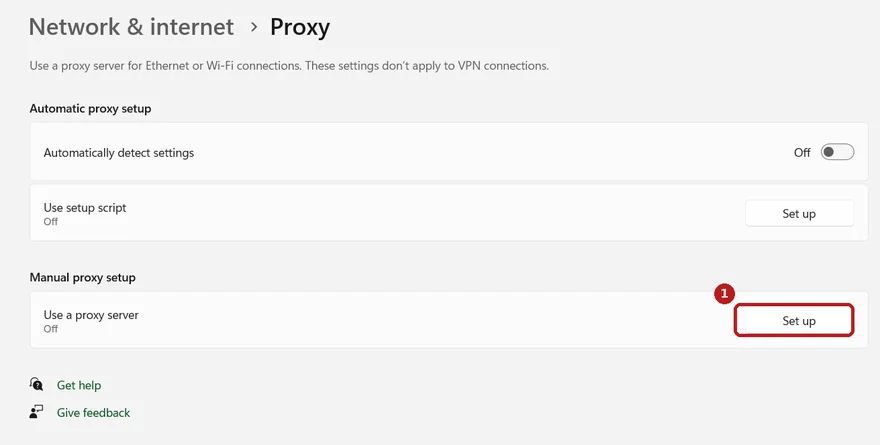
- Go to Network & internet → Proxy.
- Under Manual proxy setup, click Set up.
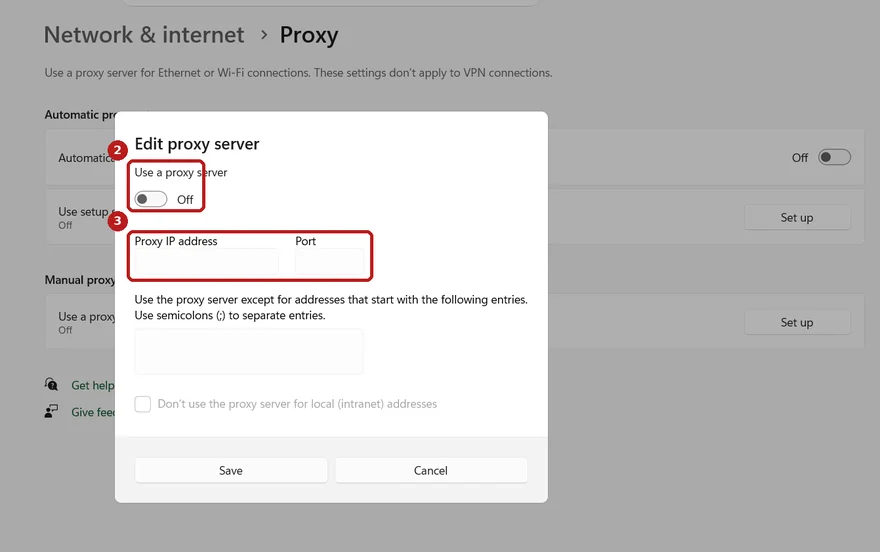
- Toggle Use a proxy server to on, then enter the address and port your provider gave you.
- Click Save.
macOS
- Open System Settings → Network.
- Select your active connection (Wi-Fi or Ethernet), then click Details.
- Go to the Proxies tab.
- Check the protocol your proxy uses (Web Proxy HTTP, Secure Web Proxy HTTPS, or SOCKS Proxy), then enter the server address and port.
- Click OK, then Apply.
Google Chrome
Chrome has no separate proxy panel of its own. On Windows and macOS, it reads your operating system's proxy settings directly — opening Settings → System → Open your computer's proxy settings inside Chrome just launches the OS panel above. If you need a proxy for one browser profile without affecting the rest of your device, use a dedicated proxy-management extension from the Chrome Web Store instead of the system setting.
Android
- Open Settings → Wi-Fi.
- Tap the network you're connected to, then the gear or pencil icon next to it.
- Expand Advanced options.
- Under Proxy, select Manual.
- Enter the proxy hostname and port, then tap Save.
This only applies to that specific Wi-Fi network, not mobile data, and some apps bypass the system proxy setting entirely.
iPhone
- Open Settings → Wi-Fi.
- Tap the (i) icon next to your connected network.
- Scroll down to HTTP Proxy and select Manual.
- Enter the server address and port, then tap Save.
Best Proxy Server Providers
The proxy providers worth paying for in 2026 are Bright Data and Oxylabs for large-scale, enterprise use, and Decodo, IPRoyal, or SOAX for smaller teams and solo developers who don't need millions of IPs. What separates a legitimate commercial provider from a "free proxy" is where the IP addresses actually come from and whether real, informed consent sits behind that sourcing — which, per the NetNut case above, isn't automatically true just because a company is publicly traded.
Disclosure: some links below may be affiliate links. That never changes the ranking or which provider is listed first — the criteria are network transparency, protocol support, and stated data-sourcing policy.
| Provider | Network | Approx. Size | Starting Price | Best For |
|---|---|---|---|---|
| Bright Data | Residential + datacenter | 400M+ residential IPs | ~$8.40/GB pay-as-you-go | Large-scale scraping, compliance-heavy use |
| Oxylabs | Residential + datacenter | 175M+ residential IPs | ~$15/GB pay-as-you-go | Enterprise, fastest response times |
| Decodo (ex-Smartproxy) | Residential + datacenter | 115M+ IPs | Free trial + pay-as-you-go | Budget-conscious developers and SMBs |
| IPRoyal | Residential + datacenter | Mid-sized pool | From ~$1.75/GB | Lowest-cost entry point |
| SOAX | Residential | 155M+ IPs | Subscription + usage credits | Granular city/carrier-level targeting |
None of these are built for everyday private browsing — they're infrastructure products for web scraping, ad verification, and SEO monitoring at scale. If what you actually want is to keep your own browsing hidden from your ISP and the sites you visit, a reputable no-logs VPN is the simpler, more complete tool for that job. See our public IP address guide for what a VPN actually hides and what it doesn't.
Free Fire Proxy Servers
A "Free Fire proxy server" is a third-party app that reroutes Garena Free Fire's network traffic through an alternate path, marketed as a way to cut ping, fix lag, or reach a game server outside your default region. A proxy can occasionally help if your ISP is genuinely taking a bad route to Free Fire's servers, but it cannot do anything about latency caused by physical distance, and most of what these apps promise doesn't hold up.
Free Fire, like most competitive mobile games, assigns you to a server region based on your account and IP address. Switching that region through a proxy is real and does work — it's the one consistently accurate claim in this category. Cutting your ping "from 150ms to 70ms," on the other hand, isn't something a generic proxy app can reliably promise. Actual latency depends on the physical route between you and Garena's servers, and adding a proxy hop in the middle just as often makes that route longer, not shorter.
Garena's own terms define unauthorized third-party software broadly, covering any tool that "defeats or overcomes" the encryption or security measures protecting its game data and network traffic — language broad enough to cover some proxy apps, depending on exactly how they intercept and modify Free Fire's traffic. Garena has stated its anti-cheat enforcement is zero-tolerance, with no appeal once an account is flagged for unauthorized third-party software.
If ping is a genuine, ongoing problem, the fixes that carry no ban or malware risk are: switching to a wired connection or 5GHz Wi-Fi, closing background apps competing for bandwidth, manually confirming Free Fire is set to the nearest available region in its own in-game settings, and contacting your ISP if the problem is constant rather than occasional.
Proxy-Based VPN Apps
Some apps marketed as a "VPN" are actually just a proxy underneath, with encryption either missing, partial, or loose enough that it doesn't provide what people expect a VPN to provide. "VPN" isn't a protected technical term — any app can call itself one.
The clearest documented case is Hola VPN, a free browser extension once used by tens of millions of people. Hola didn't run dedicated server infrastructure the way a standard VPN does. Instead, each free user's own internet connection became an exit node for other Hola users' traffic, peer-to-peer style. Security researchers found that a company called Luminati (now Bright Data) was selling access to that same pool of Hola users' residential IP addresses as a commercial proxy product — meaning people who installed a free "VPN" for privacy were, without clearly understanding it, renting out their own connection to unrelated third parties.
Before trusting an app calling itself a VPN, check that it:
- Names an actual encryption protocol it uses — WireGuard, OpenVPN, or IKEv2 — rather than staying vague about "secure connections."
- Publishes a no-logs policy that has been independently audited, not just claimed in marketing copy.
- Doesn't monetize a free tier by routing other users' traffic through your own device.
- Has a real company and jurisdiction behind it, rather than an anonymous developer listing.
AI Proxy Servers
An AI proxy server, more commonly called an LLM gateway, sits between an application and one or more AI model providers, forwarding requests the way any proxy does but adding features specific to AI traffic: response caching, per-provider rate limiting, automatic fallback to a different model if one provider goes down, and centralized cost tracking across providers.
This solves a real problem for developers building on more than one AI provider at once. Without a gateway, an app calling Anthropic, OpenAI, and Google separately needs three SDKs, three different failure-handling paths, and no single place to see combined spend. An AI proxy puts one consistent API in front of all of them, so switching or falling back between providers becomes a configuration change instead of a code change.
- LiteLLM — open-source, self-hosted proxy supporting 100+ providers behind one OpenAI-compatible API. The standard choice for teams wanting full control over their own infrastructure.
- Portkey — a gateway focused on production safety: guardrails, PII redaction, and audit logging built directly into the routing layer, with its core gateway now open-source.
- OpenRouter — a hosted marketplace model. One API key gives access to 200+ models with no infrastructure to run, at the cost of a per-token markup.
- Cloudflare AI Gateway — a managed proxy running on Cloudflare's edge network, adding caching, rate limiting, and centralized logging in front of 20+ AI providers behind a single unified API.
Proxy Server Legality
Using a proxy server is legal in the large majority of countries, including the US, Canada, the UK, and the EU — the tool itself isn't regulated in these places, only what you do with it. A smaller group of countries restrict or ban proxy and VPN use outright, mostly to enforce state-level internet censorship rather than for anything to do with fraud or hacking:
- China — blocks unapproved proxy and VPN services as part of the Great Firewall; only government-approved services are permitted, and enforcement is active.
- Russia — requires proxy and VPN providers to register with the government and block sites on a federal blacklist; non-compliant services get blocked at the network level.
- Iran, UAE, Saudi Arabia — proxy use to bypass government content restrictions is prohibited and monitored, with penalties that can include fines or imprisonment.
- Turkmenistan, North Korea — among the most restrictive; bypassing state internet controls with a proxy is treated as a serious offense.
Even where a proxy is legal everywhere you might use it, that doesn't exempt you from a website or platform's own terms of service — the Free Fire example earlier in this guide is a case where the tool is legal everywhere but still breaks a platform's rules, which is a far more common risk than any actual law.
Proxy Server Lists
A proxy list is a public webpage that aggregates the IP addresses, ports, and protocols of proxy servers scraped or submitted from across the internet, usually for free. They're the primary way people find free proxies in the first place, which means every risk covered earlier in this guide applies directly to whatever's currently listed on one.
The academic study cited above built its entire 640,000-proxy dataset by scraping 11 of these list sites daily for 30 months — the same kind of sites a search for "free proxy list" surfaces today. That's not a coincidence. It's simply where free proxies live.
If you need a proxy for a legitimate purpose — testing your own site's geo-blocking, for instance — a reputable paid provider's dashboard (see the providers list above) is a far more reliable source than a public list, since every IP comes with a known origin and an accountable company behind it, rather than an anonymous submission of unknown provenance.
Do I need a proxy if I already have a VPN?
Usually not. A paid VPN already does everything a basic proxy does, and it also encrypts your traffic and covers your entire device instead of one app at a time. The one case where a proxy still earns a place alongside a VPN is app-specific IP rotation for tasks like web scraping or ad verification, where you want a different address on every request rather than one stable VPN server.
Can a proxy server see my passwords or login details?
It can, if your connection to the site itself is not encrypted. A proxy that intercepts plain HTTP traffic, or one that strips HTTPS, can read exactly what you type into a form. Most sites now serve pages over HTTPS by default, which keeps a proxy from reading the contents, but the proxy operator can still see which domains you visit and roughly how much data you send.
Are free proxy servers safe to use?
Rarely, based on the two largest independent studies of the category. A 30-month academic study of over 640,000 free proxies found only about a third ever worked at all, and thousands ran on IP addresses with known, exploitable vulnerabilities. Separate research by a security researcher testing more than 25,000 free proxies found the large majority blocked encrypted (HTTPS) connections outright, which forces your traffic into a form the proxy operator can read.
Will using a proxy get my Free Fire account banned?
It can, depending on exactly what the app does once installed. Garena bans any unauthorized third-party software that interferes with the game client or the encryption protecting its network traffic, and that definition is broad enough to cover some proxy apps depending on how they intercept Free Fire's data. Garena has also said its anti-cheat enforcement is zero-tolerance with no appeal once an account is flagged.
What is a SOCKS5 proxy used for?
A SOCKS5 proxy forwards any kind of network traffic, not just web pages, which is why it is the standard choice for torrenting, gaming clients, and email apps that do not speak plain HTTP. Unlike an HTTP proxy, it does not inspect or modify the traffic passing through it, which makes it faster but means it offers no content filtering or caching on its own.
Is a reverse proxy the same thing as a load balancer?
No, though the two overlap. A load balancer's only job is spreading incoming traffic across multiple backend servers. A reverse proxy does that too, but also handles jobs like SSL termination, caching, and hiding a server's real IP address from clients. Every load balancer is essentially a reverse proxy doing one specific job, but not every reverse proxy is being used as a load balancer.
Can my ISP see that I am using a proxy?
Yes. Your ISP can see the IP address of the proxy server you are connecting to and how much data flows to it, the same way it can see that you are connected to a VPN server. What it typically cannot see, if your connection to the proxy itself is encrypted, is the content of what you send once it reaches the proxy — though a plain, unencrypted proxy connection offers no such protection at all.