The short version
- Free plan No, 7-day mobile trial
- Protocols Lightway, OpenVPN, IKEv2
- No-logs audits 23 independent audits since 2018
- Based in British Virgin Islands
ExpressVPN is a paid VPN app built around one proprietary protocol, Lightway, and one server design, TrustedServer, both engineered so the company physically can't retain the kind of logs most VPNs promise not to keep. It has no permanent free tier, it's one of the pricier options on a plain monthly plan, and its parent company employed a former UAE cyber-surveillance operative in a senior security role, a fact that became public the day after that company bought ExpressVPN. None of that is spin — it's the actual trade-off profile of the service, and most competitor reviews mention at most one side of it.
What ExpressVPN gets right is consistency: it's one of a shrinking handful of VPNs that reliably works in mainland China, it unblocks Netflix libraries other providers lose within weeks, and its no-logs claim has been tested by a hostile government seizing an actual server, not just an auditor reading a policy document. This review covers all of it — pricing, downloads for every platform, the router setup, and what to do when a specific server or country stops working.
What ExpressVPN is
ExpressVPN is a consumer VPN app, first launched in 2009, that routes your internet traffic through an encrypted tunnel to hide your IP address and browsing activity from your internet provider, your network administrator, and the sites you visit. The company is incorporated in the British Virgin Islands, a jurisdiction with no mandatory data-retention law, which is the same legal reasoning most privacy-first VPNs use to justify where they're based.
ExpressVPN itself is owned by Kape Technologies, a London-headquartered security software company, following a $936 million acquisition that closed in December 2021. Kape also owns CyberGhost, Private Internet Access, and ZenMate — meaning four of the more recognizable VPN brands on the market answer to the same parent company. That ownership structure matters enough for streaming and privacy decisions that it gets its own section below rather than a passing mention here.
Is there a free ExpressVPN
No, ExpressVPN doesn't run a free tier the way some budget competitors do. What it offers instead is a 7-day free trial, available only through the iOS and Android app stores, and a 30-day money-back guarantee on every paid plan bought directly from ExpressVPN's own site.
The two aren't the same thing in practice:
- The 7-day trial requires installing the app from the App Store or Google Play, which starts a store-billed subscription that auto-cancels if you cancel before day seven — no card charge if you cancel in time.
- The 30-day refund applies to any plan bought through expressvpn.com, lets you use the full desktop and mobile app suite, and is a request made through the account dashboard or support chat rather than an automatic app-store cancellation.
- Neither option works if you buy through a third-party reseller or a heavily discounted bundle site — refunds in that case go through whoever you actually paid.
If a free, ongoing VPN with no time limit matters more to you than ExpressVPN's specific features, our free VPN vs. paid VPN guide covers what a genuinely free tier can and can't do safely.
ExpressVPN download for PC
ExpressVPN ships native apps for Windows, Mac, and Linux, all downloaded directly from ExpressVPN's own site rather than an app store — Linux in particular has no store distribution at all.
Windows
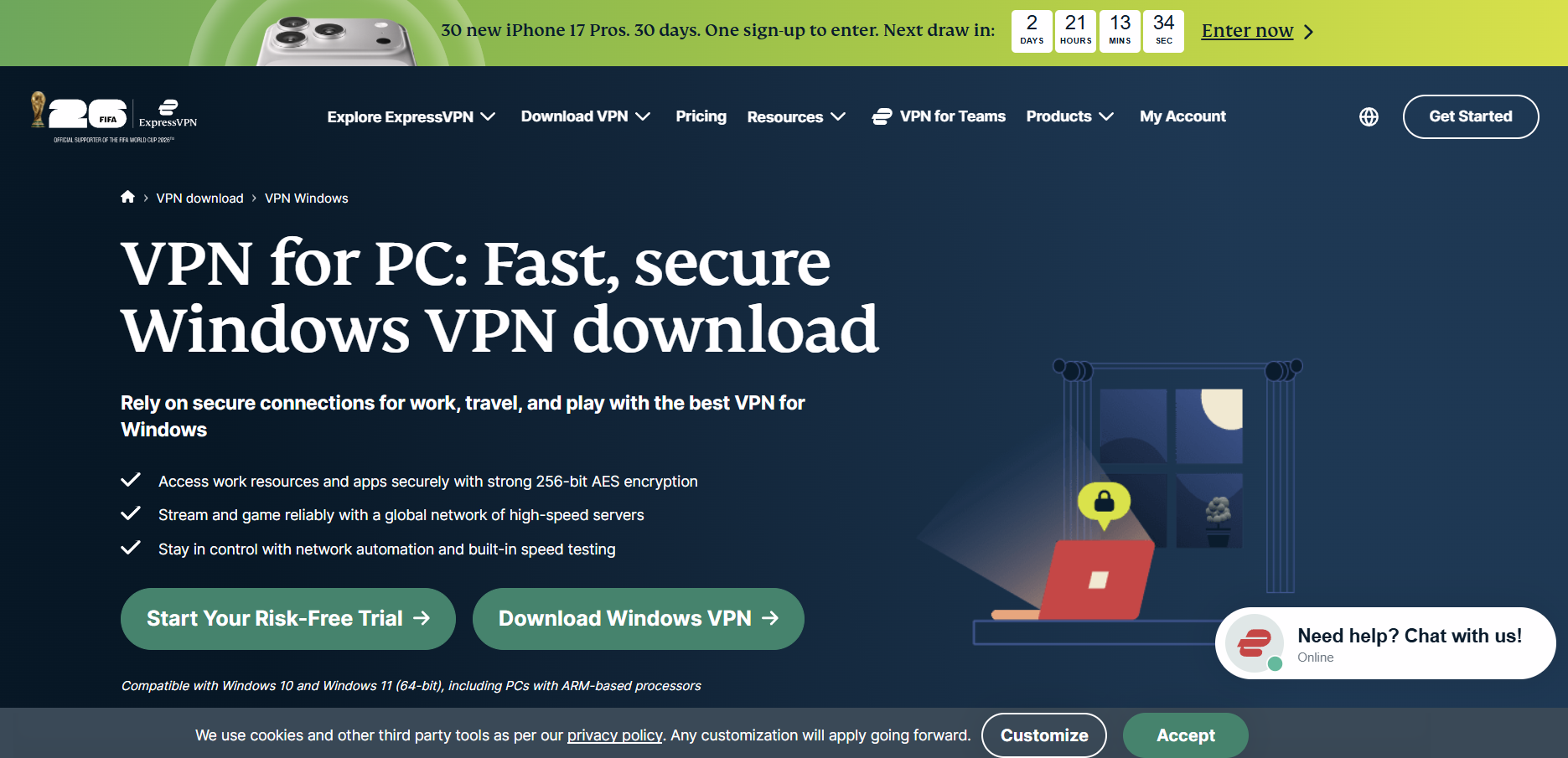
- Sign up for a plan at expressvpn.com, then go to your account dashboard.
- Click Set Up ExpressVPN and select Windows; the installer (
.exe) downloads directly. - Run the installer and follow the setup prompts. Windows may show a SmartScreen prompt on first run — this is standard for any less-common publisher and not specific to ExpressVPN.
- Open the app and enter the activation code shown in your dashboard, or sign in with your ExpressVPN account.
- Pick a location and click the power button to connect.
Mac
- From the same account dashboard, select macOS and download the
.dmginstaller. - Open the file and drag ExpressVPN into your Applications folder.
- On first launch, macOS will ask you to approve a network extension — required for the VPN tunnel to function, and a standard permission across every VPN app on macOS, not an ExpressVPN-specific request.
- Sign in or enter your activation code, then connect.
Linux
ExpressVPN's Linux support is command-line based rather than a graphical app, though a GUI companion app is available separately for supported distributions.
- From your account dashboard, download the
.deb(Debian/Ubuntu) or.rpm(Fedora/CentOS) package matching your distribution. - Install it via terminal — for example,
sudo dpkg -i expressvpn_x.x.x_amd64.debon Ubuntu. - Run
expressvpn activateand paste in your activation code from the dashboard. - Connect from the terminal with
expressvpn connect, or specify a location withexpressvpn connect smartfor the fastest recommended server. - Optionally install the separate ExpressVPN GUI app for a visual interface instead of terminal commands, if your distribution supports it.
ExpressVPN download for mobile
Unlike some budget competitors, ExpressVPN's mobile apps carry the same core feature set as desktop — kill switch, split tunneling, and protocol choice are all present on both Android and iOS, which isn't universal in this category.
Android
- Open Google Play and search "ExpressVPN," or follow the link from your account dashboard.
- Confirm the developer is listed as Express Technologies Ltd before installing.
- Install the app, open it, and either start the 7-day free trial or sign in with an existing plan.
- Grant the Android VPN permission when prompted — a standard system permission for any VPN app.
- Select a location and tap the power button.
iOS
- Open the App Store and search "ExpressVPN," or use the link from your account dashboard.
- Tap Get to install, then open the app.
- Start the 7-day free trial or sign in with your account.
- Approve the "VPN configuration" prompt — Apple's standard system dialog for any VPN app.
- Choose a server location and tap to connect.
ExpressVPN app features
The feature set is consistent across desktop and mobile, which is the opposite of the split many budget VPNs build in. The core list:
- Lightway protocol — ExpressVPN's own protocol, built for faster connection times and automatic obfuscation that disguises VPN traffic as ordinary HTTPS; see our WireGuard vs. OpenVPN guide for how the two protocols Lightway competes with actually differ
- TrustedServer technology — every server runs entirely on RAM, so data is wiped on every reboot and no server ever writes to a hard disk
- Network Lock kill switch — blocks all traffic if the VPN connection drops, present on every platform including mobile
- Split tunneling — route specific apps or sites outside the VPN tunnel, with per-platform limitations (see the Netflix section below for the iOS caveat specifically)
- Threat Manager — blocks known trackers and malicious domains at the network level, active even before you visit a site
- MediaStreamer — a DNS-only proxy for devices that can't run the VPN app directly, like some smart TVs and game consoles; it changes your apparent location but doesn't encrypt traffic, so it's not a privacy tool, just an unblocking one
- Server count — 3,000+ servers across 113 countries and 214+ locations, following a July 2026 expansion that added Lagos, Doha, Manchester, Valencia, and Nuuk
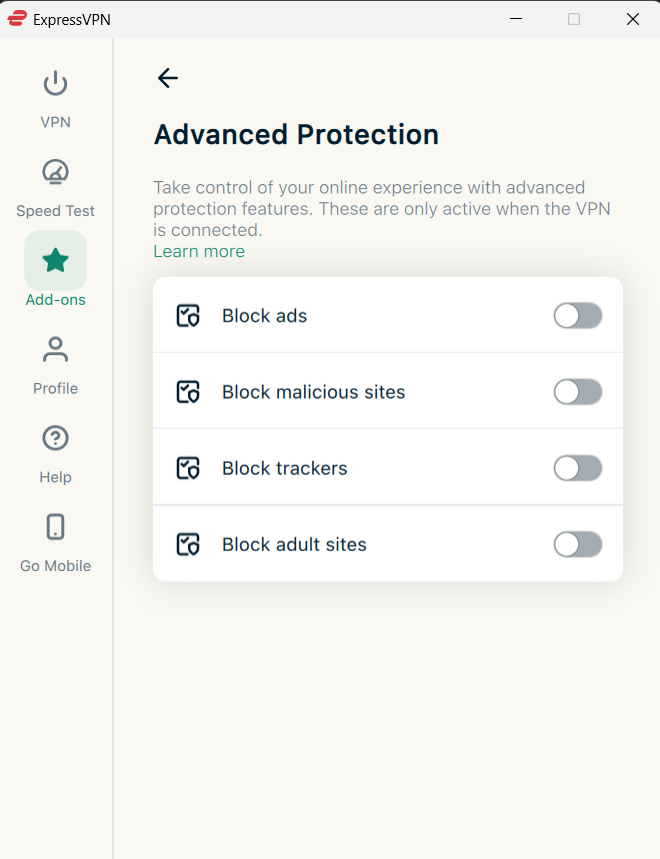
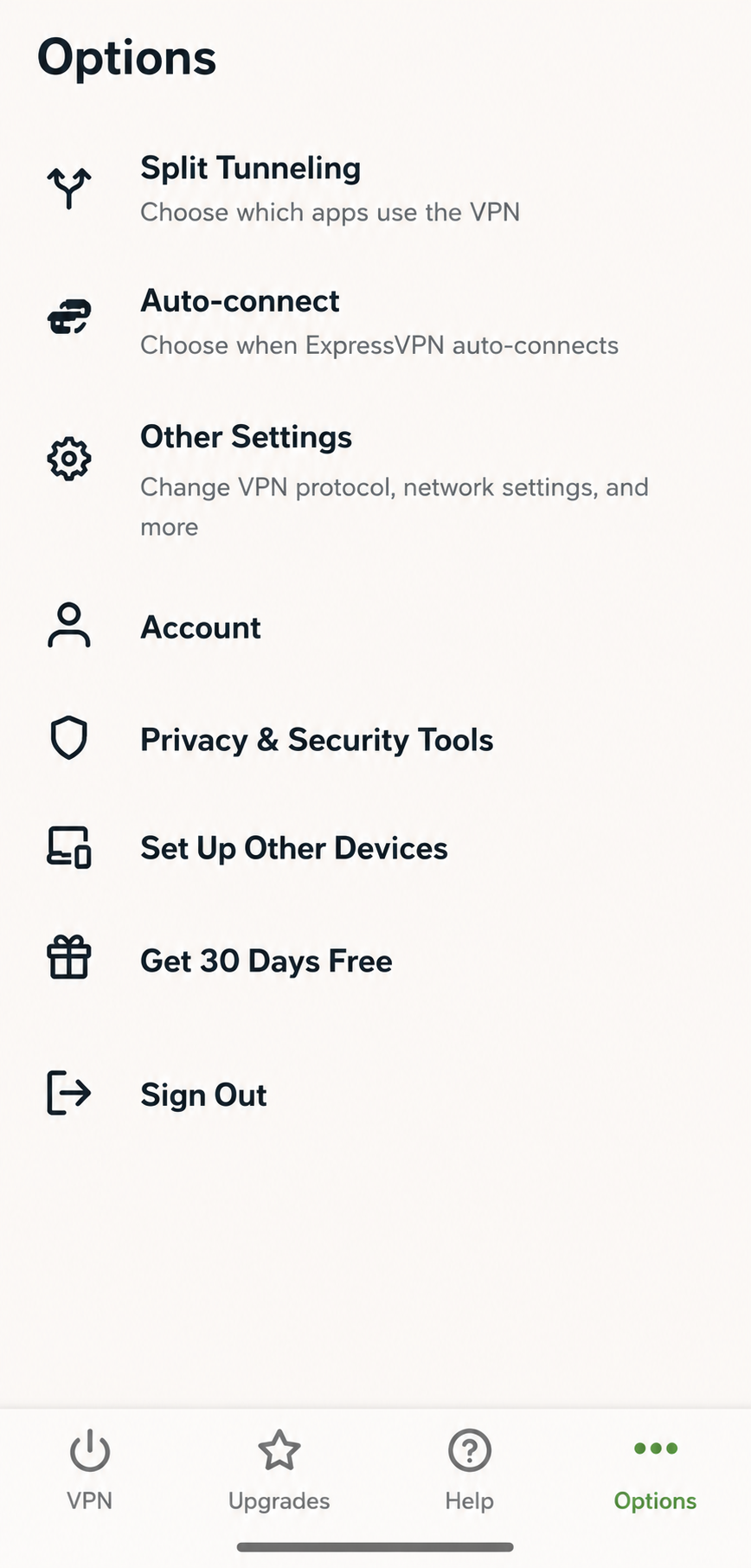
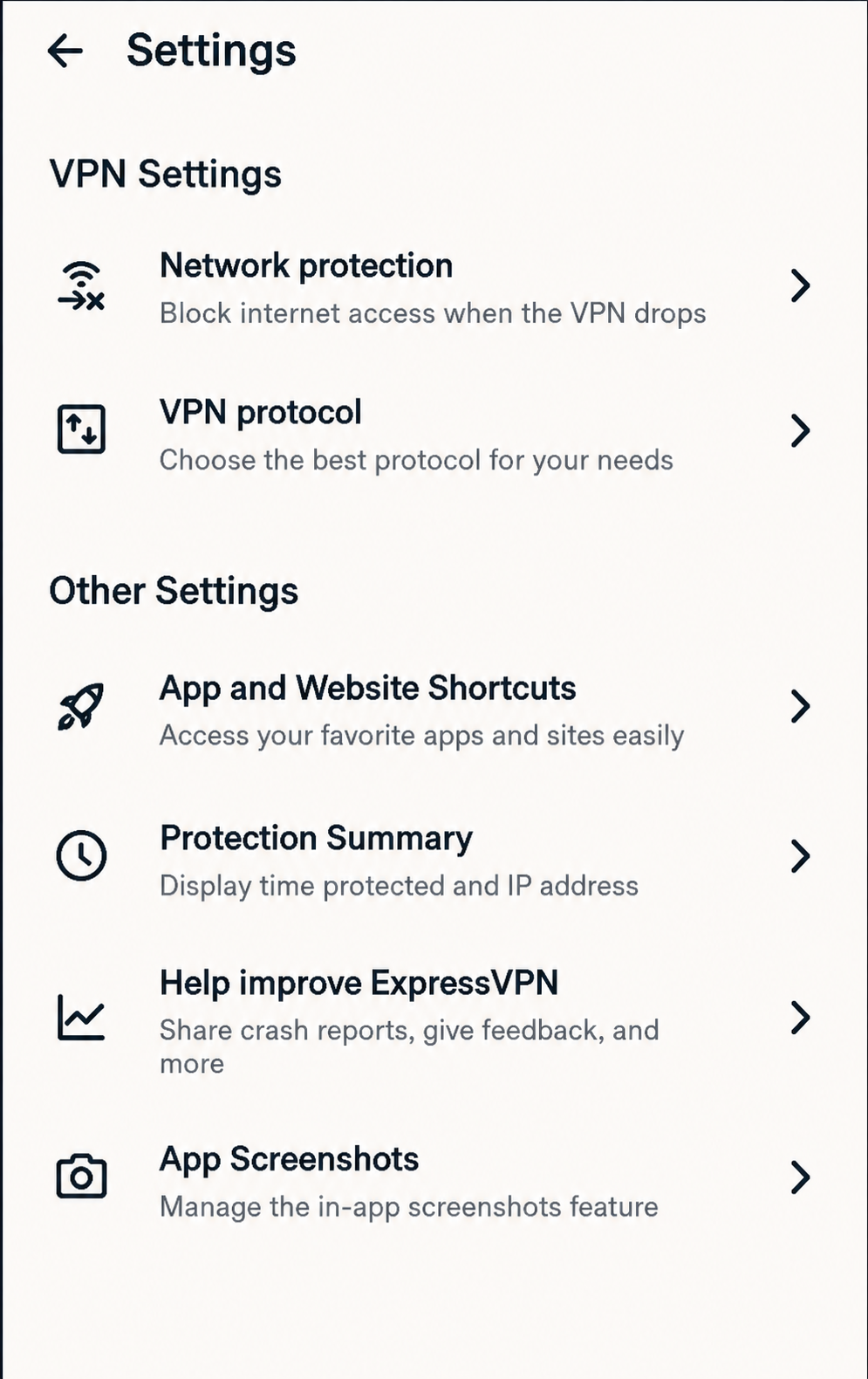
Split tunneling, the kill switch, and protocol choice sit in the app's own menus rather than being buried in OS-level settings:
Password Manager, identity monitoring, and a data-removal tool are bundled into the higher Advanced and Pro tiers rather than the base plan — the pricing section below breaks down exactly which tier includes what.
ExpressVPN router setup
Running ExpressVPN on your router covers every device on your home network — smart TVs, consoles, IoT devices — through a single VPN connection, without using up one of your plan's device slots. There are two ways to do it.
Aircove router
Aircove is ExpressVPN's own Wi-Fi 6 router with the VPN built directly into its firmware — no manual configuration or flashing required.
- Unbox Aircove and connect it to your existing modem via the included Ethernet cable.
- Download the ExpressVPN app and follow the guided router setup flow, which walks through Wi-Fi network naming and password creation.
- Sign in with your ExpressVPN account; the router activates automatically against your subscription.
- Use the app to create separate network groups — for example, one that always uses the VPN and one that connects directly — so specific devices can bypass the tunnel without a full router reconfiguration.
Manual router setup
For routers not running Aircove's firmware, ExpressVPN supports manual installation on routers that run compatible firmware such as DD-WRT, Asuswrt, or Tomato.
- Confirm your router's firmware is on ExpressVPN's supported list — unsupported firmware can't run the required configuration files.
- From your account dashboard, generate router-specific setup files under Set Up Other Devices.
- Follow the firmware-specific instructions in your dashboard to upload the configuration, which varies meaningfully between DD-WRT and Asuswrt and isn't a single universal process.
- Reboot the router and confirm the connection status shown in its admin panel.
Manual router installs are the more failure-prone option in this list — a mismatched firmware version is the most common reason a manual setup won't connect, more often than an account issue on ExpressVPN's side.
Pricing and plans
ExpressVPN splits into three tiers — Basic, Advanced, and Express Pro — each available on monthly, 12-month, or 24-month (billed as "2 years + 4 months") billing. Pricing shifts with promotions fairly often, so treat the table below as a snapshot rather than a guarantee, and check ExpressVPN's own checkout page for the current offer.
| Plan | Monthly (no commitment) | 12-month | 24-month | Devices |
|---|---|---|---|---|
| Basic | ~$12.99–15.99/mo | ~$4.99/mo | ~$2.99/mo | 10 |
| Advanced | ~$15.99–18.99/mo | ~$6.99/mo | ~$4.49/mo | 12 |
| Express Pro | ~$19.99–22.99/mo | ~$9.99/mo | ~$7.49/mo | 14 |
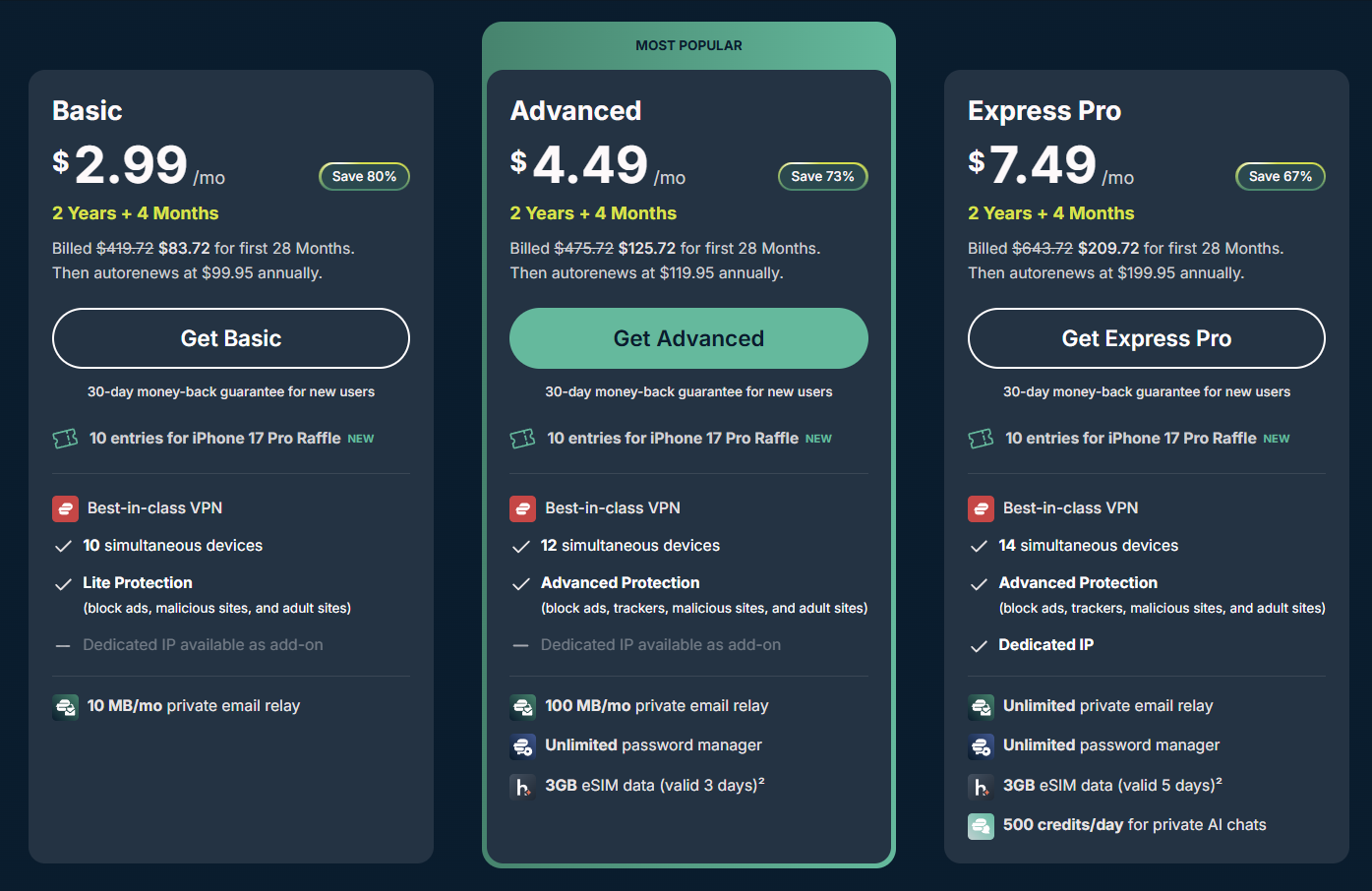
The difference between tiers isn't just device count or price. Basic covers the VPN itself — Lightway, the full server network, kill switch, split tunneling — plus a lighter "Lite Protection" filter that blocks ads and malicious/adult sites, but not trackers. Advanced upgrades that to full "Advanced Protection" (adds tracker blocking), plus an unlimited password manager, a private email relay, and 3GB of eSIM data valid for 3 days. Express Pro adds a dedicated IP address at no extra cost (an add-on on the lower tiers), 3GB of eSIM data valid for 5 days, and 500 daily credits toward ExpressVPN's private AI chat feature. For most people who just want a VPN, Basic covers it; Advanced is the tier worth the extra dollar or two if you'd otherwise pay separately for a password manager.
Two things worth checking before you commit to a long-term plan: the 24-month price above is a promotional rate for the first term only — it renews at the higher annual rate shown in the fine print once that term ends, unless you cancel auto-renewal first. Neither the bonus months nor the renewal jump is unique to ExpressVPN, but both are easy to miss at checkout.
Who owns ExpressVPN
ExpressVPN is owned by Kape Technologies, a London-based company controlled by Israeli businessman Teddy Sagi through his holding company Unikmind. Kape itself was formerly known as Crossrider, an ad-injection and browser-extension company before it rebranded and pivoted into privacy software starting around 2018 — a history some competitor reviews raise as a separate credibility question on its own.
The more specific incident worth knowing: the day after Kape's $936 million acquisition of ExpressVPN was announced in September 2021, Reuters revealed that ExpressVPN's Chief Information Officer, Daniel Gericke, had previously worked on Project Raven, a covert surveillance program built for the United Arab Emirates that hacked the phones of journalists, human rights activists, and political dissidents. Gericke and two other former U.S. intelligence operatives later agreed to a $1.68 million settlement with the U.S. Department of Justice; Gericke's individual share was $335,000.
ExpressVPN didn't dispute the Reuters reporting or remove Gericke. In an internal all-hands meeting, employees directly challenged leadership over the hire, and the company told Reuters that Gericke had "earned senior leadership roles" through his work at ExpressVPN, not that the surveillance history was irrelevant. Gericke remained CIO afterward. Whatever you make of the decision, it's a documented, on-the-record response — not a rumor circulating in privacy forums, which is why several major outlets covered it as news rather than speculation.
This doesn't affect ExpressVPN's technical security or its audited no-logs claim, which are separate questions addressed in the next section. It's a reason some privacy-conscious users choose an independent provider over one owned by a larger holding company, and it's the kind of fact a surface-level "best VPN" roundup tends to leave out entirely.
Privacy and no-logs policy
ExpressVPN doesn't log browsing history, DNS queries, traffic content, or the IP address you connect from. That's the standard claim nearly every no-logs VPN makes. What sets ExpressVPN apart is the volume of independent verification behind it — 23 separate third-party audits since 2018, more than any other VPN provider publishes.
The most recent, completed by KPMG and covering the period through February 28, 2025, found "reasonable assurance" that ExpressVPN's TrustedServer architecture technically prevents the collection of activity logs — not just that the written policy says it won't, but that the RAM-only server design makes persistent logging structurally difficult to implement even if the company wanted to. Earlier audits, dating back to a 2019 PwC Switzerland review, covered the same TrustedServer claim; more recent ones have separately tested the Windows and Android apps, the browser extensions, and the Lightway protocol itself for implementation bugs.
The claim has also been tested outside a lab setting. In January 2017, Turkish authorities seized a physical ExpressVPN server in Ankara while investigating the assassination of Russian ambassador Andrei Karlov, after tracing activity related to deleted evidence back to one of the company's IP addresses. The server held nothing useful: no connection logs tying any specific customer to that IP, because ExpressVPN's architecture doesn't record that link in the first place. ExpressVPN has since replaced its physical Turkish servers with virtual ones hosted in the Netherlands.
That's a stronger form of evidence than an audit, because it wasn't ExpressVPN choosing what to show an auditor — it was a government physically inspecting hardware it had already seized. You don't have to take either the audits or the Turkey case on faith, either: our own DNS leak test and WebRTC leak test let you check any VPN's actual leak behavior for yourself rather than relying on a provider's claims.
ExpressVPN in China
Yes, ExpressVPN works in mainland China as of mid-2026, and it's one of a shrinking list of VPNs that still does reliably. Independent retesting from inside China in June 2026 found ExpressVPN connecting successfully in 100% of attempts, tied only with the China-specialist provider Astrill and ahead of Surfshark (92%) and NordVPN (86%) in the same round of testing.
The mechanism is automatic obfuscation built into the Lightway protocol: it disguises VPN traffic as ordinary HTTPS browsing so China's Great Firewall, which uses deep packet inspection to detect and reset VPN connections, doesn't flag it in the first place. You don't need to enable anything manually — it activates on its own when the app detects a Chinese network.
Two things matter for a real trip. First, you have to install the app before you arrive — ExpressVPN's own site, the App Store, and Google Play are all blocked inside China, so there's no way to download it once you're already there. Second, obfuscation isn't invincible: reviewers note that ExpressVPN "does slip up here and there," particularly around politically sensitive dates when the Firewall's filtering tightens further. If a connection fails, switching to a different nearby server location, or manually selecting the Lightway protocol instead of Automatic, resolves most cases according to ExpressVPN's own support guidance.
ExpressVPN in India
ExpressVPN removed its physical servers from India in June 2022, and the reason is a specific regulatory conflict worth understanding rather than a vague "legal issues" wave. India's Computer Emergency Response Team (CERT-In) introduced a directive requiring any VPN provider with physical servers inside the country to store customer names, IP addresses, and usage logs for a minimum of five years, and to hand that data over within six hours of a government request.
That requirement is structurally incompatible with a no-logs VPN, not just philosophically opposed to it — ExpressVPN's TrustedServer design runs entirely on RAM specifically so it can't retain the kind of records CERT-In's rule demands. Rather than build a separate, logging version of its infrastructure for one country, ExpressVPN pulled its physical Indian servers on June 2, 2022, becoming one of the first major providers to do so; NordVPN, Surfshark, and Proton VPN followed the same path within weeks.
You can still get an Indian IP address: ExpressVPN offers virtual India server locations — "India (via Singapore)" and "India (via UK)" — that assign an Indian-registered IP while the underlying hardware sits outside the country, entirely outside CERT-In's jurisdiction. ExpressVPN describes the practical difference for streaming and browsing as minimal. Using a VPN itself remains legal for individuals in India; the CERT-In rule targets providers' infrastructure, not the act of connecting to one.
Legal status in the US, UK, and Canada
VPN use is legal for individuals in the United States, the United Kingdom, and Canada, and none of the three countries requires VPN providers to retain user logs the way India's CERT-In rule does. That doesn't mean jurisdiction is irrelevant to those users specifically, though.
All three countries are members of the Five Eyes intelligence-sharing alliance, which is one reason ExpressVPN's British Virgin Islands incorporation matters to some users: BVI sits entirely outside that alliance's legal reach, even though ExpressVPN's parent company, Kape, is headquartered in London — inside the UK, a Five Eyes member. In practice, the operating entity that holds (or in ExpressVPN's case, structurally doesn't hold) your data is BVI-incorporated Express VPN International Ltd, not Kape itself, and the company has pointed to that structure directly in response to the Turkey server seizure discussed above.
ExpressVPN and Netflix
Yes, ExpressVPN works with Netflix, and it's held up better over time than most rivals — testing published in mid-2026 found it unblocking 18 separate Netflix regional libraries, including the US, UK, Canada, and India, without the flickering on-and-off reliability some competitors show after Netflix updates its VPN detection.
The most common failure is a "you seem to be using an unblocker or proxy" error, and it usually traces back to one of a few specific causes rather than a fundamental block:
- Try a different server in the same country first. Netflix blocks individual IP ranges, not entire countries, so a specific server — reviewers specifically flag ExpressVPN's default New York location as historically unreliable — can fail while a neighboring one in the same region works fine.
- Switch the protocol to Lightway if it's set to Automatic or another protocol; Lightway is the one ExpressVPN optimizes first for streaming compatibility.
- Clear your browser or app cache, or try Netflix in an incognito/private window — Netflix sometimes flags a session based on stored data rather than your current IP.
- Use split tunneling to route Netflix outside the VPN entirely on Windows, Mac, or Linux, if you need the local catalog rather than a foreign one. This isn't available for Netflix on iOS, because ExpressVPN's iOS app assigns single, static IPv4 addresses rather than the shared, rotating pool Netflix's detection is built to tolerate.
- Restart the Netflix app fully on smart TVs and streaming boxes — a background session often keeps using your pre-VPN IP until force-closed.
Netflix's own terms permit blocking VPN traffic, and it can legally limit VPN users to their home region's catalog rather than a chosen one — that's a Netflix policy decision, not a sign ExpressVPN is malfunctioning.
Is ExpressVPN down right now
Before troubleshooting your own setup, rule out a service-wide outage — the fix for that is waiting, not reinstalling anything. Two quick checks settle it:
- Check Downdetector for ExpressVPN specifically. A spike in reports from other users at the same time means the problem isn't local to you.
- Check ExpressVPN's official social accounts, which the company typically updates during significant outages or known server issues.
If nothing shows up on either and only a specific server or two is failing for you, the issue is more likely a single congested or temporarily blocked server than a platform-wide outage — switching to a different nearby location is the faster fix in that case, ahead of restarting the app or your router.
ExpressVPN vs. other VPNs
ExpressVPN isn't the cheapest option in this category, and it doesn't need to be to justify its price for every use case. Here's how it stacks up against two of its closest competitors on the specifics that actually differ.
| Category | ExpressVPN | NordVPN | Surfshark |
|---|---|---|---|
| Cheapest long-term price | ~$2.99/mo | ~$3–4/mo | ~$2–3/mo |
| Own protocol | Lightway | NordLynx (WireGuard-based) | WireGuard |
| Simultaneous devices | 10–14 by tier | 10 | Unlimited |
| Latest independent audit | KPMG, Feb 2025 | Deloitte, Mar 2025 | Multiple, varies by component |
| Reliable in China (2026 testing) | Yes — 100% | Inconsistent — 86% | Yes — 92% |
| Own router hardware | Aircove | No | No |
If unlimited device connections or the lowest possible price matter most, Surfshark is worth comparing directly. If China reliability or a purpose-built router is the deciding factor, ExpressVPN's specific advantages there are hard for either competitor to match right now.
Who ExpressVPN is actually for
ExpressVPN fits anyone who wants a VPN that just works without much configuration — travelers who need it to survive China's Great Firewall, streaming users chasing a specific country's Netflix library, and anyone who wants a no-logs claim backed by more than a policy page. The Aircove router and consistent mobile feature parity make it a strong pick for a household covering many devices, and the audit and Turkey-seizure track record are about as strong as independent verification gets in this industry.
It's a weaker fit if price is the only variable that matters — Surfshark and several budget competitors undercut it on a pure per-month basis — or if Kape's ownership and the Project Raven hire matter enough to you personally that you'd rather use an independently owned VPN regardless of ExpressVPN's technical merits. Both are legitimate reasons to look elsewhere, and neither one is about whether the product itself performs. Our best VPNs of 2026 roundup covers how it stacks up against a wider field than just NordVPN and Surfshark.
Frequently asked questions
Is ExpressVPN safe to use?
Yes, based on 23 independent third-party audits since 2018 and a real-world test in 2017, when Turkish authorities seized a physical ExpressVPN server and found no logs identifying any customer. Its TrustedServer technology runs entirely on RAM, so data doesn't persist on disk between reboots.
Is there a free version of ExpressVPN?
No permanent free tier. ExpressVPN offers a 7-day free trial through the iOS and Android app stores, and a 30-day money-back guarantee on paid plans purchased directly from expressvpn.com.
Does ExpressVPN work in China?
Yes, as of mid-2026 testing, and more consistently than most competitors. Its Lightway protocol includes automatic obfuscation that disguises VPN traffic as normal HTTPS, which is what lets it get past the Great Firewall's deep packet inspection. Install the app before you travel, since ExpressVPN's site and app-store listings are blocked inside China.
Why did ExpressVPN leave India?
ExpressVPN removed its physical Indian servers in June 2022 rather than comply with a CERT-In directive requiring VPN providers to store customer logs for five years, which conflicts directly with its no-logs, RAM-only server architecture. It still offers virtual India server locations hosted in Singapore and the UK.
Who owns ExpressVPN?
ExpressVPN is owned by Kape Technologies, a London-based company controlled by businessman Teddy Sagi, following a $936 million acquisition completed in December 2021. Kape also owns CyberGhost, Private Internet Access, and ZenMate.
Does ExpressVPN work with Netflix?
Yes, ExpressVPN unblocks around 18 Netflix regional libraries as of mid-2026 testing. If you hit a proxy error, try a different server in the same country, switch the protocol to Lightway, or clear your app's cache before assuming the VPN itself is broken.
How much does ExpressVPN cost?
Pricing runs from around $2.99/month on the cheapest 2-year (plus 4 bonus months) Basic plan up to roughly $22.99/month for a no-commitment Express Pro plan, split across three tiers: Basic, Advanced, and Express Pro. Long-term plans renew at a higher annual rate after the initial promotional term.
How do I check if ExpressVPN is down?
Check Downdetector for a spike in reports, or ExpressVPN's official social media accounts, which the company updates during known outages. If neither shows an issue and only specific servers are failing for you, try a different nearby location before reinstalling anything.
Can I use ExpressVPN on a router?
Yes, either through ExpressVPN's own Aircove router, which has the VPN built into its firmware with no manual setup, or through manual installation on supported third-party router firmware like DD-WRT or Asuswrt, generated from your account dashboard.