The short version
- Free planNo — 30-day money-back guarantee instead
- Paid from~$3.49/mo on 2-year Basic plan
- PlatformsWindows, macOS, Android, iOS, Linux, routers
- ProtocolNordLynx (WireGuard-based), OpenVPN, IKEv2
- No-logs auditIndependently audited 4 times since 2018
- Based inPanama
NordVPN is Nord Security's flagship VPN app, run by Tefincom S.A. out of Panama since 2012. It's one of the most-tested VPNs on the market, and the testing generally holds up: independent auditors have checked its no-logs claim four separate times since 2018, and its NordLynx protocol is genuinely fast. What it isn't is cheap or free — there's no ongoing free tier, the advertised price is a first-term promotion, and renewal pricing jumps once that term ends.
If you want a VPN backed by a real audit trail and you're willing to treat the discounted price as a fixed-term deal rather than a permanent rate, NordVPN holds up under scrutiny better than almost anything in its price range. If you're looking for something free, it isn't that, and it won't pretend to be.
What NordVPN is
NordVPN is built and operated by Tefincom S.A., part of the Nord Security group, headquartered in Panama since the company's founding in 2012. Panama has no mandatory data retention law and sits outside the 5/9/14 Eyes intelligence-sharing alliances, which is the same jurisdictional argument most privacy-focused VPNs make — the difference with NordVPN is that its practices under that jurisdiction have actually been checked by outside auditors, repeatedly, rather than asserted once and left alone.
Nord Security also makes NordPass (password manager), NordLocker (encrypted cloud storage), and NordLayer (business VPN), all of which show up bundled into NordVPN's higher-priced plans rather than sold purely as separate products.
Is NordVPN free
No. There's no permanent free version of NordVPN. What you get instead:
- A 30-day money-back guarantee on any plan longer than one month, which functions as a full refund window rather than a limited trial — you can use the service normally and still get your money back if you cancel inside 30 days
- A short free trial on Android only, not available on iOS, Windows, or Mac
- No credit card-free tier of the kind some competitors offer with daily data caps
If what you actually want is a VPN with a genuinely free ongoing plan, NordVPN isn't it — our free VPN vs paid VPN guide covers what free tiers typically trade away to stay free, and why that tradeoff exists in the first place.
NordVPN download for PC
NordVPN ships native apps for Windows and macOS, plus Linux support with a command-line interface. All install directly from NordVPN's own site.
Windows
- Go to NordVPN's official download page and select the Windows installer.
- Run the downloaded
.exefile and follow the setup steps. - Sign in with your NordVPN account, or start the sign-up flow if you're subscribing for the first time.
- Pick a server or enable Quick Connect, then click Connect.
Mac
- From the same official download page, choose the macOS version, or install it from the Mac App Store.
- Open the
.dmgfile and drag NordVPN into your Applications folder. - Approve the network extension prompt macOS shows on first launch — this is required for any VPN app to establish a tunnel.
- Sign in, choose a server, and connect.
NordVPN download for mobile
NordVPN's mobile apps for Android and iOS carry most of the desktop feature set, with one notable gap: split tunneling isn't available on iOS, a limitation of Apple's platform rather than a NordVPN choice.
Android
- Open the Google Play Store and search "NordVPN," or use the link from NordVPN's official site to go straight to the correct listing.
- Install the app and grant the VPN connection permission Android requires for any VPN app.
- Sign in with your account, or start a subscription from inside the app.
- Select a server and tap Connect.
iOS
- Open the App Store and search "NordVPN," or follow the link from NordVPN's official site.
- Tap Get to install, then open the app.
- Approve the "VPN configuration" system prompt iOS shows the first time you connect.
- Sign in, select a server, and connect.
NordVPN browser extension
NordVPN's browser extension is available for Chrome, Edge, and Firefox. It's worth being clear about what it actually is: a proxy that encrypts and reroutes your browser's traffic specifically, not a full VPN tunnel for your whole device. Traffic from other apps — email clients, torrent clients, games — isn't covered while only the extension is active.
What it does include: TLS encryption of browser traffic, IP masking through NordVPN's server network, WebRTC leak protection, and DNS-level blocking of known malicious and phishing domains. It requires an active NordVPN subscription to use — it isn't a standalone free tool.
- Install it: from the Chrome Web Store, Firefox Add-ons site, or Edge Add-ons store, or via the links on NordVPN's extension page
- Use it for: quick IP masking, region-switching for browser-only tasks, blocking malicious sites at the browser level
- Don't rely on it for: torrenting, gaming, or any traffic outside the browser itself — use the full desktop or mobile app for that
What NordVPN offers
- NordLynx — NordVPN's own implementation built on the WireGuard protocol, noticeably faster in independent throughput tests than the OpenVPN and IKEv2 options it also supports
- Threat Protection / Threat Protection Pro — blocks ads, trackers, and malicious downloads at the network level; the Pro version was recognized by AV-Comparatives in 2024 as an effective phishing-blocking tool, a distinction usually reserved for dedicated antivirus software
- Meshnet — lets you securely connect your own devices to each other directly, useful for reaching a home NAS or PC remotely, though it requires manually exchanging keys or scanning a QR code rather than automatically discovering paired devices
- Kill switch and split tunneling — both present on Windows, Mac, and Android; split tunneling is missing on iOS due to Apple's platform restrictions
- Double VPN, Onion Over VPN, and obfuscated servers — specialty routing for extra encryption layers or bypassing VPN-blocking firewalls
- Dark Web Monitor — scans breach databases for your email address and alerts you if it turns up, included from the Basic plan up
- 10 simultaneous device connections on every plan, and 7,200+ servers across roughly 118 physical countries — marketing pages sometimes cite higher "location" counts that include virtual server locations, worth knowing if the exact number matters to you
Pricing, plans, and promo codes
NordVPN sells four tiers — Basic, Plus, Complete, and Prime — that build on each other rather than offering different VPN quality. The VPN itself is identical across all four; what changes is which extra tools come bundled in.
| Plan | Approx. 2-yr price | Adds on top of the VPN |
|---|---|---|
| Basic | ~$3.49/mo | Core VPN, Threat Protection, Dark Web Monitor, 10 devices |
| Plus | ~$4.49/mo | Threat Protection Pro, NordPass password manager |
| Complete | ~$5.49/mo | All of Plus, plus 1TB NordLocker encrypted cloud storage |
| Prime | ~$6.99–7.49/mo | All of Complete, plus Coveron identity theft protection (US only) |
Approximate 2-year pricing, checked mid-2026. NordVPN runs frequent promotions and the exact figure shifts often — confirm the live price at checkout rather than treating this table as a quote.
On NordVPN discount codes specifically: the "-75% off" style pricing shown on NordVPN's own site is usually the standing, public price for a 2-year term, not a unique code that unlocks additional savings on top of it. One reviewer who disclosed their methodology directly stated the discount they linked was NordVPN's own public promotional pricing, not an exclusive code. That doesn't make the discount fake — the long-term price genuinely is lower than the monthly rate — it just means hunting for a "secret" NordVPN promo code beyond the public sale price is usually a wasted search.
Two things worth checking before you buy: the renewal price, which jumps to the standard rate once your discounted term ends and doesn't stay at the promotional price, and the 30-day refund window, which applies to direct purchases through NordVPN's own site rather than app-store purchases, which follow Apple or Google's own refund policy instead.
Privacy, logging, and the 2019 breach
NordVPN's no-logs policy has been independently audited four times: by PwC in 2018 and again in 2020, and by Deloitte in 2022 and once more in early 2023. Each report concluded NordVPN's actual server configurations matched its stated no-logging policy. That's a meaningfully different position from a VPN that only publishes a policy page and asks you to trust it.
The audits exist because of a real incident. In March 2018, an attacker exploited a remote management tool left active by a third-party data center in Finland, gaining access to one of NordVPN's then-roughly-3,000 servers. NordVPN says it wasn't notified of the intrusion until April 2019, over a year later, and didn't disclose it publicly until October 2019 — a delay the company acknowledged and was criticized for at the time. No user credentials or activity logs were exposed, because the no-logs policy meant there was nothing on that server to steal in the first place.
NordVPN terminated its contract with the affected data center immediately, then migrated its entire server fleet to RAM-only, diskless infrastructure — servers that store nothing persistently and wipe completely on every reboot, so a physically seized server yields nothing useful. It also launched a HackerOne bug bounty program and committed to the recurring independent audits described above. The breach is the reason the audit program exists at all, not a separate marketing decision.
That combination — a real incident, a disclosed (if delayed) response, and four subsequent audits confirming the fix held — is a stronger privacy track record than a clean history with zero outside verification.
What Google already knows about you
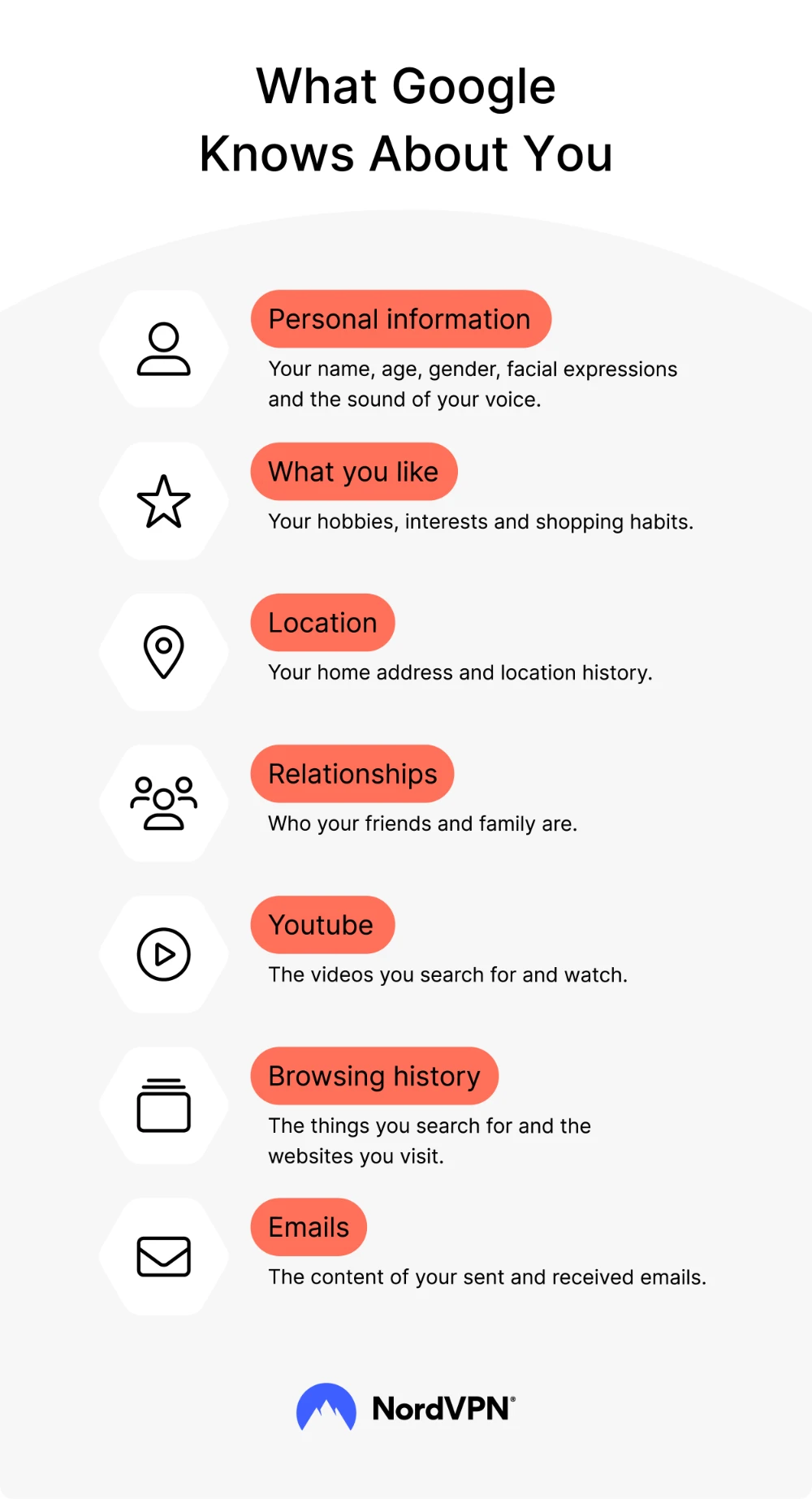
It's worth being precise about what a VPN like NordVPN actually stops here, because the honest answer is: less than the marketing around "protect your digital life" implies. A VPN hides your IP address and encrypts your traffic in transit, which stops your internet provider and anyone monitoring the network from seeing which sites you visit. It does not stop Google, or any site, from identifying you the moment you're logged into an account — your search history, YouTube activity, and email content are tied to your account, not your IP address, and a VPN doesn't touch that link.
The categories in the infographic above — personal information, interests, location history, relationships, YouTube activity, browsing history, and email content — are collected primarily through account login and on-page tracking (cookies, browser fingerprinting), which is a different attack surface than the one a VPN addresses. If you want to reduce account-level tracking specifically, that's a browser and account-settings problem, not a VPN problem; our targeted advertising guide and our WebRTC leak test cover the pieces a VPN can and can't reach.
Who NordVPN is actually for
NordVPN fits people who want a VPN they don't have to take on faith: the audit history and the transparent, if imperfect, handling of a real past breach are the strongest arguments for it over cheaper, unaudited competitors. It's also a solid pick if you'll actually use the extras — Threat Protection Pro, Meshnet, the password manager bundle — rather than paying for a Plus or Complete tier you'll never touch beyond the VPN itself.
It's a weaker fit if price is your primary constraint and you're comparing it against genuinely free options, or if you specifically need a permanently free tier rather than a 30-day refund window. It's also worth going in with clear eyes about renewal pricing: treat the advertised long-term rate as a fixed-term deal, and decide at renewal time whether to pay the standard rate, switch providers, or negotiate — not something to discover by surprise on your card statement.
If the audit trail and feature set above match what you're looking for, NordVPN's current plans are worth comparing directly against the 30-day refund window as your safety net.
Frequently asked questions
Is NordVPN actually free?
No. NordVPN doesn't offer an ongoing free plan. It offers a 30-day money-back guarantee on plans longer than a month, and a short free trial on Android only. There's no credit-card-free daily-limited tier like some competitors provide.
Is there a real NordVPN discount code, or is it just marketing?
The large "% off" figures shown on NordVPN's site are typically its own standing public pricing for a 2-year term, not a hidden code that unlocks extra savings. The discount itself is real compared to monthly pricing — it just isn't usually an exclusive code beyond what's already publicly advertised.
Is NordVPN safe to use after the 2019 breach disclosure?
The breach itself dates to March 2018, affected a single server through a third-party data center's security failure, and exposed no user credentials or logs. NordVPN's response — RAM-only servers fleet-wide, a bug bounty program, and four independent no-logs audits since — is the reason it's still considered one of the more verifiably safe options today.
Does the NordVPN browser extension protect my whole device?
No. The Chrome, Firefox, and Edge extensions are proxies that secure browser traffic only. Apps outside the browser — torrent clients, games, email apps — aren't covered unless you're also running the full desktop or mobile app.
Does NordVPN stop Google from tracking me?
Only partially. It hides your IP address from Google's location and network-level tracking, but it doesn't stop tracking tied to a logged-in Google account, since that data is linked to your account rather than your IP address.