The short version
- Free plan Yes, 300MB/day, no card
- Protocols OpenVPN, IKEv2, SSTP, PPTP
- No-logs audit Claimed, never independently audited
- Based in Hong Kong
Speed and detection figures come from our own testing of a live iTop connection. Speed is the average of three consecutive runs against the same baseline.
Save 15% on iTop VPN at checkout with code PRIVACYTESTLAB15
iTop VPN is a budget VPN app from Orange View Limited, a Hong Kong software company that also makes iTop Screen Recorder, iTop Data Recovery, and a handful of other desktop utilities. It has a genuinely free tier, desktop apps loaded with extras, and some of the cheapest long-term pricing in the VPN market. What it doesn't have is a published third-party audit of its no-logs claim, or WireGuard support, and its mobile apps are missing features its Windows and Mac apps include by default. Our own detection and speed testing found two more concrete problems: its exit IPs are identifiable as a commercial VPN, and its speed drops sharply under load.
None of that makes it a bad choice for what most people actually use a budget VPN for — hiding your traffic on hotel Wi-Fi, unblocking a show while travelling, taking the edge off ad tracking. It's a weaker choice if you need to prove, not just trust, that your activity isn't logged.
What iTop VPN is
iTop VPN is a consumer VPN app built by Orange View Limited, founded in Hong Kong in 2016. The company runs under the "iTop" brand alongside separate products — iTop Screen Recorder, iTop Data Recovery, iTop PDF Editor — that share the same install and licensing infrastructure but are otherwise unrelated tools. iTop states its VPN app has passed 10 million downloads.
Hong Kong sits outside the 5/9/14 Eyes intelligence-sharing alliances and has no VPN-specific data retention law, which is the jurisdiction argument iTop and most reviewers make in its favor. It's a genuinely different legal position from being based in the US or UK. It isn't the same as being based somewhere with no relationship to mainland Chinese authority at all, which is worth knowing rather than assuming either way.
Is iTop VPN actually free
Yes, there's a real free tier and it doesn't ask for a card to start. What it gives you has shrunk over time: independent testing in July 2026 measured 300MB of data per day, down from the roughly 700MB/day older reviews recorded, spread across a shrinking pool of free servers — 11 active free servers in a January 2026 check, 6 in the July 2026 recheck.
The free tier is limited in specific, checkable ways:
- 300MB per day, reset daily, enough for messaging and light browsing but not much video
- One device connected at a time, versus 5–8 on paid plans
- No Netflix access — testers at AllAboutCookies checked U.S., U.K., Australian, and Canadian servers and none unblocked it
- Fewer, more congested servers than the paid tier's 3,200+ server network
- Ads and upgrade prompts inside the app, on both desktop and mobile
iTop's app offers a "Daily Boost" that promises extra free data for watching a short ad or completing a task. In independent testing published in July 2026, a reward pop-up advertised 500MB of bonus data, but the amount actually credited to the account was 50MB — a tenfold gap between what was promised and what was delivered. That kind of mismatch is a bigger trust problem than the free tier being small in the first place: a limited free plan is a disclosed tradeoff, a reward that doesn't pay out what it says is a different category of issue.
If you only need a VPN for occasional, low-bandwidth use, the free tier functions as advertised within those daily limits. If you're expecting it to replace a paid VPN for regular streaming or larger downloads, it won't — and iTop doesn't claim otherwise in its own free-tier terms.
iTop VPN download for PC
iTop VPN ships native apps for Windows and macOS, both considerably more full-featured than its mobile apps. Both install directly from iTop's own site rather than requiring an app-store account.
Windows
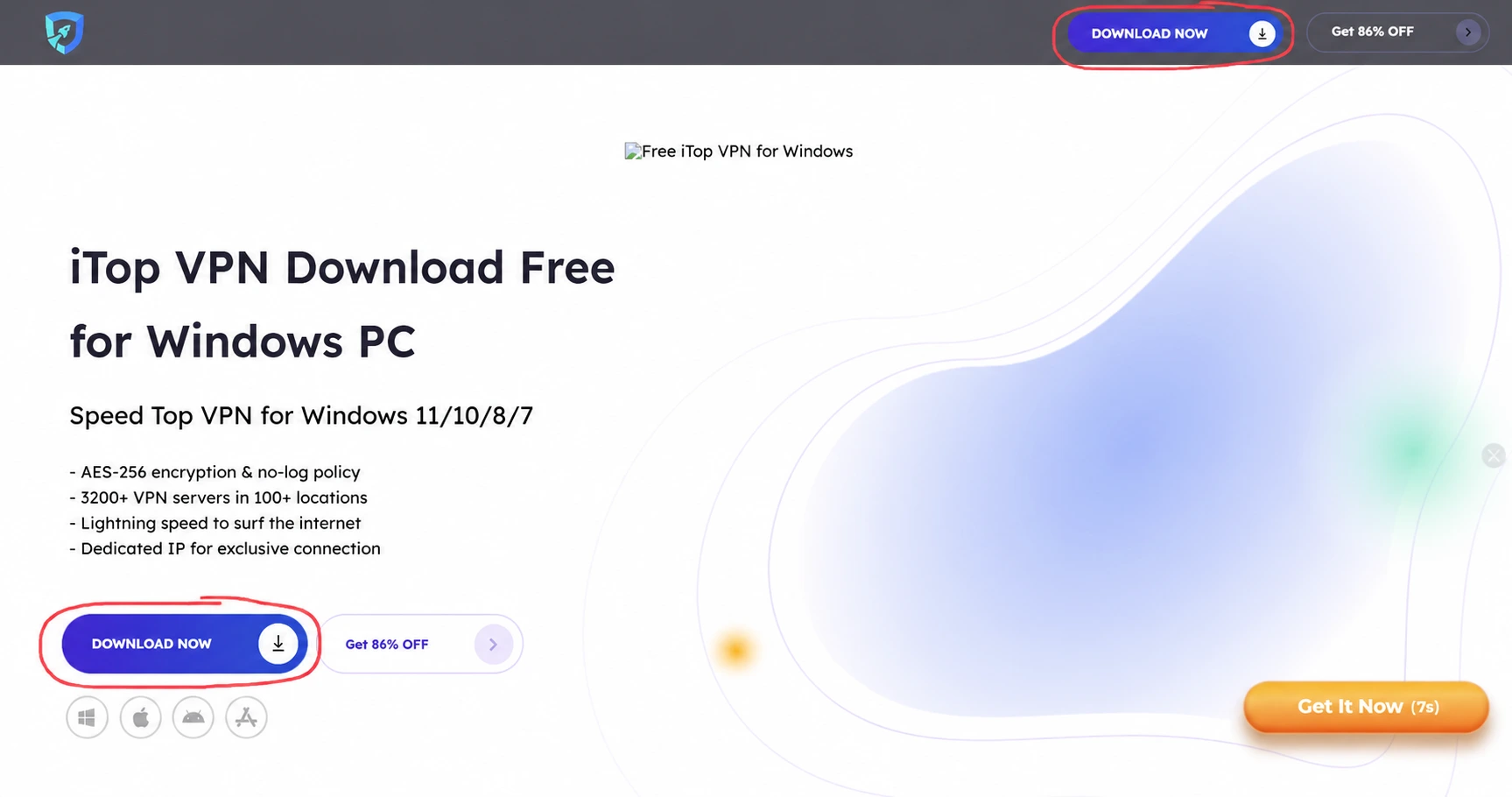
- Go to iTop VPN's official download page and select the Windows download — the site detects your OS automatically.
- Run the downloaded installer (
.exe) and follow the setup prompts. - Launch the app. You can start using the free tier immediately with just an email address, or sign in if you've already bought a plan.
- Pick a server or protocol from the app's Settings tab, then click Connect.
Mac
- From the same official download page, choose the macOS version, or install it directly from the Mac App Store.
- Open the downloaded
.dmgfile and drag iTop VPN into your Applications folder. - On first launch, macOS will prompt you to approve the app's network extension — this is required for the VPN tunnel to work, not an unusual permission for this category of app.
- Sign in or continue on the free plan, then connect to a server.
iTop VPN download for mobile
iTop VPN's mobile apps exist for Android and iOS, but they're stripped-down versions of the desktop apps. Testing by vpnMentor in 2026 found the mobile apps offer only automatic server selection, with no kill switch, no protocol switching, and no split tunneling — all present on Windows and Mac.
Android
- Open the Google Play Store and search "iTop VPN," or use iTop's official site for a direct link to the correct listing.
- Confirm the developer name reads iTop Tech before installing — several similarly named VPN apps from unrelated publishers appear in Play Store search results for this term, and installing the wrong one won't give you the account or servers you're paying for.
- Install the app, grant the VPN connection permission when prompted (this is a standard Android permission for any VPN app, not specific to iTop).
- Sign in or continue free, then tap Connect.
iOS
- Open the App Store and search "iTop VPN," or follow the link from iTop's official site to go straight to it.
- Tap Get to install, then open the app.
- Approve the "VPN configuration" prompt iOS shows the first time you connect — this is Apple's standard system dialog for any VPN app, required to route your traffic through the tunnel.
- Sign in or continue free, then tap Connect.
What iTop VPN offers
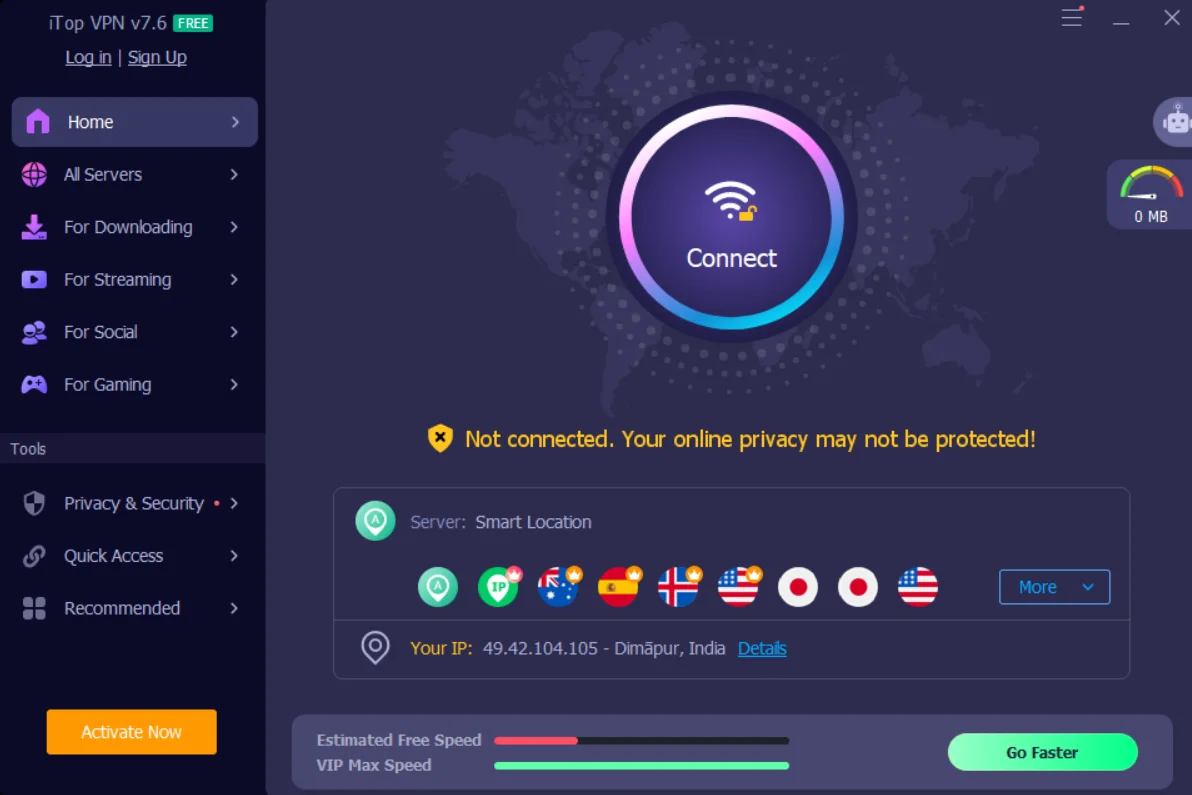
The feature set is broad, but split unevenly between desktop and mobile. On Windows and Mac, iTop bundles in:
- Protocols: OpenVPN, IKEv2/IPsec, SSTP, and PPTP — no WireGuard, which most competitors have supported for several years now
- Kill switch to block traffic if the VPN connection drops
- Split tunneling to route specific apps outside the VPN tunnel
- DNS, IPv6, and WebRTC leak protection
- Ad and tracker blocker, active at the traffic level rather than just in-browser
- Task-specific servers for streaming, gaming, and torrenting, plus Double VPN and a static or dynamic IP option on paid plans
- Security Reinforce and Dark Web Monitor, extra scanning tools bundled into the Windows app
- 3,200+ servers, though the exact country count iTop advertises varies between its own marketing pages and its app store listings — treat "180+ countries" as an upper-bound marketing figure rather than a confirmed count
On iOS and Android, you get the VPN tunnel itself, automatic server selection, and the ad blocker — not the kill switch, protocol choice, or split tunneling. If those matter to you and you're primarily a phone user, that gap is worth knowing before you buy a plan expecting desktop-equivalent features on mobile.
Streaming, gaming, and social unblocking
This is where iTop VPN spends most of its design effort, and it's the part a generic leak-test-and-encryption review tends to skip. Instead of one generic "streaming" toggle, the app organizes named, per-service and per-game servers under dedicated categories — along with a Quick Access panel of one-tap shortcuts.
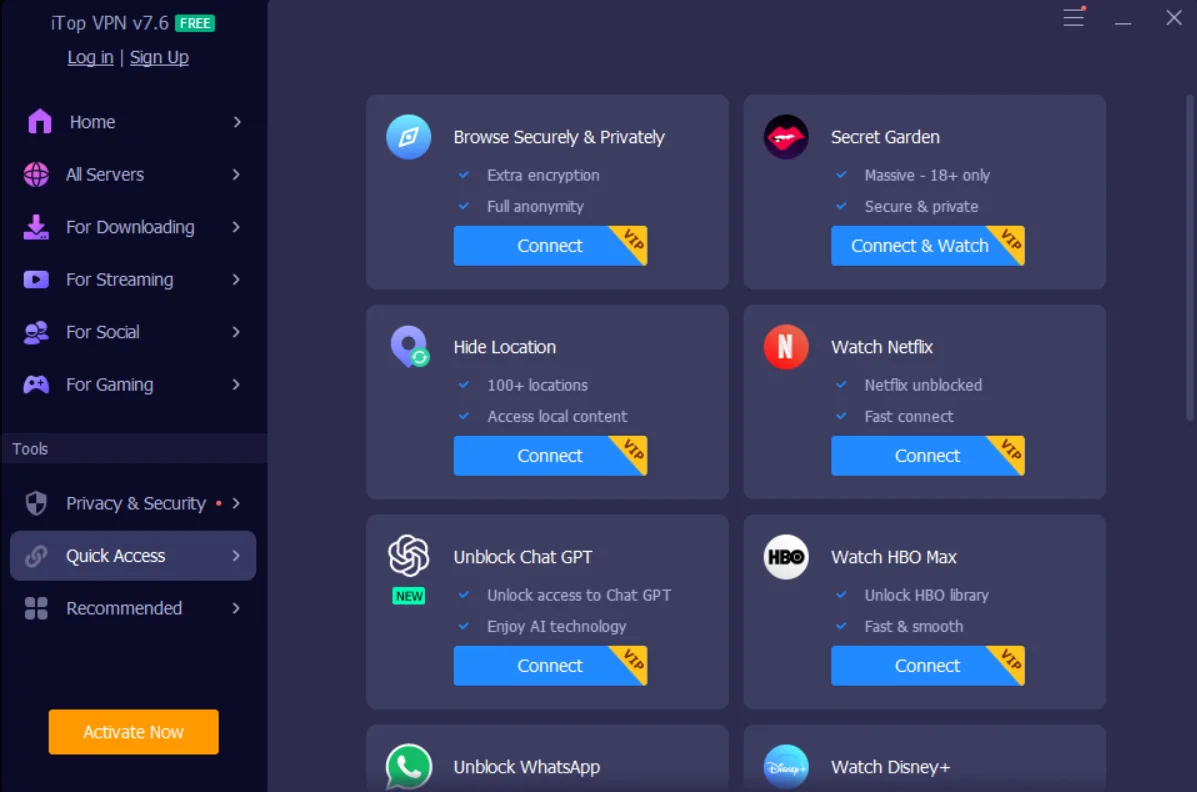
Streaming servers
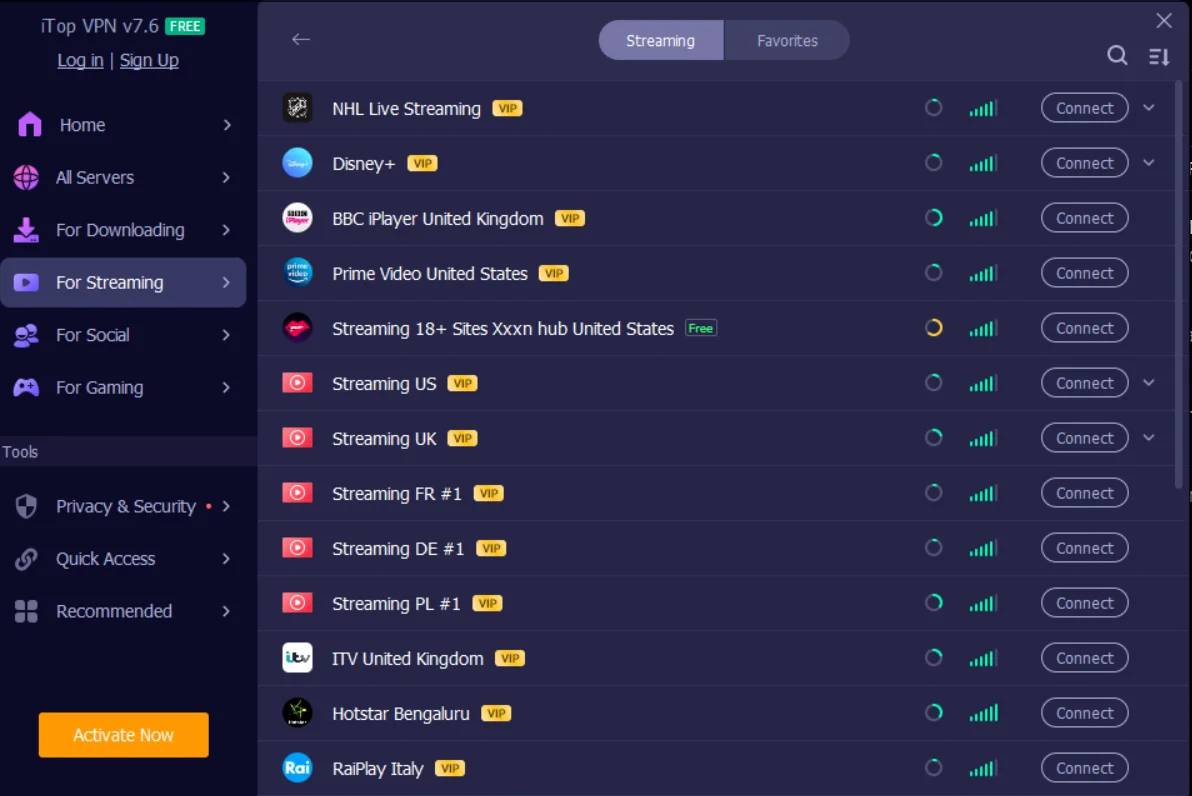
The Streaming category lists named entries including NHL Live Streaming, Disney+, BBC iPlayer (UK), Prime Video (US), ITV (UK), Hotstar (India), and RaiPlay (Italy), alongside generic country-specific "Streaming" nodes for the US, UK, France, Germany, and Poland. Every one of those is marked VIP. The one exception in our screenshots was an 18+ content hub, marked Free — worth knowing if you're choosing a VPN for a shared or family device, since it means the free tier's one unrestricted streaming category isn't Netflix or Disney+.
Gaming servers
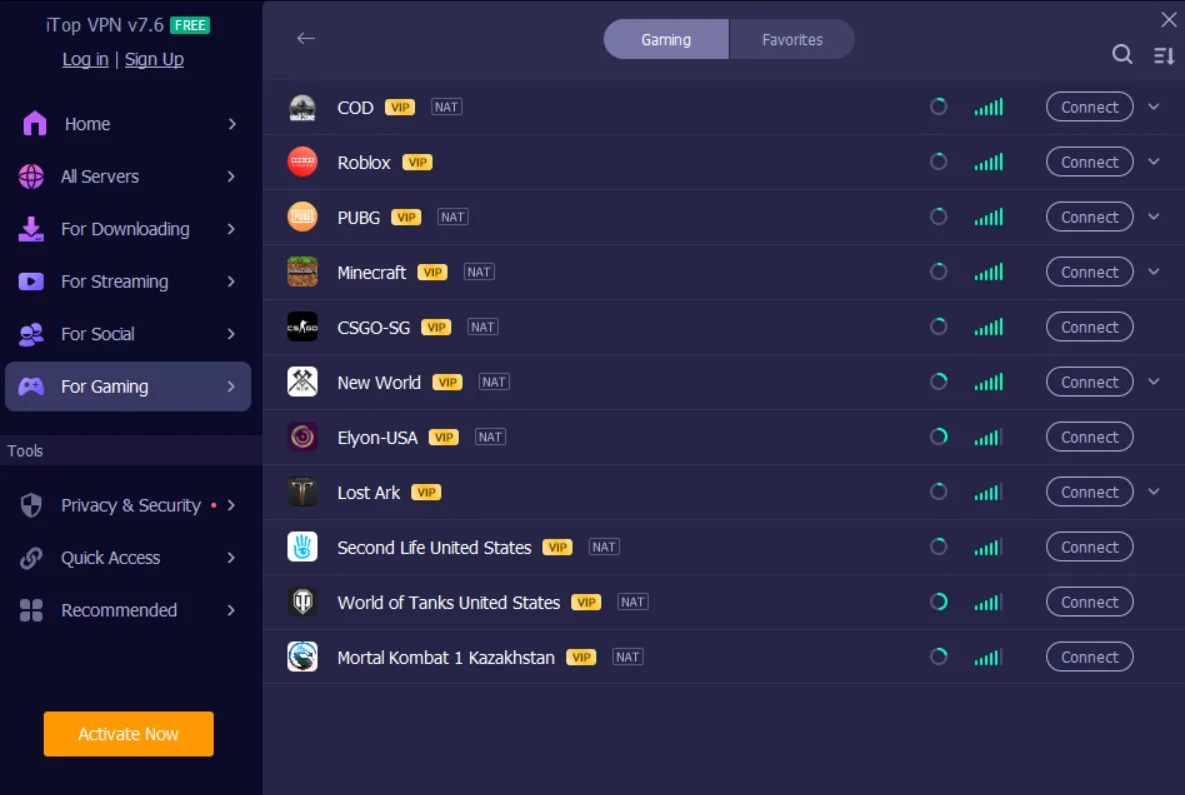
The Gaming category names individual titles rather than generic regions: Call of Duty, Roblox, PUBG, Minecraft, CS:GO (Singapore), New World, Elyon (US), Lost Ark, Second Life (US), World of Tanks (US), and Mortal Kombat 1 (Kazakhstan) all appear as separate entries, several with an additional NAT-optimized routing option aimed at reducing in-game latency. Every title in our screenshots was VIP-only — there's no free-tier gaming server in this list.
Social and AI unblocking
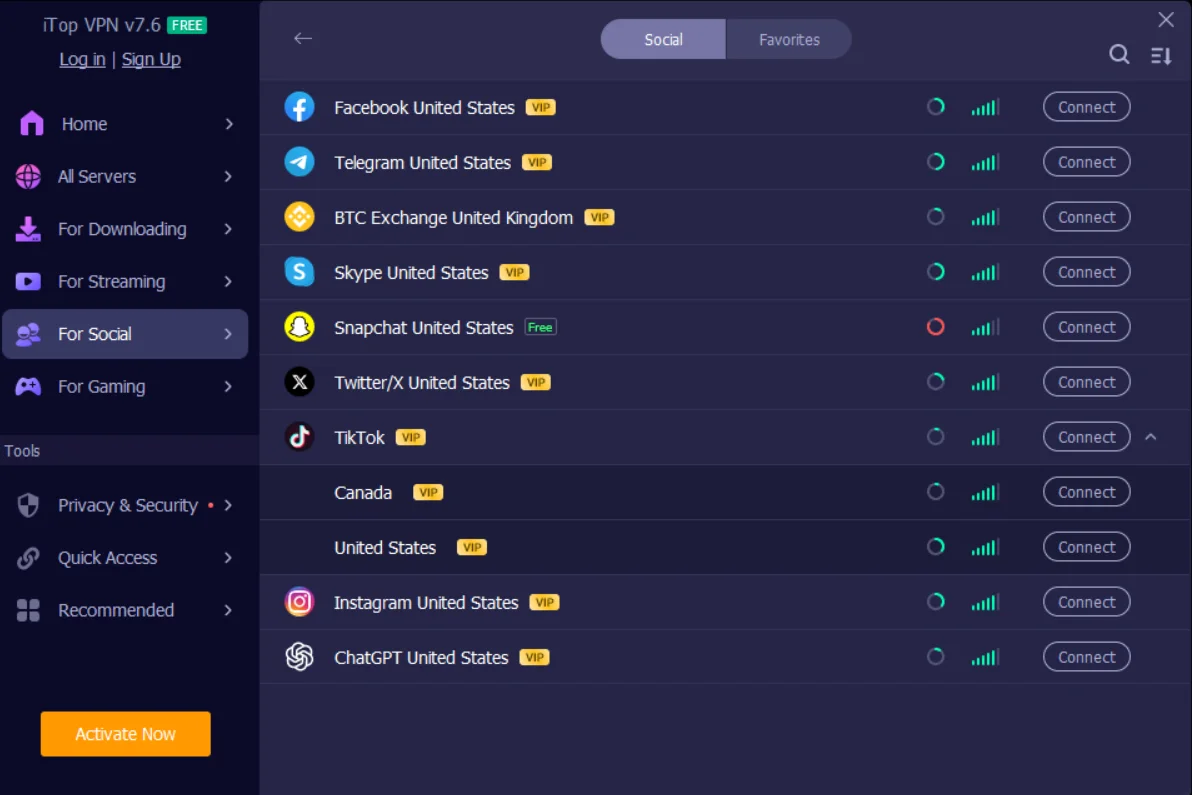
The Social category covers Facebook, Telegram, a UK-based crypto exchange node, Skype, Snapchat, Twitter/X, TikTok (with separate Canada and US routing), Instagram, and ChatGPT. Snapchat was the single entry marked Free in our screenshots; everything else, including ChatGPT access, requires VIP.
Add it up across all three categories and the pattern is consistent: two free entries out of dozens — Snapchat and the 18+ streaming hub — with Netflix, Disney+, ChatGPT, and every named game server sitting behind the paid tier. That's not a criticism of the paid tier's breadth, which is genuinely more granular than most competitors bother building. It is a reason not to expect the free plan covered in the section above to unblock much of anything beyond general browsing.
Privacy and logging
iTop's privacy policy states it doesn't log your browsing history, original IP address, DNS queries, or session data. That's a standard no-logs claim, and it's the same claim nearly every VPN on the market makes. The distinction that actually matters is whether a third party has verified it, and for iTop, none has. NordVPN, Surfshark, ExpressVPN, and Proton VPN have all published independent audits of their no-logging practices in recent years; iTop hasn't, and multiple 2026 reviews — including hands-on tests from vpnMentor, Wizcase, and AllAboutCookies — note the same gap independently.
That doesn't mean the claim is false. It means you're trusting a policy document rather than a report you or anyone else can check. For casual use — public Wi-Fi, streaming, general ad avoidance — that's a reasonable trade for the price. For anything where being wrong about it carries real personal risk, it's a meaningful gap, and our best VPNs guide covers providers that back the same claim with a published audit.
Independent leak testing has been more reassuring than the audit gap: vpnMentor's 2026 testing found no IP or DNS leaks across dozens of iTop servers, including free ones. You can verify that for yourself, on any VPN, using our own DNS leak test and WebRTC leak test rather than taking any provider's word for it.
Our own testing: detection and speed
Not leaking your real IP is a different question from whether the VPN connection itself is recognizable as a VPN, and whether it's actually usable once connected. We ran iTop VPN through two of our own tools to check both, and the results are the reason this review's rating changed with this update.
VPN detection test: it doesn't hide that it's a VPN
We pointed our own Proxy / VPN Detection tool at an active iTop VPN connection. It came back with a score of 35 out of 100 and a direct verdict: "Commercial VPN detected." The reason given was specific, not a generic guess — the exit IP's ASN and reverse DNS both match a known VPN/hosting provider, the same fingerprinting method streaming platforms, banks, and some game anti-cheat systems use to block VPN traffic outright.

This matters most for exactly the use case this review spends the most time on: the named streaming, gaming, and social servers covered above. A VPN whose exit IPs are identifiable as commercial VPN infrastructure is easier for those same services to detect and block at the network level, regardless of what's advertised inside the app. It doesn't mean the encryption or the no-leak result above is false — it means "not leaking your identity" and "not recognizable as a VPN" are two separate claims, and iTop only holds up on the first one.
Speed test: a heavy performance hit
We also ran iTop VPN through our own VPN Speed Comparison tool across three back-to-back tests against the same baseline connection. The results were consistently poor:
- Download: 99.2 Mbps without a VPN, down to 29.4 Mbps connected — a 70.4% loss
- Upload: 16.8 Mbps without a VPN, down to effectively 0.0 Mbps connected — a full 100% loss
- Ping: up from 114ms to 383ms, a +269ms increase
- Jitter: up from 103ms to 434ms, a +331ms increase
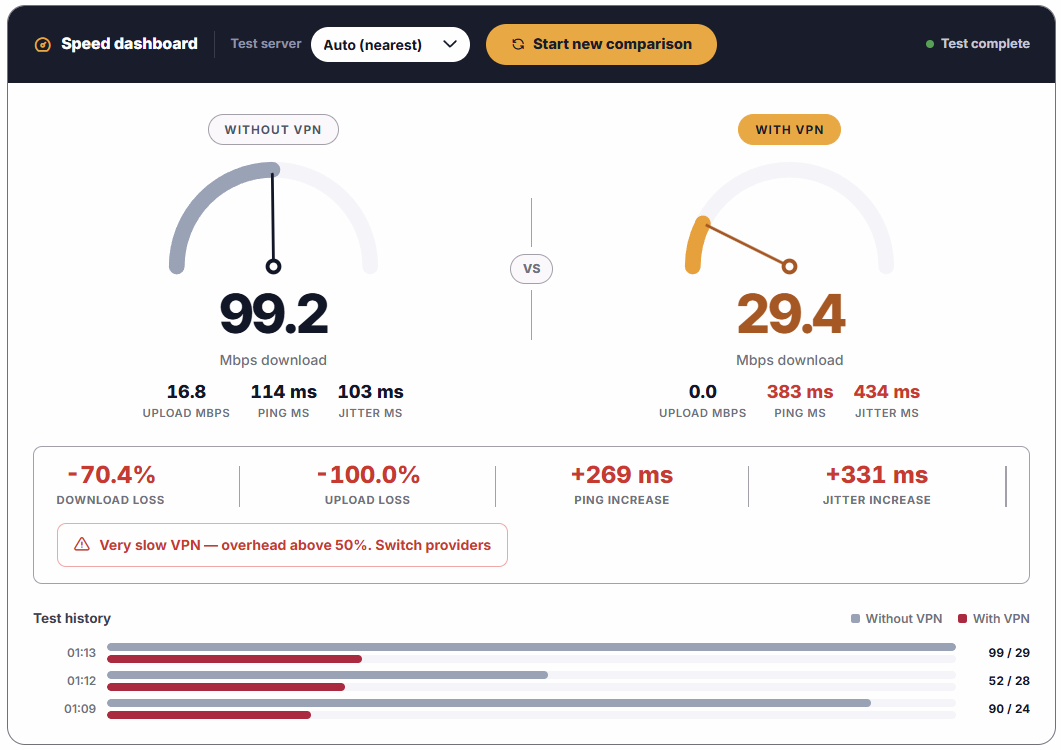
The tool's own verdict on this result was blunt: "Very slow VPN — overhead above 50%. Switch providers." That's not a one-off dip — the test history behind this result shows three separate runs, and upload stayed collapsed in every one of them. For a VPN whose entire pitch is unblocking streaming and gaming servers, a connection that can't sustain upload at all and loses most of its download throughput is a real functional problem, not a rounding error against the baseline.
Everything else in this review — the free tier, the pricing, the desktop feature set, the clean leak-test results — still holds. But a VPN that's identifiable as a commercial VPN by ASN and reverse DNS, and that loses 70% of its download speed and effectively all of its upload speed, is failing at the two things a VPN is fundamentally supposed to do: blend in, and stay usable. That's why the score below is lower than in previous versions of this review.
iTop VPN coupon code
PRIVACYTESTLAB15 takes 15% off iTop VPN plans at checkout. It's an active discount code from iTop's partner program, not a limited-time gimmick with a countdown timer — apply it in the promo code field during checkout, before payment.
Per iTop's partner terms, the same code also applies to iTop Voicy, Smart Game Booster, and iTop Data Recovery, if you use any of those separately from the VPN.
Discount codes can be replaced or discontinued by iTop without notice. If it doesn't apply at checkout, this link still reflects iTop's current live pricing.
Pricing and plans
iTop VPN's paid plans run cheaper than most competitors, especially on longer terms, and pricing shifts frequently around promotions — treat the figures below as a snapshot, not a guarantee, and check iTop's own checkout page (or apply the code above) for the current offer.
| Plan | Approx. price | Devices | Refund window |
|---|---|---|---|
| Monthly | ~$11.99/mo | Up to 8 | 30 days, direct purchase only |
| Yearly | ~$3.99/mo | Up to 8 | 30 days, direct purchase only |
| 2–3 year | ~$2.49–2.60/mo | Up to 8 | 30 days, direct purchase only |
One thing worth checking before you commit: independent pricing checks in July 2026 found iTop's 24-month and 36-month plans billed to the same total price, which makes the shorter of the two a straightforward worse deal. If a long-term plan is the one you want, compare the total cost shown at checkout rather than the per-month headline figure, since that's exactly where a per-month number can be misleading.
The 30-day refund window applies to purchases made directly through iTop's own site. Buy through the Apple App Store or Google Play instead, and refunds run through that store's own policy, which is typically shorter and less flexible.
Who iTop VPN is actually for
iTop VPN fits casual, price-driven use: securing a laptop on hotel Wi-Fi, cutting down on ad tracking, or trying a VPN for the first time without paying anything upfront. The desktop apps back that up with a genuinely deep, name-specific server catalog for the price, and the leak-testing evidence — no IP, DNS, or WebRTC leaks — is reassuring on its own terms.
It's a weaker fit for the two things this update actually changes the verdict on: unblocking, and everyday usability. Our detection test found its exit IPs identifiable as a commercial VPN, which works against it on exactly the streaming and gaming servers this review covers, and our speed test found a 70% download loss and a full upload collapse under load. It's also still a weaker fit if you're a journalist, an activist, someone in a jurisdiction where VPN use itself carries risk, or anyone who needs a provider that can prove its no-logs claim rather than state it. The missing audit and the missing WireGuard support are the two gaps that show up consistently across every independent review we checked for this piece, not just one outlier's opinion — and neither changed with this update.
If either of those descriptions sounds like you, iTop VPN's free tier is a reasonable way to try it before deciding whether the paid plan — discounted 15% with code PRIVACYTESTLAB15 — justifies its trade-offs against an audited competitor.
Frequently asked questions
Is iTop VPN safe to use?
Independent leak testing hasn't found IP, DNS, or WebRTC leaks, and the app uses standard AES-256 encryption. The gap isn't security testing, it's verification of the no-logs policy specifically: no independent auditor has confirmed it, which several competitors in the same price range now offer.
Is iTop VPN really free, or is there a catch?
The free tier is real and doesn't require a card, but it's limited to roughly 300MB of data per day, one device, and a smaller server pool than the paid tier. Its in-app "Daily Boost" reward has also been documented paying out less bonus data than the pop-up promises, which is worth knowing going in.
Is there an iTop VPN coupon code?
Yes — PRIVACYTESTLAB15 takes 15% off iTop VPN at checkout, and the same code applies to iTop Voicy, Smart Game Booster, and iTop Data Recovery. Enter it in the promo code field before completing payment.
Does iTop VPN unblock Netflix and ChatGPT for free?
No. Both are listed as VIP-only in the app's Streaming and Social categories. Of the named services and games we checked across iTop's Streaming, Gaming, and Social server lists, only Snapchat and an 18+ content hub were available on the free tier.
Why are there multiple "iTop VPN" apps in the Play Store?
Search results for "iTop VPN" on Google Play return apps from several different publishers, not all of them affiliated with Orange View Limited, iTop's actual developer. Check that the listed developer is iTop Tech before installing, or use the download link from iTop's official site to avoid installing the wrong app.
Does iTop VPN support WireGuard?
No, as of mid-2026 iTop VPN supports OpenVPN, IKEv2/IPsec, SSTP, and PPTP, but not WireGuard. Several independent 2026 reviews flag this as a real gap against competitors, since WireGuard generally connects faster and performs better on longer-distance server hops.
Can websites detect that I'm using iTop VPN?
Yes. Our own Proxy / VPN Detection tool scored an active iTop VPN connection 35/100 and flagged it as a "Commercial VPN" — the exit IP's ASN and reverse DNS both matched a known VPN/hosting provider. That's separate from leaking your real IP, which independent leak testing hasn't found; it means the connection itself is recognizable as VPN traffic to services that specifically screen for it.
Does iTop VPN slow down your internet connection?
Significantly, based on our own testing. Our VPN Speed Comparison tool measured a 70.4% download speed loss (99.2 Mbps down to 29.4 Mbps) and a full upload collapse (16.8 Mbps down to effectively 0.0 Mbps), consistent across three separate test runs. The tool itself flagged the result as "Very slow VPN — overhead above 50%."