The short version

- Free planYes: 5 countries, 6 locations, no data cap
- Sign-upNone needed for the free plan
- PremiumFrom $1.99/mo (4-year plan), 10 devices
- Based inRomania (FREE VPN PLANET S.R.L.)
- Leak testsPassed IP, DNS, WebRTC and IPv6
- Kill switchOff by default; leaked in our tests
- Independent auditNo public audit found
- PlatformsWindows, Mac, Linux, Android, iOS, TV, extensions
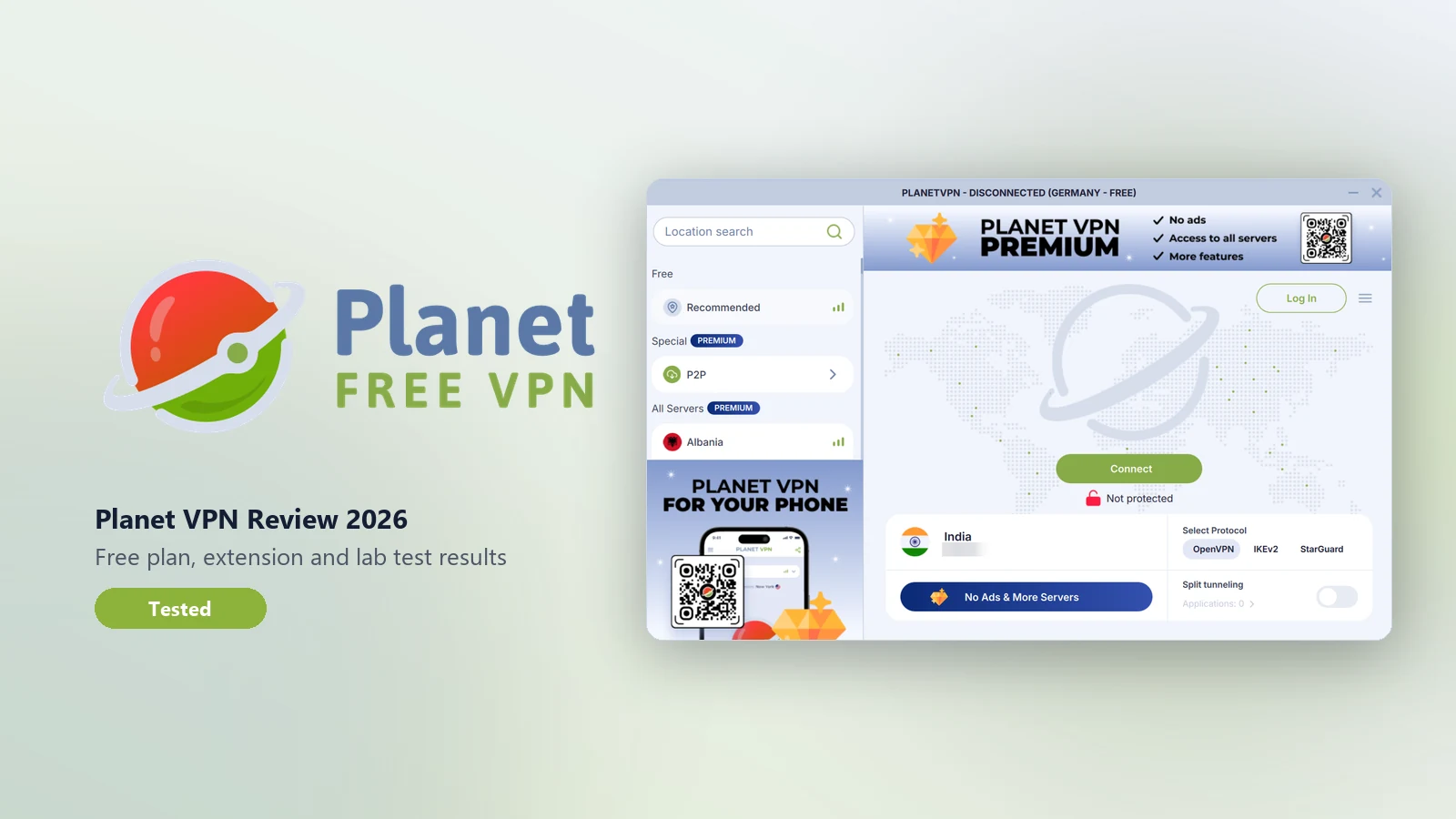
Planet VPN is a free VPN from a Romanian company that you can use without creating an account. The free plan has no data cap and no time limit, covers five countries, and is paid for by short ads. Premium removes the ads and unlocks more than 100 locations for 10 devices.
In our tests it did the core job of a VPN well. Our IP, DNS, WebRTC and IPv6 leak tests found nothing, and all seven servers we checked were where the app said. Speeds were usable on every server, and the connection stayed up through a five-minute stability run. The weak points are the ones that matter when hiding your real IP really counts. The kill switch is off by default, and even switched on it let our real IP out when we changed servers and when the app crashed. There is no independent audit of the no-logs claim, the privacy policy names eight advertising networks, and an independent scan of the Android app found 26 tracker libraries.
Our verdict: a good free VPN for everyday browsing, public Wi-Fi and getting around simple location blocks without handing over an email address. It is not the right tool when exposing your real IP would put you at risk.
What Planet VPN does well
Before the test details, here's where Planet VPN stood out in our testing and research:
- A free plan with no strings attached. No data cap, no time limit, no account and no card. That combination is rare. Most free VPNs cap you at somewhere between 500 MB and 10 GB a month, make you register, or both. Planet VPN lets you install it and connect in under a minute without handing over any personal details.
- Leak protection that held every time. Across three servers it passed every IP, DNS, WebRTC and IPv6 leak test. It blocks IPv6 completely, a common gap that some much bigger VPNs still leave open.
- Real server locations. We checked seven servers on three continents, and every one was in the country the app named, confirmed by geolocation databases and by ping times. No "virtual locations" dressed up as real ones.
- Apps for nearly everything. Windows, macOS, Linux, Android, iPhone, Android TV, Huawei, router configs and extensions for Chrome, Firefox, Edge and Opera. Few free VPNs cover Linux and TVs at all.
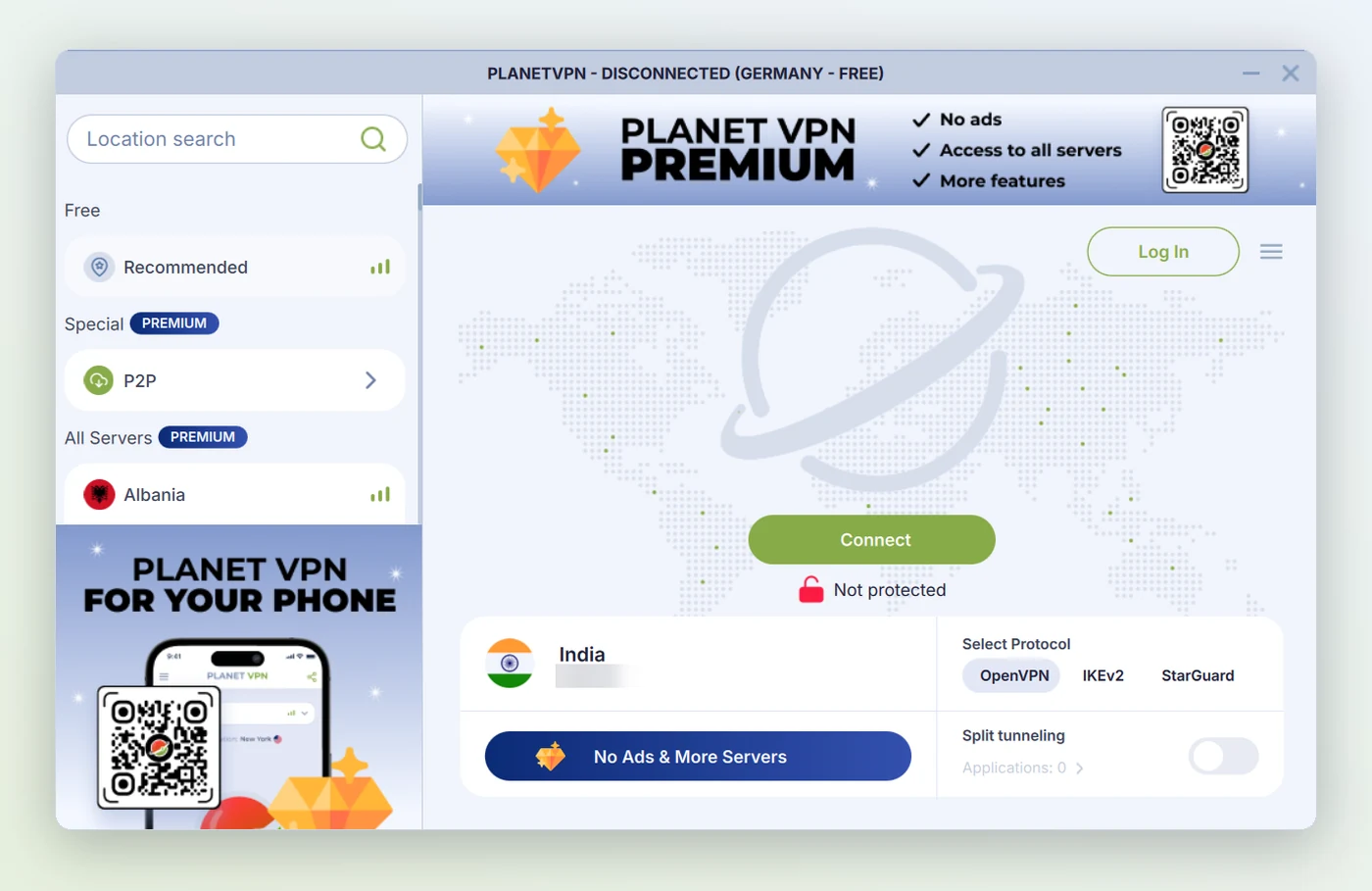
- Simple to use. One Connect button, a clear split between free and Premium locations, and a choice of three protocols for people who want it. The Windows installer is signed and had zero malware detections.
- Usable speed. Across six servers we kept on average about 69% of our download speed, and 88% on the best one (the Netherlands). That's plenty for HD streaming, video calls and browsing.
- Steady connections. Over more than 700 pings through the VPN, fewer than 1 in 200 were lost, and the tunnel never dropped on its own during our tests.
- A built-in anti-blocking protocol. StarGuard is designed for networks that block ordinary VPN traffic, which is useful on restrictive school, office or hotel Wi-Fi.
- Cheap Premium for a household. $1.99 a month on the 4-year plan covers up to 10 devices and 100+ locations, among the lowest prices for a 10-device plan.
- EU jurisdiction. Planet VPN is based in Romania, under EU data protection law. Romania's Constitutional Court has struck down data-retention laws twice.
What Planet VPN is
Planet VPN is a consumer VPN service run by FREE VPN PLANET S.R.L., a company registered in Bucharest, Romania. Its apps appear in stores as "Planet Free VPN". The company says it started in 2017. Earlier independent coverage, including TechRadar's RusVPN review, documents that the service was previously sold as RusVPN before the rebrand. It is not part of the big VPN groups such as Kape Technologies or Nord Security, so in ownership terms it is independent.
It is a large operation for a name many people haven't heard of. The Google Play listing shows 50M+ downloads and a 4.6-star rating from about 1.99 million reviews. The US App Store shows 4.5 stars from about 37,700 ratings. The Chrome extension lists 2,000,000 users and a 4.6 rating.
The pitch is simple: a working VPN with no sign-up and no data cap. That is unusual. Most free VPNs either cap your data (often 500 MB to 10 GB a month), make you register, or both.
Is Planet VPN free?
Yes. Planet VPN has a permanently free plan with no data limit, no time limit and no registration. You install the app or extension, press Connect, and you're on a free server. No email, no password and no card.
The free plan is limited in four ways:
- Locations: 6 locations in 5 countries, against 100+ on Premium.
- Ads: Planet's FAQ says the free version "is funded by short ads". On desktop the app also shows banners for Premium and the mobile app.
- Features: P2P servers, streaming locations, split tunnelling and Double VPN are Premium only.
- Speed: Planet's own plan comparison doesn't tick "High Speed" for the free plan, and free servers are shared by more people.
Privacy is the part people skip. A free VPN that needs no account can't link your activity to an email address, which is a real advantage. But the free plan is paid for by advertising, and ads need ad SDKs. We cover what that means in the privacy policy section. For the wider trade-off, see our guide to free vs paid VPNs.
Planet VPN countries and server locations
This is the part people search for most: "Planet VPN for different countries". The answer depends on the plan.
| Plan | Countries | Locations / servers |
|---|---|---|
| Free | United States, United Kingdom, Germany, France, Netherlands | 6 locations in 5 countries |
| Premium | 60+ countries on five continents | 100+ locations, 1,260+ servers |
The free countries come from Planet's free servers page. The app's "Recommended" option picks one for you. A US or UK server is enough to look like you're browsing from those countries. If you need a specific country outside those five, such as Japan, Canada, India or Brazil, you need Premium.
Are the locations real? Some VPNs use "virtual locations", where a server labelled Germany is physically somewhere else. We checked seven servers against IP geolocation databases and against ping times from India: Denver, New York, Los Angeles, Singapore, London, Frankfurt and Naaldwijk in the Netherlands. That includes four of the five free-plan countries. Six were in the exact city the app named. The Frankfurt server geolocated to Limburg an der Lahn, a data-centre town about 60 km away, which is normal geolocation variation rather than a fake location. Ping times are a useful sanity check: Singapore answered in about 180 to 300 ms and US and European servers in about 330 to 390 ms, which fits the real distances from India.
Restricted countries. Planet's own site says VPNs are banned in North Korea, Belarus, Oman and Turkmenistan, and restricted in China, Russia, the UAE and Turkey. For networks that block VPNs it offers StarGuard, its own anti-censorship protocol. We tested from India only, so we can't confirm how well StarGuard works behind China's firewall or in Russia. Check the law where you are before relying on any VPN there.
Planet VPN browser extension
Planet VPN has extensions for Chrome, Firefox, Edge and Opera. The Chrome version is the most popular: 2,000,000 users, a 4.6 rating from about 30,500 reviews, and version 3.8.1, updated September 23, 2026. The free extension gets the same 6 locations in 5 countries as the free app. It also offers an ad blocker and a cookie-banner denier.
The key thing to know about any VPN extension is what it covers. The extension only protects traffic from that browser. Your other apps, games, torrent client and system updates still use your normal connection. That's fine if you only want a different country in one browser tab. For full protection, use the desktop or mobile app, which tunnels the whole device. The Windows app's settings link to the extension directly ("Secure your browser traffic with our extension"), and you can run both.
Because a browser extension handles requests rather than the whole network connection, it has no system-level kill switch. To check what a site sees with the extension on, our WebRTC leak test is the one to run, since WebRTC is the usual way browser-only VPNs leak. The difference between the two kinds of tool is covered in our guide to a proxy vs a VPN.
Planet VPN download: PC, Mac, Android, iPhone and TV
Planet VPN covers more platforms than most free VPNs:
- Desktop: Windows (the "Planet VPN for PC" download), macOS and Linux.
- Mobile: Android on Google Play and Huawei AppGallery, and iPhone and iPad on the App Store (iOS 16 or later).
- TV: Android TV.
- Browsers: Chrome, Firefox, Edge and Opera.
- Routers: manual OpenVPN configuration files for Premium users.
Get the apps from the official site or the official app stores only. Searches for "Planet VPN APK" and "Planet VPN mod" lead to repackaged builds on mirror sites. A tampered VPN app is about the worst thing you can install, because all of your traffic goes through it. Planet VPN is free on every platform anyway, so there is nothing to unlock. You can also find it in our downloads directory, with its official store links.
Planet VPN in action
Planet VPN's own 35-second demo shows the Android app: open it, tap Connect and pick a location. The mobile app works the same way as the Windows app we tested.
Video: Planet VPN's official YouTube channel. It loads from youtube-nocookie.com, so YouTube doesn't set cookies until you press play.
How we tested Planet VPN
We installed the Windows app on a Windows 11 laptop in India and tested it in two rounds in early November 2026, on ordinary consumer connections. Leak, kill switch and privacy results come from the app itself, so they apply wherever you are. Speed, ping and site access depend on your location and network, so expect different numbers outside India, and usually better ones on a server near you. We tested on a Premium account. The free plan uses the same app, protocols and leak protection, with fewer locations.
- Baseline first: every test was run with the VPN off, then repeated with it on, so changes come from the VPN and not the connection.
- Several servers: Denver, Singapore and New York in the first round; London, Frankfurt, the Netherlands, Los Angeles and Singapore again in the second. That covers Asia, Europe and both US coasts.
- Our own tools: the IP leak test, DNS leak test, WebRTC and IPv6 leak tests, VPN speed comparison, VPN detection and IP geolocation lookup.
- Outside checks: ipleak.net and command-line lookups to confirm the leak results, command-line speed tests against Cloudflare, VirusTotal for the installer, and the Exodus Privacy report for the Android app.
- Manual tests: second-by-second IP checks while switching servers and while force-closing the app, to test the kill switch, plus a five-minute ping run to measure stability.
Planet VPN test results
Here is every result in one place. The detail for each area follows below.
| Test | Result | What we found |
|---|---|---|
| IP leak | Pass | Only VPN IPs showed while connected, on every server |
| DNS leak | Pass | Browser and Windows lookups used the VPN's resolver, never our ISP's |
| WebRTC leak | Pass | Only the VPN IP was exposed |
| IPv6 leak | Pass | Our ISP's IPv6 address was blocked completely |
| Kill switch | Fail | Off by default; real IP leaked during server switches (twice) and after an app crash |
| Speed | Good | Average 31% download loss over six servers; 12% at best, 44% at worst |
| Stability | Good | 0.4% packet loss over 720 pings; latency spikes and 3 to 13 second connects |
| Server locations | Accurate | All seven servers were in the country the app named, six in the exact city |
| VPN detection | Detectable | Flagged as a datacenter IP; on no blacklist |
| Site access | Mixed | Reddit blocked it; Google, ChatGPT, Amazon and streaming home pages loaded |
| Protocols | Average | OpenVPN, IKEv2, StarGuard; no WireGuard |
| Windows app safety | Clean | Signed installer, 0 VirusTotal detections |
| Android trackers | 26 found | Mostly ad networks, per Exodus Privacy |
| No-logs evidence | Weak | No independent audit; the policy lists usage data and ad partners |
| Torrent leak | Not tested | No torrent client on the test machine |
| Streaming playback | Not tested | Needs a paid streaming account in each region |
Leak tests: IP, DNS, WebRTC and IPv6
Planet VPN passed every leak test we ran. This is the most important result in the review, because a VPN that leaks fails however fast or cheap it is.
| Leak type | VPN off (baseline) | VPN on | Result |
|---|---|---|---|
| Public IPv4 | Our real IP (India) | The VPN server's IP only, on every server | Pass |
| DNS resolver | ISP and public DNS | Planet VPN's resolver only | Pass |
| WebRTC | Real IP visible | VPN IP only | Pass |
| IPv6 | Our ISP IPv6 address visible | No IPv6 at all (blocked) | Pass |
The IPv6 result stands out. Our connection has IPv6 normally, and IPv6 is a common leak because some VPNs only tunnel IPv4. Planet VPN blocks IPv6 completely while connected, which is the safe approach. We confirmed the IP and DNS results three ways: our own tools, ipleak.net, and the Windows command line. They all agreed.
Kill switch test
The kill switch is where Planet VPN fails. A kill switch should block all internet traffic when the VPN drops, so your real IP never goes out unprotected. Planet VPN's "Network Kill Switch" setting says it will "automatically disconnect internet when VPN is unavailable". In our tests it didn't do that reliably. We repeated the server-switch test in a second round, after confirming the setting was on, and got the same kind of leak, so this isn't a one-off.
| Scenario | Kill switch | What happened | Result |
|---|---|---|---|
| Default install | Off | The kill switch ships switched off | Fail |
| Switching servers (first round) | On | Our real IP was exposed for about 10 seconds during the switch | Fail |
| Switching servers, London to Frankfurt (repeat) | On, checked in Settings | Our real IP and ISP showed for about 5 seconds before the Frankfurt IP took over | Fail |
| App force-closed (simulated crash) | On | Real IP exposed at once and stayed exposed; the app did not reconnect by itself | Fail |
| Normal disconnect | On | Traffic returned to the normal connection, as expected when you choose to disconnect | Expected |
| Wi-Fi drop | On | Not tested this time | Not tested |
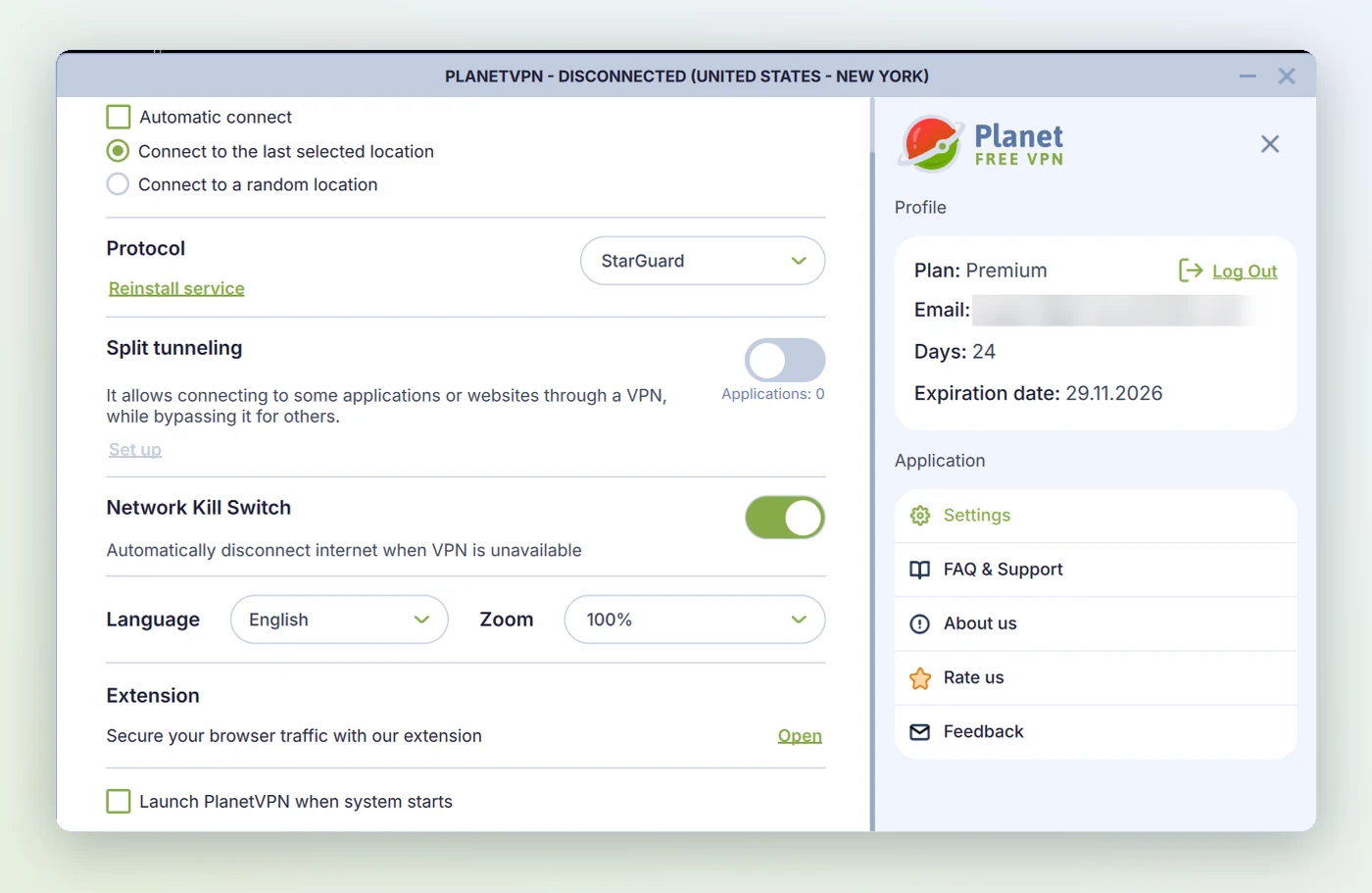
For browsing, streaming and public Wi-Fi, a few seconds of exposure during a server change rarely matters. It matters a lot if you use a VPN to hide your IP from someone who is watching for it: torrenting where that carries legal risk, journalism, activism, or getting around censorship. Turn the kill switch on in Settings anyway. Then don't switch servers in the middle of anything sensitive, and don't treat the kill switch as a guarantee.
Speed test
We tested six servers over two rounds, one at a time so the tests didn't interfere with each other. Each round started with a fresh no-VPN baseline, and every percentage below is measured against that same day's baseline, so the two rounds compare fairly even though our base connection was faster on the first day. Each download figure is the average of three 20 MB downloads from Cloudflare.
| Connection | Download | Upload | Average ping |
|---|---|---|---|
| Round 1: no VPN (baseline) | 40.5 Mbps | 4.0 Mbps | 99 ms |
| Planet VPN, Singapore | 29.1 Mbps (−28%) | 1.4 Mbps (−65%) | 178 ms |
| Planet VPN, New York | 23.3 Mbps (−42%) | 3.5 Mbps (−12%) | 379 ms |
| Round 2: no VPN (baseline) | 19.4 Mbps | 7.1 Mbps | 117 ms |
| Planet VPN, Netherlands | 17.0 Mbps (−12%) | 1.9 Mbps (−73%) | 330 ms |
| Planet VPN, Los Angeles | 14.8 Mbps (−24%) | 1.3 Mbps (−82%) | 390 ms |
| Planet VPN, London | 12.5 Mbps (−36%) | 2.1 Mbps (−70%) | 346 ms |
| Planet VPN, Frankfurt | 10.9 Mbps (−44%) | 0.9 Mbps (−87%) | 354 ms |
Download speed is Planet VPN's good news. Across all six servers it kept about 69% of our download speed on average. The Netherlands server lost only 12%, which is excellent for a server roughly 7,000 km from the test machine, and even the slowest result (Frankfurt, 44%) was fast enough for HD video. Under about 30% loss is a good result for any VPN, and three of the six servers beat it. It's enough for HD streaming, video calls and normal browsing.
Upload speed is the weak number. Uploads dropped by 65% to 87% on five of the six servers. It matters if you upload large files, back up to the cloud or stream video out, not for everyday browsing and watching. Losses are larger than with WireGuard-based VPNs because Planet VPN runs on OpenVPN by default, which costs more processing per packet. We explain that in WireGuard vs OpenVPN, and what normal VPN slowdown looks like in does a VPN slow down your internet.
Best server from India: Singapore for the lowest ping; the Netherlands kept the most download speed. If you're elsewhere, pick the nearest location and test it with our speed comparison tool.
Stability and connection time
| Measure | Result |
|---|---|
| Packet loss, all servers (720 pings) | 0.4% (3 lost) |
| Five-minute run, Singapore (300 pings) | Stayed connected; 2 pings lost (0.7%), average 295 ms |
| Latency spikes | 8% of pings above 500 ms on the five-minute run; worst single spike 3.2 seconds |
| Time to connect | 3 to 13 seconds |
| Failed connections | In the first round, two attempts ended with "Failed to connect via any protocols"; none in the second |
Almost nothing was lost in transit, which is what matters for downloads and browsing, and the tunnel never dropped on its own. The latency spikes would be noticeable in online games and calls. Connecting takes longer than on WireGuard-based VPNs, which usually connect in about a second. The failed connections in the first round fixed themselves later, and every connection worked first time in the second round, but they show the service isn't always available on the first try.
VPN detection and site access
Websites can often tell when you use a VPN, and some block VPN users. Our proxy and VPN detection tool gave Planet VPN's US IP a detection score of 60 out of 100. It was flagged as a datacenter address, but it wasn't on any blacklist. The biggest giveaway wasn't the IP. Our browser's timezone was still set to India while the IP said the US, and some sites check for exactly that mismatch.
| Site | Result |
|---|---|
| Google Search | Loaded normally |
| ChatGPT | Loaded normally |
| Amazon | Loaded normally |
| Netflix, Disney+, Hulu home pages | Loaded (playback not tested) |
| Blocked: "blocked by network security" |
Reddit blocks many VPN and datacenter IPs, so this isn't unique to Planet VPN, but it's worth knowing if Reddit is part of your day. We didn't test streaming playback, because that needs a paid account in each region. A home page loading doesn't prove a show will play. Premium is the plan Planet markets for streaming.
App safety: Windows app and Android trackers
The Windows installer is signed by FREE VPN PLANET S.R.L. and had 0 detections on VirusTotal. A few behaviours are worth knowing about:
- It installs a background service that runs with system rights and starts with Windows, even when the app itself isn't set to launch at startup. That's normal for a VPN that needs to change network settings, but it means the service is always running.
- The app window contacts Google servers. That fits the Firebase and Google Analytics tools named in the privacy policy.
- It shows a "rate us 5 stars" popup.
The Android app is where the free plan's business model shows. The Exodus Privacy report for version 8.5.9 (October 20, 2026) found code from 26 tracker libraries. Among them are Google AdMob, Facebook Ads, AppLovin, ironSource, Unity Ads, Mintegral, InMobi, Pangle, Yandex Ads, Adjust, AppMetrica and Firebase Analytics.
Exodus finds tracker code by static analysis, so it proves the libraries are in the app, not what they send. Planet says its ad partners "do not receive VPN traffic logs or sensitive personal identifiers", and ad SDKs serve the ads that pay for the free plan rather than reading your VPN traffic.
Still, a VPN is a privacy tool, and ad SDKs normally collect device identifiers, rough location and usage events. If that bothers you, the desktop app and browser extension are the lighter options, and Premium removes the ads.
Protocols and encryption
Planet VPN offers three protocols, chosen in Settings:
- OpenVPN (default): the long-standing open-source standard. Planet says it uses 256-bit encryption with RSA-2048 certificates. We confirmed that all traffic went through the tunnel; reading the exact cipher in use would have needed admin access to the service. Background: what OpenVPN is.
- IKEv2: good at reconnecting when you switch between Wi-Fi and mobile data, so a sensible choice on phones.
- StarGuard: Planet's own protocol, built to get past networks that block VPNs. It isn't publicly documented or independently reviewed, so we can't say how it works or how strong it is.
The missing option is WireGuard. It's the protocol behind the fastest VPNs we test, including NordVPN's NordLynx, Surfshark and Mullvad, and its absence explains most of the speed and connection-time results above.
Planet also says its servers are RAM-only with encrypted drives, so nothing is kept after a restart. That is a good design if true, but no outside audit has confirmed it.
Privacy policy and the no-logs claim
Planet VPN advertises a "strict no-logs policy". It says it doesn't record browsing history, traffic, DNS queries, connection timestamps or IP addresses. Our guide to no-logs VPNs explains why the claim itself means little without evidence. So here's what the full privacy policy says Planet does collect:
| Data | Collected? | Notes |
|---|---|---|
| Browsing history, traffic, DNS queries | No | Stated in the policy |
| Connection status (success or failure) | Yes | Described as anonymised on collection |
| VPN server location you use | Yes | Described as anonymised on collection |
| Your country, city and ISP | Yes | City-level location and internet provider |
| Device model, OS and app version | Yes | Plus crash reports and speed-test data |
| Random internal user ID | Yes | Also used for personalised in-app offers |
| Email address | Optional | Only if you create an account or buy Premium |
| Card details | No | Handled by payment processors (Stripe, Airwallex and others) |
None of that is browsing activity, and most VPNs collect some diagnostic data. But "server used, city and ISP, tied to a user ID" is more than the phrase "no logs" suggests. The policy also gives no retention periods, only "as long as needed".
The third-party list is long. It names Google Firebase, Adjust, Google Analytics, GrowthBook, Zendesk, the payment and fraud processors, and eight advertising partners: AdMob, DT Exchange, InMobi, ironSource, Liftoff Monetize, Meta Audience Network, Mintegral and Unity Ads. The ad list is introduced as "including but not limited to", which is why the Android scan found more.
We found no public independent audit of Planet VPN's no-logs claim, its RAM-only servers or its apps. That's the biggest difference from the VPNs at the top of our best VPNs of 2026 list. NordVPN, Surfshark and CyberGhost have been audited by Deloitte, Proton VPN by Securitum, and Mullvad by Cure53. We also found no reported breach or court case involving Planet VPN, but with no audit you are relying on the company's word.
Jurisdiction. Romania is a good place for a VPN company. It's covered by EU data protection law (the GDPR), and its Constitutional Court struck down data-retention laws in 2009 and again in 2014. It's also where CyberGhost is based. Romania isn't one of the "14 Eyes" intelligence-sharing countries, though as an EU member it does cooperate with EU police requests. The policy says Planet may disclose "limited data" where the law requires.
Is Planet VPN safe?
Planet VPN is safe for everyday use, with two clear limits. It encrypts your connection, blocks IP, DNS, WebRTC and IPv6 leaks, and its Windows installer is clean, so it protects you on public Wi-Fi and hides your IP from the sites you visit. But its kill switch leaked in our tests, and its no-logs claim has no independent audit behind it. Use it for browsing, streaming and travel. Don't use it where exposing your real IP could cause you serious harm.
Is it legal? Using a VPN is legal in most countries, including the US, UK, EU and India. Planet's own site lists the countries where VPNs are banned or restricted, and using a VPN never makes an illegal activity legal.
Planet VPN Premium price
If the free plan isn't enough, Premium costs:
| Plan | Per month | Billed |
|---|---|---|
| Free | $0 | Never; no card needed |
| 1 month | $9.99 | $9.99 monthly |
| 1 year | $3.99 | $47.88 once a year |
| 4 years | $1.99 | $95.52 once every four years |
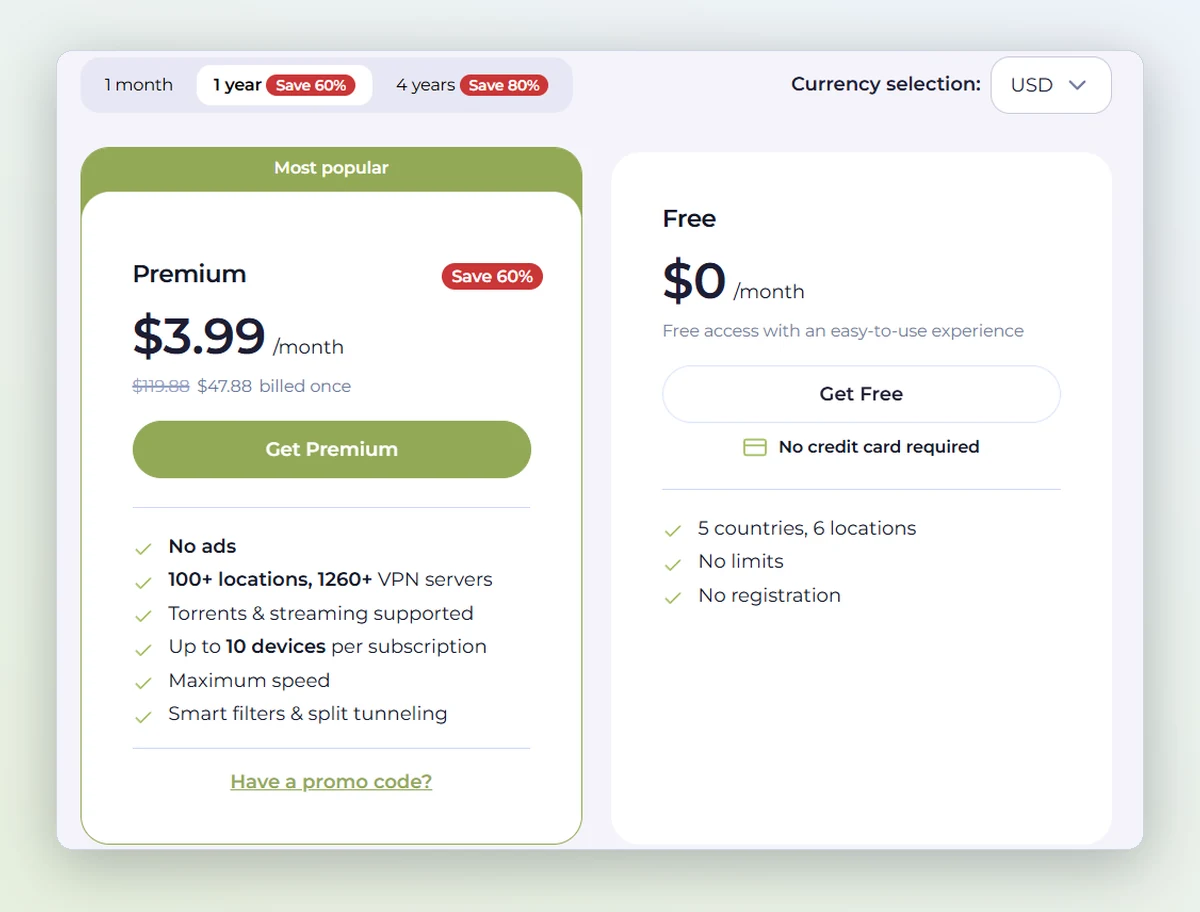
Premium gets you no ads, 100+ locations and 1,260+ servers, P2P and streaming servers, split tunnelling, Double VPN and up to 10 devices. The 4-year plan is cheap at $1.99 a month, but it's a long commitment to a service with no audit. If you want Premium, the 1-year plan is the better balance. Current prices are on the Planet VPN plans page, which also shows euro and pound prices.
Refunds: Planet's refund policy gives a 14-day right of withdrawal, and you have to give a reason. Auto-renewal payments aren't refundable, so cancel at least 24 hours before renewal. Purchases through the App Store or Google Play follow the store's refund rules. A 14-day window is shorter than the 30 days NordVPN, Surfshark and ExpressVPN give, or CyberGhost's 45.
Planet VPN vs other VPNs
How Planet VPN compares with the VPNs we've reviewed:
| VPN | Free plan | Based in | Independent audit | WireGuard-class protocol | Email needed |
|---|---|---|---|---|---|
 Planet VPN | Yes, no data cap | Romania | None found | No | No (free plan) |
 Proton VPN | Yes, no data cap | Switzerland | Securitum, yearly | Yes | Yes |
 NordVPN | No | Panama | Deloitte | Yes (NordLynx) | Yes |
 Surfshark | No | Netherlands | Deloitte | Yes | Yes |
 ExpressVPN | No | British Virgin Islands | 20+ audits | Yes (Lightway) | Yes |
 Mullvad | No | Sweden | Cure53 and others | Yes | No |
 CyberGhost | No | Romania | Deloitte | Yes | Yes |
The table shows Planet VPN's place clearly. It's one of only two VPNs here with a free plan that has no data cap, and the only one where you need no account at all and pay nothing. Mullvad also needs no email, but it's paid only. On the other side, it's the only VPN here with no independent audit and no WireGuard-class protocol.
Planet VPN vs Proton VPN free
These are the two free VPNs worth comparing, because both have no data cap. Proton VPN's free plan is the more trustworthy: no ads, open-source apps, yearly audits and Swiss law. But you need a Proton account with an email, it works on one device only, and Proton picks the server for you. Planet VPN's free plan is the more convenient: no account, a choice of five countries, and both an app and browser extensions. If privacy from the VPN company itself is your priority, pick Proton. If you want no sign-up, more countries to choose from and a quick browser extension, pick Planet. Our Proton VPN review covers its free plan in detail.
Planet VPN Premium vs NordVPN and Surfshark
Planet's 4-year plan is cheaper per month than most premium VPNs. But NordVPN and Surfshark give you audited no-logs policies, WireGuard speed, a kill switch that holds, and a 30-day refund window. If you're going to pay, those are worth the difference. Planet VPN Premium makes the most sense for people who already like the free app and want more countries without ads.
Planet VPN for streaming, torrenting and gaming
Streaming: Premium is marketed for streaming, with pages for Netflix, Amazon Prime Video and HBO Max. In our tests streaming home pages loaded, but we didn't test playback. The free plan isn't advertised for streaming.
Torrenting: P2P servers are Premium only, under "Special" in the app. Because the kill switch leaked in our tests, we wouldn't use Planet VPN for torrenting where your real IP being seen carries legal risk.
Gaming: Planet has gaming pages for PUBG, Mobile Legends and Roblox, mainly for reaching other regions' servers. Expect higher ping, not lower: our US pings averaged 379 to 390 ms with spikes above 1.5 seconds. A nearby server is best for games.
Pros and cons
| Pros | Cons |
|---|---|
| Free plan with no data cap or time limit | Kill switch off by default and leaked in our tests |
| No account, email or card needed for the free plan | No independent audit of the no-logs claim |
| No IP, DNS, WebRTC or IPv6 leaks | 26 tracker libraries in the Android app; ads on the free plan |
| Server locations are real, checked on seven servers | No WireGuard; slower connects and weak upload speeds |
| Kept about 69% of download speed across six servers | Latency spikes that games and calls will notice |
| Apps for almost every platform, plus four browser extensions | Only 14-day refund window |
| Romanian jurisdiction under EU privacy law | Detectable as a VPN; Reddit blocked it |
How we scored Planet VPN: 7 / 10
We score every VPN in the same seven areas, weighted by how much each one matters for privacy. Leak protection carries the most weight, because a VPN that leaks fails at its main job.
| Area | Weight | Score | Why |
|---|---|---|---|
| Leak protection | 25% | 10 / 10 | No IP, DNS, WebRTC or IPv6 leaks on any server |
| Privacy and logging | 20% | 3.5 / 10 | No account needed and EU law, but no audit, ad partners and 26 Android trackers |
| Speed and stability | 15% | 6.5 / 10 | About 69% of download speed kept, 0.4% packet loss; weak uploads and latency spikes |
| Kill switch | 10% | 2 / 10 | Off by default; leaked on server switches and after a crash |
| Apps and features | 10% | 8 / 10 | Apps for nearly every platform, three protocols, honest locations; no WireGuard |
| Ease of use | 10% | 9 / 10 | No sign-up, one-button connect, clean settings |
| Value | 10% | 9 / 10 | Uncapped free plan; Premium from $1.99 a month for 10 devices |
| Overall | 100% | 7 / 10 | Weighted total: 6.98, rounded to 7 |
Planet VPN earns its 7 with a rare mix: complete leak protection, real server locations, solid download speeds and a free plan with no cap and no sign-up. The kill switch and the lack of an audit are what keep it out of the 8s and 9s. If a future version fixes the kill switch, or Planet commissions an independent audit, we'll test it again and update the score.
Who Planet VPN is for
Use Planet VPN if you want a free VPN for everyday browsing, public Wi-Fi in cafés, hotels and airports, reaching sites that are only available in the US, UK or Europe, or a quick browser extension. You won't need an email address or a card, and you won't hit a data cap.
Choose something else if you need your real IP to stay hidden every time: torrenting, journalism, activism, or living somewhere VPNs are policed. For that you want an audited VPN with a kill switch that holds, such as Mullvad or Proton VPN. We compare those in our best VPNs guide, where Planet VPN is our pick for the best free VPN with no sign-up.
Whatever you choose, check it yourself. Run our IP leak test with the VPN on, and you'll see in seconds what websites see.
Frequently asked questions
Is Planet VPN free?
Yes. Planet VPN has a free plan with no data limit, no time limit and no registration. It covers 6 locations in 5 countries (the US, UK, Germany, France and the Netherlands) and is funded by ads. Premium costs from $1.99 a month on a 4-year plan and adds 100+ locations and 10 devices.
Is Planet VPN safe to use?
For everyday use, yes. In our tests it blocked IP, DNS, WebRTC and IPv6 leaks, and its Windows installer had no malware detections. But its kill switch leaked our real IP during a server switch and after an app crash, and its no-logs claim has never been independently audited, so it isn't the right choice for high-risk activities.
Which countries does Planet VPN free work in?
The free servers are in the United States, the United Kingdom, Germany, France and the Netherlands: 6 locations in 5 countries. Premium unlocks 100+ locations in more than 60 countries. You can use the free plan from almost anywhere, but Planet notes that VPNs are banned in North Korea, Belarus, Oman and Turkmenistan and restricted in China, Russia, the UAE and Turkey.
Is there a Planet VPN extension for Chrome?
Yes. There are free Planet VPN extensions for Chrome, Firefox, Edge and Opera. The Chrome extension has about 2 million users and a 4.6 rating. It only protects traffic inside that browser. To cover your whole device, use the desktop or mobile app.
Does Planet VPN keep logs?
Planet VPN says it doesn't log browsing, traffic, DNS queries or IP addresses. Its privacy policy does say it collects connection status, the server you use, your city and ISP, device details and a random user ID, described as anonymised. No independent audit has checked these claims.
Who owns Planet VPN?
Planet VPN is run by FREE VPN PLANET S.R.L., an independent company registered in Bucharest, Romania. It isn't part of a larger VPN group. Earlier independent reviews report that the service was previously sold as RusVPN.
Does the Planet VPN kill switch work?
Not reliably in our tests. It is off by default. With it switched on, our real IP was exposed for about 5 to 10 seconds while switching servers, in two separate rounds of testing. When we force-closed the app, our IP was exposed immediately and stayed exposed until we reconnected manually.
Is Planet VPN good for PC?
Yes, the Windows app is the most complete version. It offers three protocols (OpenVPN, IKEv2 and StarGuard), split tunnelling on Premium, a kill switch setting and a link to the browser extension. In our tests it kept about 69% of our download speed on average across six servers. There are also apps for macOS and Linux.
Does Planet VPN work with Netflix?
Planet markets Premium for Netflix, Amazon Prime Video and HBO Max. In our tests the Netflix, Disney+ and Hulu home pages loaded through the VPN, but we didn't test playback, which is what streaming services actually block. The free plan isn't marketed for streaming.
How many devices can I use with Planet VPN?
Premium covers up to 10 devices at once on one subscription. The free plan needs no account, so you can install it on each of your devices separately.
Does Planet VPN offer refunds?
Yes, within 14 days of purchase, and you have to give a reason. Auto-renewal payments aren't refunded, and App Store or Google Play purchases follow the store's own refund rules.
Does Planet VPN use WireGuard?
No. Planet VPN offers OpenVPN (the default), IKEv2 and its own StarGuard protocol for networks that block VPNs. Not having WireGuard is the main reason it connects more slowly and loses more speed than VPNs such as NordVPN, Surfshark and Mullvad.