The short version
- Free plan No, 30-day trial without a card
- AV-TEST score 6/6 protection
- Money-back 30 days
- Owned by Advent International group
McAfee's malware detection is genuinely strong — AV-TEST's recent Windows evaluations give it a perfect 6/6 for protection, catching 100% of zero-day malware samples and 100% of widespread known threats. Its higher tiers cover unlimited devices, and its identity protection features (credit monitoring, up to $2 million in identity theft coverage on the top plan) are among the more comprehensive in the consumer market.
The problems are commercial rather than technical. McAfee's renewal pricing is among the steepest in the industry — a $29.99 first year commonly becomes $84.99, and the McAfee+ Advanced tier jumps from $89.99 to $199.99. It also ships pre-installed on a large share of new Windows laptops, which is why "how to uninstall McAfee" is one of the most-searched antivirus questions on the internet. And separately from anything McAfee does, its brand is currently the vehicle for a large, active phishing campaign — fake renewal emails and pop-ups claiming you owe hundreds of dollars. That last one is not McAfee's doing, but it's the thing most likely to actually cost you money, so it gets a full section below.
What McAfee is
McAfee is a consumer cybersecurity company founded in 1987 by John McAfee, who released what's generally credited as the first commercial antivirus product and resigned from the company in 1994. The company is headquartered in San Jose, California, and has changed hands repeatedly: it was acquired by Intel in 2011, spun back out in 2017, taken public on NASDAQ in 2020, and taken private again in March 2022 by an investor group led by Advent International and Permira, in a deal valuing the company at over $14 billion.
Since selling off its enterprise business — now operating as the separate companies Trellix and Skyhigh Security — McAfee is a pure consumer-focused business. Its current flagship line is McAfee+, which leans heavily on identity and privacy protection alongside traditional antivirus, with the older Total Protection branding still used for its lower-priced, more device-focused plans. The company reports over 600 million users worldwide.
The full McAfee product lineup
McAfee sells more separate products than its marketing pages make obvious, and several of them overlap. Here's what each name actually refers to, so you can tell which one you're being sold:
- McAfee+ Individual — the flagship single-user line (Premium, Advanced, Ultimate), covering unlimited devices for one person and adding identity monitoring, data-broker removal, and identity theft coverage on top of antivirus.
- McAfee+ Family — the same feature set extended to up to six household members, each with their own identity monitoring profile, plus parental controls.
- McAfee Total Protection — the older, cheaper, device-focused line (Basic, Plus, Premium). Antivirus, firewall, password manager, and a VPN on Plus and above, with far lighter identity features than McAfee+.
- McAfee AntiVirus — the stripped-back entry product: real-time malware protection and web protection on a small number of devices, without the VPN or identity tooling.
- McAfee Secure VPN — the VPN bundled into Plus tiers and above. The older standalone Safe Connect branding is being retired, so if you see Safe Connect offered as a separate purchase, check what you're actually buying.
- McAfee PC Optimizer — the Windows cleanup and startup-management component, covered in more detail below. Worth knowing: McAfee's own removal tool doesn't uninstall it, so it needs removing separately.
- McAfee TechMaster — a paid, human tech-support service sold separately from any antivirus plan, covering device setup, virus removal, and performance tuning by remote session. It is not part of a standard subscription.
- McAfee Mobile Security — the standalone Android and iOS app, also available free with ads. On iOS it is necessarily limited to web protection, VPN, and monitoring rather than device scanning, for the same platform reasons covered in the download section.
The practical takeaway: McAfee+ is sold on identity protection, Total Protection is sold on device count. If you don't want identity monitoring, the cheaper Total Protection line does the antivirus job with the same engine.
How to uninstall McAfee completely
Removing McAfee properly takes two steps on Windows, not one: the standard uninstall, then McAfee's own cleanup tool to remove the drivers and services the standard uninstall leaves behind. Skipping the second step is why so many people find McAfee pop-ups still appearing after they thought they'd removed it.
Your PC is briefly unprotected between removing McAfee and your replacement taking over. On Windows, Microsoft Defender normally activates automatically once McAfee is gone — after you restart, open Settings → Privacy & security → Windows Security and confirm that Virus & threat protection and Firewall are both switched on. If you're installing a different antivirus instead, have the installer downloaded before you begin.
Windows 11 and Windows 10
Step 1: Close McAfee's background processes
- Right-click the Start button and open Task Manager.
- Find any running McAfee processes and select End task for each one.
- This prevents the "files in use" errors that cause a partial uninstall.
Step 2: Uninstall through Settings
- Press Windows + I to open Settings.
- Go to Apps → Installed apps.
- Find McAfee Total Protection (or McAfee+, or whichever product name appears), click the three dots beside it, and choose Uninstall.
- When McAfee's own removal window appears, tick both the product checkbox and the box beneath it for removing all files, then confirm.
- Repeat for McAfee WebAdvisor, which installs as a separate entry and is commonly missed — this is the component responsible for many lingering browser pop-ups.
- Restart your PC. This is not optional: McAfee installs kernel-level drivers that are only fully released on reboot.
Step 3: Run the MCPR cleanup tool
MCPR (McAfee Consumer Product Removal) is McAfee's own free cleanup utility. It requires no installation and is the vendor-supported way to clear leftover services, drivers, and scheduled tasks.
- Download a fresh copy of MCPR.exe from McAfee's official support site — always download it new rather than reusing an old copy, since the tool is updated alongside their products.
- Right-click the file and choose Run as administrator.
- Click Next, accept the licence agreement, then type the security validation characters shown on screen.
- Let it run to completion. This can take several minutes with no visible progress — that's normal.
- When it reports Cleanup Successful, click Restart.
If MCPR reports Cleanup Unsuccessful, it generates a log file you can send to McAfee support for analysis. If it appears to run indefinitely without finishing — a problem some users report — restart the PC, then try running it again in Windows Safe Mode.
Alternative: uninstall via winget
If you're comfortable with the command line, Windows Package Manager can be quicker:
- Right-click Start and open Terminal (Admin).
- Run
winget list --name McAfeeto see every installed McAfee package. - Run
winget uninstall --id [PackageID]for each package listed, substituting the actual ID. - Restart, then run MCPR as above for the deep cleanup.
Mac
- Open Finder → Applications.
- Find and open the McAfee Security Uninstaller (or the McAfee folder containing it).
- Follow the prompts, entering your Mac's administrator password when asked.
- Remove any separate McAfee browser extensions from Safari, Chrome, or Firefox individually — these don't always go with the main app.
- Restart your Mac and empty the Trash.
Android
- Open Settings → Apps.
- Find McAfee Security in the list and tap it.
- If the app has device administrator permissions, go to Settings → Security → Device admin apps first and deactivate McAfee there — otherwise the uninstall button will be greyed out.
- Return to the app entry and tap Uninstall.
iPhone and iPad
- Press and hold the McAfee app icon on your home screen.
- Tap Remove App, then Delete App.
- If you subscribed through Apple, cancel the subscription separately in Settings → your name → Subscriptions — deleting the app does not cancel billing.
Uninstalling the software doesn't stop the billing. If you bought directly from McAfee, log in to your account at mcafee.com, go to My Account → Auto-Renewal, and turn it off. If you bought through the Apple App Store or Google Play, cancel through that store's subscription settings instead — McAfee can't cancel a store-billed subscription for you. Do this even if you're keeping the software, if you don't want the automatic renewal at the higher rate covered in the pricing section below.
Is McAfee a scam
No — McAfee is a legitimate, 39-year-old cybersecurity company with independently verified lab results, and its software does what it claims. But the question gets asked constantly for two very different reasons, and separating them matters because one of them can genuinely cost you money.
The fake McAfee renewal scam
There is a large, active phishing campaign impersonating McAfee right now — and it targets people who have never used McAfee at all. The typical version: an email, text, or browser pop-up claims your McAfee subscription has auto-renewed for somewhere between $200 and $500, or that viruses have been detected on your device. It includes a phone number to call if you want to dispute the charge. If you want to check the anatomy of one of these messages before you act on it, our guide to phishing attacks covers the same pattern, and our phishing link detector will check a suspicious link without you having to open it.
Calling that number connects you to a fake support centre. Operators there run a social-engineering script designed to extract payment card details, remote access to your computer, or both — often through a staged "we refunded you too much, please send the difference back" routine — the same social-engineering shape as SIM swapping and other account-takeover scams. Security researchers have documented this pattern reviving repeatedly over several years, with 2026 versions using AI-generated emails and fake invoices that are harder to spot than earlier attempts.
- McAfee will never ask you to call a phone number included in an email, text, or pop-up. The company states this on its own scam awareness page. A phone number in the message is the single clearest sign it's fake.
- Never call the number, click the link, or reply. Close the tab or delete the message.
- To check your actual subscription status, type mcafee.com into your browser manually and log in — never through a link in the message.
- Watch for generic greetings, unusual sender addresses, grammatical errors, and renewal amounts far higher than any real McAfee plan costs.
- If a pop-up appeared while browsing, clear your browser cache and run a scan — adware on your device may be generating them.
The complaints about McAfee itself
The other reason people call McAfee a scam comes down to three legitimate business-practice grievances, none of which are fraud but all of which are worth knowing before you buy:
- Steep automatic renewals — subscriptions renew at two to three times the first-year price, automatically, unless you turn auto-renewal off yourself.
- Pre-installed trials on new laptops — McAfee pays PC manufacturers to bundle trial versions, so many people encounter it without ever choosing it, complete with upgrade prompts.
- Difficult removal — the standard uninstall leaves components behind, which is why the full removal process above needs three steps rather than one.
Those are real criticisms of how the company sells and packages its product. They're a different category from the phishing campaign above, and conflating the two makes it harder to spot the one that's actually dangerous.
Malware detection and lab scores
McAfee's protection scores are genuinely top-tier. AV-TEST's recent Windows evaluations awarded it a full 6/6 for protection, with 100% detection of both zero-day malware and widespread known threats, and AV-Comparatives has given McAfee Advanced+ ratings across recent test cycles — its highest award band.
System performance, historically McAfee's weakest area, has improved measurably. Independent analysis found McAfee's system impact dropped by roughly 35% between 2023 and 2025, with AV-TEST performance scores rising to 5.5 out of 6 in that period. It's still not as light as Bitdefender, which consistently posts a full 6/6 on performance, but the "McAfee slows your PC to a crawl" reputation is more dated than current.
McAfee features and the app
The McAfee app consolidates everything into a single dashboard with a "Protection Score" that nudges you toward enabling features you haven't set up yet. Depending on your tier, you get:
- Real-time antivirus and firewall — the core protection, on every plan.
- McAfee WebAdvisor / Web Protection — a browser extension that blocks malicious and phishing sites before they load, colour-codes search results by safety, and warns about risky downloads.
- Secure VPN — unlimited data on Plus tiers and above, with automatic connection on unsecured Wi-Fi.
- Identity monitoring — scans for your personal data on the dark web, with credit monitoring and identity theft coverage up to $1 million (Advanced) or $2 million (Ultimate) on US plans.
- Password manager — cross-device credential storage and autofill. You can check anything already in it against our password strength checker.
- Personal Data Cleanup — finds your personal information on data-broker sites and, on higher tiers, submits removal requests automatically.
- Safe Family — parental controls with age-based web filtering, screen time limits, and location tracking, included on Premium tiers.
- Scam Detector — AI-based detection of scam texts, emails, and deepfake video, added across McAfee's lineup in recent versions.
McAfee PC Optimizer
PC Optimizer is McAfee's system cleanup component, bundled into Total Protection and McAfee+ plans on Windows. It clears temporary files, browser caches, and other junk to reclaim disk space, and manages startup programs to reduce boot time. It's a reasonable convenience if you're already paying for the suite, but it isn't a reason to choose McAfee on its own — Windows' built-in Storage Sense and Task Manager startup tab cover most of the same ground at no cost.
McAfee Secure VPN
McAfee's bundled VPN uses standard encryption with a no-logs claim and auto-connects on unsecured networks, and it's unlimited on Plus tiers and above rather than data-capped the way Bitdefender's entry tiers are. Its limitation is scope: a small server network and no specialised features for streaming, torrenting, or getting past network-level VPN blocking. Independent reviewers consistently note it can't compete with dedicated providers like ExpressVPN or Surfshark on those specific jobs. It's fine for encrypting a coffee-shop connection; it's not a substitute for a purpose-built VPN — our best VPNs of 2026 roundup covers the audited alternatives, and it's worth knowing what a VPN actually hides before paying for one either way. You can check what any VPN is actually leaking with our own DNS leak test and WebRTC leak test.
McAfee download for every device
Windows
- Buy a plan or start the 30-day trial from McAfee's official downloads page and create an account.
- From your account dashboard, download the installer and run it.
- Sign in to activate your subscription.
- Install the WebAdvisor browser extension when prompted, if you want web protection in your browser.
- Run an initial full scan.
Mac
- Download the macOS installer from your McAfee account dashboard.
- Open the file and follow the prompts.
- Approve the system extension permissions macOS requests — required for real-time scanning, standard for every security app on macOS.
- Sign in and let the first scan complete.
Android
- Open Google Play and search "McAfee Security," or use the link from your account dashboard.
- Install, open, and sign in with your McAfee account.
- Grant the permissions requested for real-time scanning and, if you want them, anti-theft features.
iPhone and iPad
- Open the App Store and search "McAfee Security."
- Install and sign in with your account.
- Approve the VPN configuration prompt if you're using Secure VPN — Apple's standard system dialog.
- Note that iOS platform restrictions mean the app focuses on web protection, VPN, and identity monitoring rather than an on-device malware scanner.
McAfee's consumer line also supports ChromeOS, which several competitors don't. There's no consumer Linux desktop product — Linux coverage exists only in business endpoint products from the spun-off enterprise arm.
McAfee price and plans
McAfee's pricing structure is the single thing most worth understanding before you subscribe, because the advertised number is not the number you'll pay long-term. Prices vary by region and promotion — confirm the live figure at checkout.
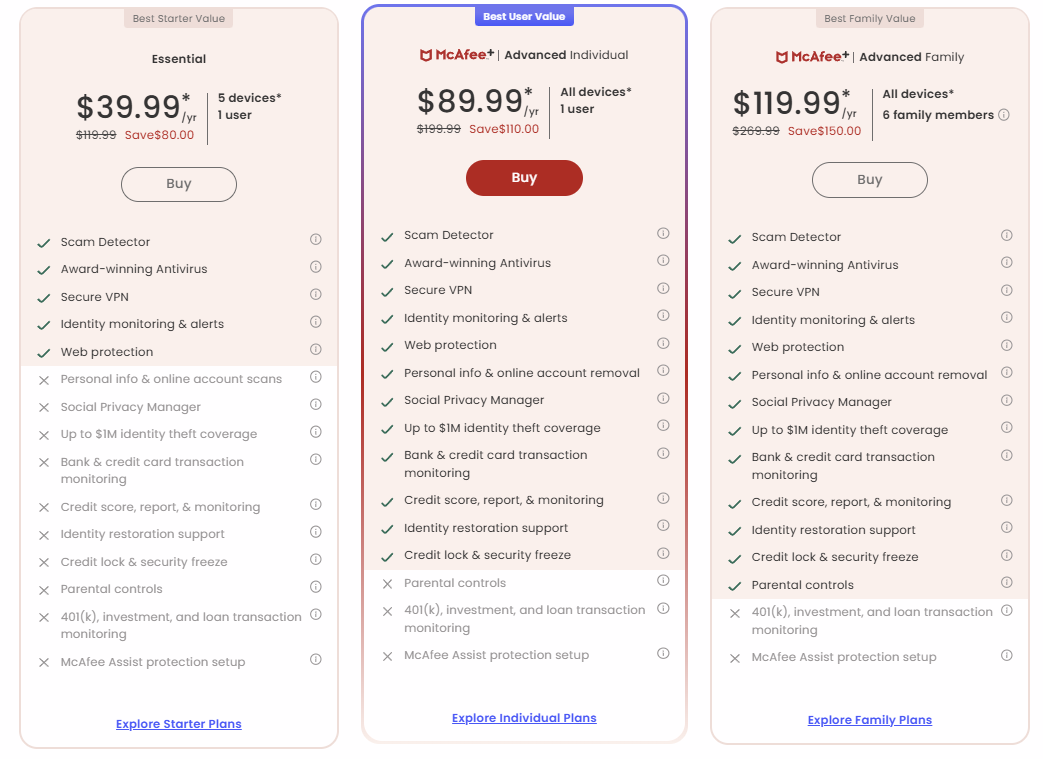
| Plan | First year | Typical renewal | Devices | VPN / Identity |
|---|---|---|---|---|
| Total Protection Basic | ~$29.99 | ~$84.99 | 1 | No / No |
| Total Protection Plus | ~$39.99 | ~$119.99 | 5 | Yes / Basic |
| Total Protection Premium | ~$49.99 | ~$149.99 | 10 | Yes / Yes |
| McAfee+ Advanced | ~$89.99 | ~$199.99 | Unlimited | Yes / $1M coverage |
| McAfee+ Ultimate | ~$149.99 | Higher | Unlimited | Yes / $2M coverage |
The renewal jump is the defining feature of McAfee's pricing: roughly 150% to 200% above the introductory rate across every tier. That's steeper than Norton's or Bitdefender's equivalent increases, both of which follow the same general pattern at lower magnitudes. Two practical responses: set a calendar reminder a week before your renewal date, and if you decide to stay, contact support before renewal — retention offers below the standard rate are commonly available but rarely volunteered.
There's no permanent free version. McAfee offers a 30-day free trial of Total Protection that doesn't require a credit card, covering up to five devices across Windows, Mac, Android, iOS, and ChromeOS, plus a 30-day money-back guarantee on paid plans.
McAfee promo codes
PrivacyTestLab doesn't run an affiliate program with McAfee, so there's no exclusive code here. What's worth knowing: McAfee's advertised first-year prices are already the discount — often 70% or more off the standard rate — and third-party retailers like Walmart and Amazon frequently list McAfee subscription keys below McAfee's own site price, sometimes substantially. Compare those against mcafee.com's live price before assuming a coupon code adds anything. The larger saving is almost always in managing the renewal, not in shaving a few dollars off year one.
McAfee customer service
McAfee provides 24/7 support through live chat, phone, and a community forum, plus a searchable knowledge base. Support quality reports are mixed, with billing and cancellation queries drawing more complaints than technical ones. The top-tier McAfee+ Ultimate plan adds McAfee Assist, a live session where a McAfee expert helps set up your protection remotely.
Only ever get McAfee's support number by navigating to mcafee.com yourself and finding it on the site. Searching "McAfee customer service number" in a search engine can surface paid ads and SEO-optimised pages run by the fake support operations described in the scam section above — this is one of the primary ways people end up calling scammers while believing they've contacted McAfee.
McAfee by country
McAfee is sold in most countries worldwide, with localised pricing, language support, and regional websites — mcafee.com/en-ca for Canada, mcafee.com/en-gb for the UK, and so on. Unlike Kaspersky, it faces no government bans or restrictions anywhere; as a US-headquartered company it cleared a CFIUS national security review during its 2022 take-private acquisition without conditions.
Two things do vary by region and are worth checking on your local McAfee site rather than assuming from a US-focused review:
- Identity theft coverage and restoration services are US-centric. Canadian, UK, Australian, and other international customers on similarly named higher tiers often receive a reduced version, or none, of the monitoring and reimbursement guarantees advertised in US marketing.
- Pricing differs meaningfully between regions beyond simple currency conversion — European pricing in particular has historically run higher than US pricing for equivalent tiers.
McAfee vs. other antivirus software
| Category | McAfee | Norton 360 | Bitdefender |
|---|---|---|---|
| First-year entry price | ~$29.99 | ~$19.99–29.99 | ~$12.99–29.99 |
| Typical renewal increase | ~150–200% | ~150% | ~100% |
| Free tier | No (30-day trial) | No | Yes (Windows only) |
| Device limit (top tier) | Unlimited | 10–unlimited | 10–25 |
| System resource use | Moderate | Moderate | Light |
| Refund window | 30 days | 60 days | 30 days |
All three post excellent detection scores — the same is true of Kaspersky, where availability rather than detection is the deciding factor. This category has converged at the top technically, so the deciding factors are pricing structure, device coverage, and system footprint rather than malware-blocking ability. McAfee's unlimited-device tiers are its clearest advantage; the renewal increase is its clearest disadvantage.
Who McAfee is actually for
McAfee fits households with a large number of devices, where the unlimited-device McAfee+ tiers genuinely undercut per-device pricing elsewhere, and anyone who specifically wants identity theft monitoring with financial reimbursement bundled into their antivirus rather than bought separately. The detection engine is independently verified as strong, and the performance complaints that dogged it for years are substantially less true than they used to be.
It's a weaker fit if you want the lightest possible system footprint, if you'd rather not manage an aggressive auto-renewal each year, or if you're outside the US and the identity protection features — the main thing distinguishing the higher tiers — don't fully apply in your region. And if McAfee arrived pre-installed on a laptop you just bought, you're under no obligation to keep it: the uninstall guide above exists precisely because that's how most people first encounter it.
Frequently asked questions
How do I completely uninstall McAfee?
On Windows it takes three steps: end McAfee processes in Task Manager, uninstall through Settings → Apps → Installed apps (including the separate WebAdvisor entry), then run McAfee's MCPR cleanup tool as administrator and restart. The standard uninstall alone leaves drivers and services behind, which is why pop-ups often continue afterwards. On Mac, use the McAfee Security Uninstaller in your Applications folder.
Is McAfee a scam?
No, McAfee is a legitimate company with strong independent lab results. But there is a widespread phishing campaign impersonating McAfee — fake renewal emails and pop-ups claiming you owe $200 to $500, with a phone number to call. McAfee never includes a phone number to call in its emails or pop-ups, so that's the clearest sign a message is fake.
Why did McAfee charge me hundreds of dollars?
Two possibilities. If it's a real charge, McAfee subscriptions auto-renew at two to three times the first-year price — check your account at mcafee.com by typing the address manually. If you received an email or pop-up about a charge you don't recognise, treat it as a likely phishing attempt and don't call any number it contains.
Is McAfee free?
No permanent free version. McAfee offers a 30-day free trial of Total Protection with no credit card required, covering up to five devices, plus a 30-day money-back guarantee on paid plans.
Does McAfee slow down your computer?
Less than it used to. Independent analysis found McAfee's system impact fell by roughly 35% between 2023 and 2025, with AV-TEST performance scores reaching 5.5 out of 6. It's still heavier than Bitdefender, which scores a full 6/6, but the old reputation overstates the current reality.
How do I cancel my McAfee subscription?
If you bought directly from McAfee, log in at mcafee.com and turn off auto-renewal under My Account. If you subscribed through the Apple App Store or Google Play, cancel in that store's subscription settings instead — McAfee can't cancel a store-billed subscription for you. Uninstalling the app does not stop billing.
Who owns McAfee?
An investor group led by Advent International and Permira, which took the company private in March 2022 in a deal valued at over $14 billion. Its former enterprise business was spun off separately as Trellix and Skyhigh Security.
Does McAfee include a VPN?
Yes, unlimited on Plus tiers and above, with a no-logs claim and auto-connect on unsecured Wi-Fi. Its server network is small and it lacks streaming or obfuscation features, so it works for basic public Wi-Fi encryption but not as a replacement for a dedicated VPN provider.
What is McAfee WebAdvisor?
A browser extension that blocks malicious and phishing sites, colour-codes search results by safety rating, and warns about risky downloads. It installs as a separate program from the main McAfee app, which is why it needs uninstalling separately if you're removing McAfee.