The short version
- Free version Yes, on-demand scans only
- AV-TEST score 18/18, Jan to Feb 2026
- Money-back 30 days annual, 14 monthly
- Owned by Point Wild
TotalAV scored a perfect 18 out of 18 in AV-TEST's January–February 2026 evaluation, and blocked 99.98% of malware samples in AV-Comparatives' March 2026 test. The software works. Its dashboard is genuinely one of the easiest to use in the category, and it's among the cheapest antivirus suites you can buy in year one.
Almost every serious criticism of TotalAV is about how it's sold rather than how it performs. Renewal prices run three to four times the introductory rate. Auto-renewal is on by default and the reminder arrives close to the billing date. It has no firewall at any tier. And it's advertised through scareware-style pop-up ads claiming your device is infected — the kind of marketing that leads people to search "is TotalAV a scam" about software that is, technically, fine. This review covers the product honestly and gives you the cancellation process in full, because that's what most people arriving here actually need.
What TotalAV is
TotalAV is a consumer antivirus and system-optimisation suite launched in 2016 by Protected.net, a company based in Portsmouth, United Kingdom. It's aimed squarely at non-technical home users rather than businesses — there's no enterprise product line, no centralised admin console, and no Linux support.
The product bundles malware scanning with a VPN, ad blocker, password manager, and a set of PC cleanup tools, all inside a single dashboard. TotalAV reports protecting more than 25 million users worldwide across its parent company's brands.
Is TotalAV free
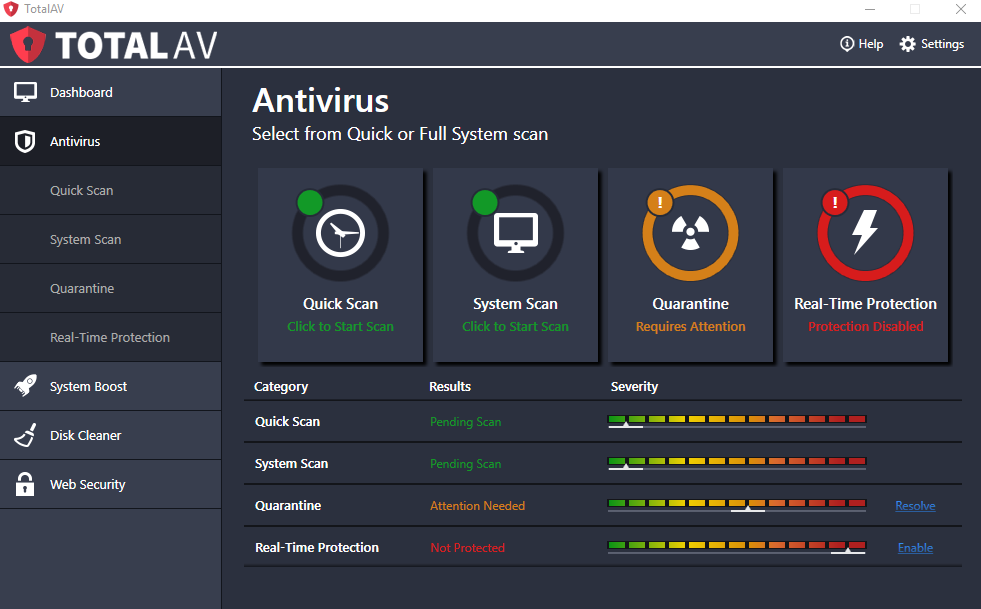
There's a real free version, but it does considerably less than TotalAV's marketing suggests, and the difference matters. The free tier gives you on-demand scanning only — you have to manually start each scan. Real-time protection, the feature that actually blocks malware as it arrives, is not included on an ongoing basis.
Independent testing found real-time protection active for roughly the first two days after install, as part of an introductory trial, after which the free version drops back to manual scans only. That's a meaningful distinction: an antivirus that only scans when you remember to run it is a second-opinion tool, not a primary defence.
What the free version includes:
- On-demand malware scanning on Windows and Mac, with good detection rates.
- System cleanup tools — junk file removal, duplicate file finder, startup program manager.
- Data breach checking for your email address.
What it doesn't include: ongoing real-time protection, the VPN, the password manager, ad blocking, or ransomware-specific defences. Free availability also varies by country, covered further down.
If you want to try TotalAV's full feature set without paying, the 30-day money-back guarantee on annual plans is a more useful trial than the free tier — you get everything, and reviewers who have tested the refund process report it working as advertised, in at least one case processing within a single business day. Just make sure you understand the cancellation process, covered in detail below, before you commit.
Malware detection and lab scores
TotalAV's detection results are strong, with one consistent caveat around false positives. In AV-TEST's January–February 2026 evaluation it scored a perfect 18 out of 18 across protection, performance, and usability. In AV-Comparatives' March 2026 Malware Protection Test it blocked 9,998 of 10,000 samples — a 99.98% online protection rate — and earned an Advanced+ award for real-world protection.
Two numbers from that same AV-Comparatives round are worth knowing, because they're the kind of detail a promotional review skips:
- 19 false alarms, compared to four from Bitdefender in the same test. False positives mean legitimate files getting flagged as threats, which is its own kind of daily friction.
- A total performance-impact score of 18.2, against Bitdefender's 9.6 — roughly double the system slowdown on lower-specification hardware.
In practice, background resource use is light — under 1% CPU and around 65 MB of RAM when idle. Full scans push CPU load to between 30% and 65%, which is noticeable if you're doing anything demanding at the same time. Scheduling full scans for when the machine is idle solves this.
No TotalAV plan at any price includes a firewall. Most competitors at this price point do. In practice, Windows Defender Firewall is already active and handles this job adequately for most home users — but if you were expecting a security suite to replace or improve on your built-in firewall, TotalAV doesn't. Some independent testing also found TotalAV allowed potentially harmful files to download, quarantining them only when accessed rather than blocking them on arrival.
The TotalAV app and features
The dashboard is the strongest part of the product. It's clean, uncluttered, and organised so that a non-technical user can find what they need without a manual — noticeably friendlier than Norton's more crowded interface. Depending on your tier, you get:
- Real-time antivirus — continuous scanning of downloads, installs, and executables (paid plans only).
- WebShield — browser-level blocking of phishing and malicious sites before they load.
- Total Adblock — blocks ads and trackers, which also speeds up page loading.
- Total VPN — unlimited-data VPN, included on higher tiers.
- Password Vault — credential storage and autofill, on the top tier. If you already keep logins elsewhere, our password strength checker will sanity-check them.
- System Tune-Up — junk file cleaner, duplicate file finder, browser cleanup, and startup manager.
- Data breach monitoring — checks whether your email has appeared in known breaches.
The system optimisation tools are more prominent here than in most rival suites, which suits TotalAV's target audience — people who want their computer to feel faster as much as they want it protected. They're convenience features rather than security ones; Windows' built-in Storage Sense and Task Manager cover similar ground for free.
Total VPN
TotalAV's bundled VPN is better than most antivirus-included VPNs, which is a low bar it clears comfortably. It offers unlimited data, servers in roughly 30 to 35 countries, both WireGuard and OpenVPN protocols, AES-256 encryption, a kill switch, and a no-logs policy. Independent leak testing across 20+ server locations found no IPv6, DNS, or WebRTC leaks.
Its limitation is unblocking. One hands-on review found it accessed Netflix but failed on Disney+, Hulu, HBO Max, BBC iPlayer, and Amazon Prime Video — so treat any marketing claim about accessing "any region-locked service" with scepticism. There's also a jurisdiction point worth knowing: TotalAV's operating company is UK-based, and the UK is a member of the Five Eyes intelligence-sharing alliance, unlike the British Virgin Islands or Romania where ExpressVPN and CyberGhost are respectively based.
It's a solid extra if you're already buying the antivirus. It's not a reason to choose TotalAV over a dedicated VPN provider if privacy or streaming is your main goal. You can check what any VPN is actually leaking using our own DNS leak test and WebRTC leak test.
TotalAV plans compared
TotalAV sells three paid tiers above the free version, and the naming is easy to confuse — Antivirus Pro, Internet Security, and Total Security are progressively larger bundles rather than different products.
| Plan | First year | Typical renewal | Devices | Adds |
|---|---|---|---|---|
| Free Antivirus | Free | — | 1 | On-demand scans, cleanup tools |
| Antivirus Pro | ~$19 | ~$99 | 3 | Real-time protection, WebShield |
| Internet Security | ~$39 | ~$129 | 5–6 | Total VPN, ad blocker |
| Total Security | ~$49 | ~$129+ | 6–8 | Password vault, breach monitoring |
Internet Security is the sensible default for most people — it's the cheapest tier that includes the VPN, which is the main thing distinguishing TotalAV from free alternatives. Total Security adds a password manager for around $10 more, which is reasonable value only if you don't already use one.
Pricing and renewals
The renewal increase is the single most important thing to understand before subscribing. A $39 Internet Security plan renews at around $129 — a jump of roughly 230%. Reports of $249 charges appear in customer complaints where higher-tier or multi-year plans were involved.
This pattern isn't unique to TotalAV. Norton, McAfee, and Bitdefender all discount year one and renew higher. TotalAV sits at the more aggressive end of that spectrum, and its marketing amplifies the effect by advertising "original" prices of $179 to $249 alongside 80–90% discount claims. Those inflated reference prices are rarely what anyone actually pays; the discounted figure is the real price.
- Set a calendar reminder for 30 days before your renewal date, on the day you subscribe. TotalAV's own renewal notice arrives close to the billing date.
- Turn off auto-renewal immediately after purchasing. You keep your full paid term; you just don't get charged again automatically.
- Compare the renewal price to the current new-customer offer. Cancelling and re-subscribing at the promotional rate is often possible and meaningfully cheaper than renewing.
TotalAV coupon codes
PrivacyTestLab doesn't run an affiliate program with TotalAV, so there's no exclusive code here. In TotalAV's case that matters less than usual: the advertised first-year price is already the discount, and stacking a coupon on top of an 80%-off promotional rate rarely produces meaningful additional savings. The real money is in managing the renewal, not in shaving a few dollars off year one. Be particularly cautious with third-party TotalAV "coupon" sites — the same SEO ecosystem that produces those pages also produces the fake support pages described in the cancellation section below.
How to cancel TotalAV
You can cancel TotalAV, and the process is straightforward once you know two things: where you originally bought it determines how you cancel, and cancelling and getting a refund are two separate actions. Getting either of those wrong is the most common reason people think their cancellation didn't work.
While researching this article, we found that search results for TotalAV cancellation are heavily polluted with SEO spam pages carrying prominently displayed "support" phone numbers — several formatted oddly to evade filtering, like 1=855=574=4313. These are not TotalAV's numbers. This is the same fake-support-centre pattern that targets McAfee and Kaspersky customers: you call, a live operator asks for remote access or card details to "process your refund," and the loss is far larger than the subscription would have been.
Cancel through your TotalAV account dashboard by typing totalav.com into your browser manually. If you need to speak to someone, get the contact details from inside your logged-in account, never from a search result. A link you're unsure about is worth running through our phishing link detector before you click it.
If you bought from TotalAV's website
- Type totalav.com into your browser and log in with the email address you used to purchase.
- Open your account dashboard and find My Services or My Subscriptions.
- Select the subscription you want to stop and choose the option to manage or cancel it.
- Turn off auto-renewal. You may be asked to verify your identity with a code sent to your registered email — check your spam folder if it doesn't arrive.
- Confirm, and check for a confirmation email. Keep it.
This stops future charges. Your current subscription continues until the end of the term you already paid for.
If you bought through Google Play
- Open the Google Play Store app.
- Tap your profile icon, then Payments & subscriptions → Subscriptions.
- Select TotalAV and tap Cancel subscription.
If you bought through the App Store
- Open Settings on your iPhone or iPad.
- Tap your name at the top, then Subscriptions.
- Select TotalAV and tap Cancel Subscription.
TotalAV cannot cancel or refund an app-store subscription on your behalf — that billing relationship is with Apple or Google.
Requesting a refund
Turning off auto-renewal does not refund anything. If you want your money back, you have to request it separately and within the eligibility window:
- Annual or biannual plans: full refund within 30 days of purchase or renewal.
- Monthly or quarterly plans: 14 days.
- Add-on services: TotalAV's documentation refers to a 14-day rule, which may differ from your main subscription — verify against your own receipt.
- Gather your order number, purchase date, the email used, and the exact product name.
- Contact TotalAV support via live chat or the support form from inside your logged-in account.
- State clearly that you want a refund under the money-back guarantee, and give your details.
- Ask for written confirmation, and note the date you requested it.
For app-store purchases, request the refund through reportaproblem.apple.com or the Google Play refund process instead. Uninstalling the software at any point does not stop billing or trigger a refund — those are separate from removing the app.
TotalAV contact and support
TotalAV offers live chat, email support, and phone support, with phone lines advertised for Australia, Canada, France, Germany, Spain, the UK, and the US. One hands-on reviewer noted the live chat option was hard to find from the account dashboard and the help centre, though once connected the agent resolved the issue within minutes.
Get every contact detail from inside your logged-in TotalAV account or by typing totalav.com directly. As covered above, searching for a TotalAV support number is how people end up calling fake support centres.
TotalAV download for every device
Windows
- Go to totalav.com and choose the free version or a paid plan.
- Download and run the installer, then follow the setup prompts.
- Sign in with your TotalAV account to activate.
- Run the initial scan. Expect upsell prompts for additional products during and after setup.
Requires Windows 7 or later. Windows XP and Vista are no longer supported.
Mac
- Download the macOS installer from your TotalAV account.
- Open the file and follow the prompts.
- Approve the system extension permissions macOS requests — standard for any real-time security app.
- Sign in and let the first scan run.
Requires OS X 10.9 or later.
Android
- Open Google Play and search "TotalAV," or use the link from your account.
- Install, open, and sign in.
- Grant the requested permissions for scanning and web protection.
Requires Android 6.0 or later.
iPhone and iPad
- Open the App Store and search "TotalAV."
- Install and sign in with your account.
- Approve the VPN configuration prompt if you're using Total VPN.
Requires iOS 9.3 or later. As with every iOS security app, Apple's platform restrictions mean no on-device malware scanner — the app focuses on web protection, VPN, and breach monitoring.
TotalAV is also one of the few consumer antivirus products supporting Fire OS (version 5 or higher) for Amazon Fire tablets. There's no Linux version.
Who owns TotalAV
TotalAV is owned by Point Wild, a Boston-headquartered holding company formed in December 2024 when Pango Group merged with Total Security, TotalAV's parent. The combined company reports around $600 million in annual revenue and an enterprise value of $1.7 billion, led by CEO Hari Ravichandran.
Two things about that ownership are worth knowing, neither of which appears in most TotalAV reviews:
UltraAV is the product that roughly one million US Kaspersky customers were automatically migrated to in September 2024, when Kaspersky was banned from the US market — a transition that happened without user consent on Windows and drew significant criticism. That's covered in full in our Kaspersky review. It doesn't reflect on TotalAV's software quality, but it's relevant context on how the parent company operates.
Comparitech is a consumer security review site that reviews and ranks antivirus products — including TotalAV. When you read a TotalAV review, it's worth checking whether the publisher discloses common ownership. This is widespread in the security-review industry rather than unique to one company: several other major VPN and antivirus review sites are owned by Kape Technologies, which also owns ExpressVPN, CyberGhost, and Private Internet Access. It's a reason to read multiple independent sources rather than trusting any single "best antivirus" ranking.
Availability by country
TotalAV is sold worldwide, in most countries, with support for multiple languages including English, German, French, and Spanish. There's no government ban or restriction on it anywhere, unlike Kaspersky in the United States. If you can reach totalav.com, you can generally buy and use it.
Three things do vary by country, and they're worth checking on your local version of the site rather than assuming from a US-focused review:
- The free version isn't offered everywhere. It's available in a subset of countries, including the US. If the free download isn't appearing for you, that's likely why — the 30-day money-back guarantee on a paid plan is the alternative route to testing it.
- Payment methods differ. In some countries, including Romania, TotalAV restricts checkout to PayPal only. One reviewer noted this rule couldn't be worked around, and attempting to disguise your location to access different regional pricing or payment options generally breaches the terms of sale and can cause the purchase to be reversed. If your preferred payment method isn't offered, PayPal or contacting support directly are the legitimate options.
- Pricing and phone support vary. Local currency pricing isn't a straight conversion, and phone support is only advertised for seven countries. Live chat and email are available more broadly.
TotalAV vs. other antivirus software
| Category | TotalAV | Bitdefender | Norton 360 |
|---|---|---|---|
| First-year entry price | ~$19 | ~$12.99–29.99 | ~$19.99–29.99 |
| Renewal increase | ~230–300% | ~100% | ~150% |
| Firewall included | No | Yes | Yes |
| Free version | Yes, scans only | Yes, real-time | No |
| Performance impact score | 18.2 | 9.6 | Moderate |
| Refund window | 30 days | 30 days | 60 days |
If you want a free tier with genuine real-time protection, Bitdefender's free edition does what TotalAV's doesn't. If you want a firewall and a longer refund window, Norton covers both. TotalAV's advantage is first-year price and interface simplicity.
Who TotalAV is actually for
TotalAV fits non-technical users who want protection that's easy to understand, who value the system cleanup tools alongside the antivirus, and who are disciplined about diarising a renewal date. The detection is independently verified as strong, the VPN is better than most bundled ones, and at $19 to $49 for year one it's cheap.
It's a weaker fit if you want a firewall, if you'd rather not manage an aggressive auto-renewal, if you're running older or lower-specification hardware where the higher performance impact will show, or if you specifically want a free antivirus with real-time protection. And if you arrived here because a pop-up told you your device was infected — that pop-up was advertising, not a scan result. Close it, and if you do want antivirus, install it from the vendor's own site rather than through the ad.
Frequently asked questions
Is TotalAV free?
There's a free version, but it only does on-demand scanning — you have to start each scan manually. Real-time protection, which blocks malware as it arrives, runs for roughly the first two days as a trial and then stops. The free tier also excludes the VPN, password manager, and ad blocker, and isn't offered in every country.
Can I cancel my TotalAV subscription?
Yes. If you bought from totalav.com, log in and turn off auto-renewal under My Services. If you bought through Google Play or the App Store, cancel through that store instead — TotalAV can't do it for you. Cancelling stops future charges but doesn't refund anything; refunds must be requested separately within 30 days for annual plans or 14 days for monthly.
Is TotalAV a scam?
No. It's a legitimate product from a real UK-based company with strong independent lab results. The reputation problem comes from its marketing — scareware-style pop-up ads claiming your device is infected — and from renewal prices that triple. Those are aggressive sales practices, not fraud. Separately, be aware that fake "TotalAV support" phone numbers appear widely in search results; those are a genuine scam.
Why did TotalAV charge me so much?
TotalAV subscriptions auto-renew at roughly three times the introductory price — a $39 plan commonly renews at $129. Log in at totalav.com to check your subscription and turn off auto-renewal. If you're within 30 days of the charge on an annual plan, you can request a refund.
Does TotalAV have a firewall?
No, no TotalAV plan includes a firewall at any price. Windows Defender Firewall remains active and handles this for most home users, but competitors like Bitdefender and Norton include their own.
Who owns TotalAV?
Point Wild, a Boston-based holding company formed in December 2024 from the merger of Pango Group and Total Security. Point Wild also owns UltraAV, Hotspot Shield, Betternet, and the review site Comparitech.
Does TotalAV include a VPN?
Yes, on the Internet Security and Total Security tiers. Total VPN offers unlimited data, servers in around 30 to 35 countries, WireGuard and OpenVPN protocols, and a kill switch. It unblocks Netflix but failed on Disney+, Hulu, and BBC iPlayer in independent testing.
Is TotalAV available in my country?
Almost certainly — it's sold worldwide with no government restrictions anywhere. What varies is the free version's availability, accepted payment methods (some countries are PayPal-only), local pricing, and whether phone support is offered in your region.
Does uninstalling TotalAV cancel my subscription?
No. Removing the software and cancelling the billing are entirely separate. You must cancel through your account dashboard or your app store, or charges will continue.